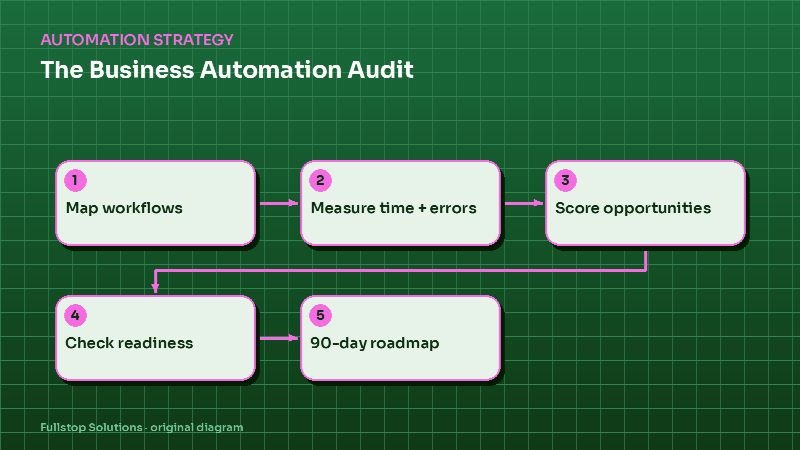
Short answer: an automation audit has five steps: map the workflows that keep your business running, measure the time and errors in each using your own numbers, score each opportunity on value, effort and risk, check whether your tools and data are ready, and turn the top items into a 90-day roadmap. Done well, it tells you which one or two automations to build first and why.
Why audit before automating
Most businesses that struggle with automation started with a tool rather than a problem. They bought a platform, built a few workflows that sounded useful, and found that the real bottleneck was somewhere else. An audit flips the order: find where time, leads and money leak first, then pick tools.
Step 1: Map your workflows
List the recurring processes in each part of the business. A starting checklist:
Getting customers
- inquiries from web forms, calls, chats and ads,
- lead follow-up and qualification,
- quotes and proposals,
- booking consultations or appointments.
Delivering work
- scheduling and dispatch,
- onboarding new clients,
- document collection,
- job or project updates,
- quality checks.
Getting paid
- invoicing, payment reminders, collections,
- bookkeeping data entry.
Keeping customers
- review requests, referrals, reactivation, renewals.
Running the business
- reporting, hiring and onboarding staff, compliance tasks.
For each workflow, write the trigger, the steps, the people involved, the tools used and the output. A whiteboard or a simple spreadsheet works.
Step 2: Measure with your own numbers
For each workflow, estimate:
- Volume: how often it happens per week or month.
- Time: minutes per occurrence, including switching between tools.
- Errors: how often it goes wrong, and what that costs to fix.
- Delay: how long the customer waits, and whether that loses business.
- Who does it: and their loaded hourly cost.
Use real data where you have it (call logs, CRM reports, calendar history) and careful estimates where you do not. A simple formula for time cost:
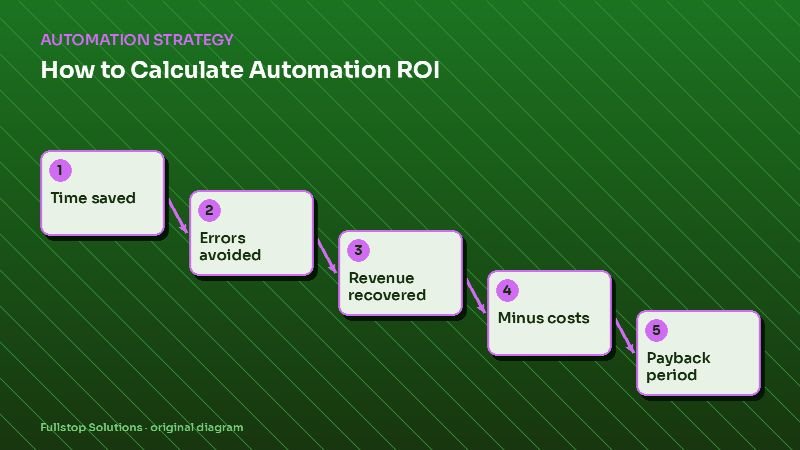
monthly volume × minutes per occurrence ÷ 60 × loaded hourly cost
For revenue leaks, such as missed calls or slow lead follow-up, use:
leads lost per month × your close rate × your average job value
Both give you an estimate in your own numbers, which is far more useful than any industry average. The ROI calculator does this arithmetic for you.
Step 3: Score the opportunities
Score each workflow from 1 to 5 on:
| Factor | Question |
|---|---|
| Value | How much time, money or revenue is at stake? |
| Frequency | How often does it run? |
| Rule clarity | Are the steps predictable and rule-based? |
| Data readiness | Is the data clean and in systems with integrations? |
| Risk | What happens if automation gets it wrong? (lower risk scores higher) |
| Effort | How hard is it to build? (lower effort scores higher) |
Add the scores. High-value, high-frequency, clear-rule, low-risk work rises to the top. In many service businesses, lead follow-up, missed-call handling, appointment reminders and document collection appear near the top; your scores will show whether that holds for you.
Step 4: Check readiness
Before committing, check:
- Tools: do your CRM, phone system, scheduler and accounting tool have integrations or APIs?
- Data: are customer records reasonably clean and in one place? See CRM setup for automation.
- Process: is there one agreed way of doing the work, or does each person do it differently?
- Ownership: who will own the automation after launch?
- Compliance: do texts, calls or data handling raise consent or privacy requirements? See SMS consent and TCPA.
The AI readiness assessment and automation readiness checklist go deeper.
Step 5: Build a 90-day roadmap
Turn the top-scoring, ready items into a sequence:
- Days 1–30: one quick win that is visible to the team and customers, such as missed-call text-back or lead follow-up.
- Days 31–60: a second workflow that builds on the first, such as booking or reminders.
- Days 61–90: a larger project, such as document automation or an AI assistant, plus a review of results from the first two.
For each project, write the goal, the success measure, the owner, the tools, and what "done" looks like.
Common audit findings
Patterns that come up often:
- leads arriving in several inboxes with no single owner,
- data typed twice into two systems,
- reminders done manually or not at all,
- reports assembled by hand every week,
- no one tracking response time to new inquiries.
These are not universal, but they are worth checking for in your own business.
Mistakes to avoid
Auditing only what you already know. Ask the people doing the work; they know where the friction is.
Skipping measurement. Without numbers, prioritization becomes opinion.
Automating a broken process. Fix the process, then automate it.
Starting too big. The first project should be live within weeks, not months.
Questions to settle before you start
Who will be interviewed, and who signs off on the roadmap? What data can you pull for measurement: call logs, CRM reports, timesheets? What budget range are you considering for the first projects? Which compliance requirements apply to your industry? How will you measure success after launch? These keep the audit practical rather than theoretical.
Interview questions for the people doing the work
Ask each person: what takes the most time in your week? What do you do twice? What do customers wait on? What gets forgotten when it is busy? Which tools do you copy information between? Their answers often surface the best opportunities.
Related guides
The audit is the starting point for every cluster on this blog: lead follow-up, AI receptionists, workflow automation, document automation and AI agents. For the value side, read the automation ROI formula, and before hiring help, see questions to ask an automation agency.
Where to start
If you would rather not run the audit alone, our free automation audit follows these steps with you and ends with a written roadmap. You can also start with the ROI calculator to size your biggest leak.