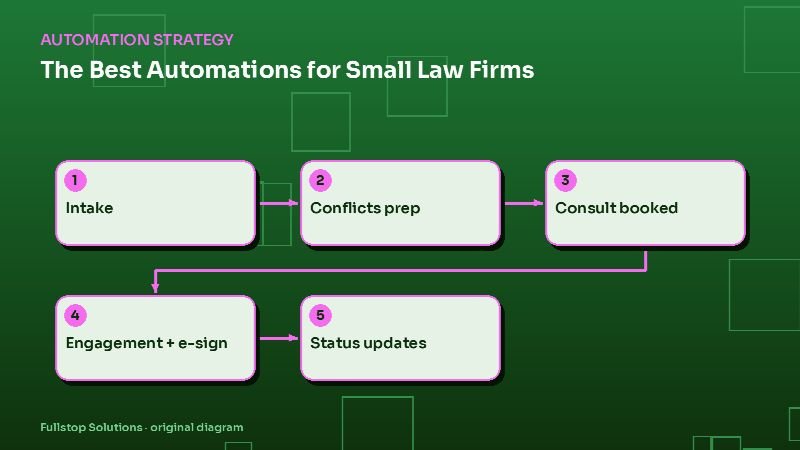
Short answer: small law firms benefit most from automating intake and lead response, conflict-check preparation, consultation scheduling, engagement letters with e-signature, document requests, matter status updates and billing reminders. These save staff hours and keep prospective and current clients informed, while conflicts decisions, legal advice and fee conversations stay with attorneys.
Where firms lose time and clients
Two leaks are common in small firms. Prospective clients who call or submit a form wait too long for a response and hire someone else. And current clients call for updates that staff must look up and relay. Both are workflow problems, not legal ones, and both suit automation. The specific numbers for your firm are in your intake log and call records.
1. Intake and lead response
Every inquiry, whether a web form, call, chat or referral, gets an immediate acknowledgment and a short set of practice-area questions, then lands in your practice management or intake system with a clear owner. After-hours calls can go to an AI receptionist that collects details and books consultations. See automating lead follow-up for law firms.
The ABA's Model Rule 7.3 commentary notes that responding to a request for information is not solicitation, but your state's version of the rules governs, so have templates reviewed.
2. Conflict-check prep
Intake collects the names of adverse parties and related people. An automation searches your system for matches and prepares a list for the responsible attorney. The decision is the attorney's, but preparation takes minutes instead of a manual search.
3. Consultation scheduling
Qualified prospects book directly into attorney calendars by practice area and consultation type, with reminders and a short pre-consultation questionnaire. Paid consultations can collect payment at booking.
4. Engagement letters and e-signature
Once the attorney decides to take a matter, the engagement letter is generated from a template with the client's details, fee arrangement and scope, sent for e-signature, and the signed copy filed to the matter. Unsigned letters trigger reminders, then a task for staff.
5. Document requests
Matters need documents from clients: IDs, financial records, medical records, contracts. A client portal or secure upload link with a checklist, plus reminders for missing items, reduces chasing. See personal injury intake and document automation for a detailed example.
6. Matter status updates
Under ABA Model Rule 1.4, lawyers must keep clients reasonably informed about the status of their matter. Automated milestone updates, written by the firm and triggered when a matter moves to a new stage, support that duty and reduce status calls. Substantive advice still comes from the attorney.
7. Billing reminders
Invoices are sent on schedule; overdue invoices get polite reminders and a payment link; trust account requests for replenishment follow your rules. Staff handle disputes and payment plans.
Practice-area differences
- Personal injury: fast intake, medical records and treatment updates matter most.
- Family law: sensitive communication; consider safety when sending messages to shared devices. See family law automation.
- Estate planning: questionnaires, document drafting prep and signing appointments. See estate planning automation.
- Immigration: document checklists, deadlines and multilingual communication.
Confidentiality and security
Use vendors that encrypt data, support access controls and keep audit logs. Avoid putting sensitive matter details in text messages; send a link to a secure portal instead. Limit what AI tools can access, and keep confidential information out of general-purpose tools that are not under your firm's agreements.
Sequencing
- Month 1: intake and consultation scheduling.
- Month 2: engagement letters and document requests.
- Month 3: status updates and billing reminders.
What to measure
Time to first response, consultation booking rate, engagement letter turnaround, outstanding document requests, client status calls per week and days sales outstanding on invoices.
Questions to settle before you build
Which practice management system do you use? Who owns intake for each practice area? Which templates need ethics review? What matter stages should trigger client updates? How will sensitive information be kept out of insecure channels? Answering these first keeps automation within your professional obligations.
Walking through one new matter
A prospective client submits a form at 8 p.m. about a family law matter. They receive an acknowledgment right away, with a short questionnaire about the type of matter, the county, and the names of the other parties. Their answers create an intake record.
Overnight, the automation searches the practice management system for the names supplied and prepares a list of possible matches for the responsible attorney. In the morning, the attorney reviews the list, clears conflicts and marks the intake as ready for a consultation.
The prospect gets a booking link for the right attorney and consultation type, and pays the consultation fee at booking. After the consultation, the attorney decides to take the matter. The engagement letter, generated from the firm's template with the agreed scope and fee, goes out for e-signature. When it comes back signed, the matter opens, folders are created, and the client receives a document checklist with a secure upload link.
From then on, each move to a new matter stage triggers a short update that the firm wrote in advance, and staff field fewer "any news?" calls.
Estimating the value in your firm
Count last quarter's inquiries that never became consultations, and those that waited more than a day for a reply. Multiply the gap by your consultation-to-client rate and average fee. That is the size of the intake opportunity using your firm's own numbers.
Where to start
Check how long the last 20 inquiries waited for a response; that usually decides the first project. Our law firm automation page and document processing service cover the details.