
Skip to content
Fullstop Solutions

Professional services

AI automation for small law firms

Qualify intake calls by practice area, run conflict checks before the consult and keep Clio matters, deadlines and billing current without more paralegal hours.

Traditional law office interior with bookshelves, desk and typewriter
Photo: daryl_mitchell, CC BY-SA 2.0.

Where time leaks

Where the hours go in law firms

Patterns we see in this industry. Your workflow will differ; discovery confirms which ones apply.

01

Intake calls are handled inconsistently and good cases go to the firm that called back first.

02

Conflict checks happen late, after time is spent on the consult.

03

Court and filing deadlines are calendared by hand.

04

Time entries are reconstructed at the end of the week, and billable time is lost.

Common tools in law firms:ClioMyCasePracticePantherSmokeballLawmaticsLawPay

Named for compatibility only. No partnership or endorsement implied; we confirm API access for your plan during discovery.

Automation recipes

5 automations built for law firms

Trigger → steps → outcome. Each one is a scoped, fixed-price build.

Discuss This Solution

Practice-area intake

#1

Trigger Call, chat or web form

  1. Asks your screening questions for that practice area
  2. Collects adverse party names for conflicts
  3. Books a consult for qualified matters; refers out others with your referral list

Outcome Consistent intake, faster consults

Typical stack: Lawmatics or Clio Grow, Calendly
Pre-consult conflict check

#2

Trigger Intake completed

  1. Searches contacts and matters for adverse parties
  2. Flags potential conflicts for attorney review
  3. Holds the consult until cleared

Outcome Conflicts caught before the consult

Typical stack: Clio Manage

Matter opening

#3

Trigger Engagement letter signed

  1. Creates the matter, tasks and folder structure
  2. Requests retainer via LawPay
  3. Sends the client welcome packet

Outcome Matters open in minutes

Typical stack: Clio, LawPay, DocuSign

Deadline calendaring assist

#4

Trigger Court order or notice received

  1. AI extracts dates and events for paralegal verification
  2. Adds verified deadlines to the matter calendar
  3. Sets reminders for attorney and staff

Outcome Fewer manual calendaring steps

Typical stack: MyCase or Clio

Time entry capture

#5

Trigger End of day

  1. Drafts time entries from calendar, emails and documents
  2. Attorney edits and approves
  3. Pushes to billing

Outcome Less lost billable time

Typical stack: Smokeball or Clio

Interactive

Build your automation

Pick what starts it and what should happen next. Your workflow assembles live below. This is a planning tool; we confirm what your tools support during discovery.

2. …do these steps (up to 6)

Your workflow

Planning preview
  1. Trigger

Add at least one step on the left.

Demo

Try a missed-call text-back

Tap "Start a missed call" and reply as the customer. Runs in your browser.

MessagesDEMO
No messages yet

Incoming call…

Nobody can answer right now

Missed-lead revenue estimate

Estimate

Move the sliders to match your business.

Est. recovered / month

Est. per year

missed → re-engaged → won per month

Estimate = leads × missed % × re-engaged % × close % × deal value, using only the numbers you entered. Not a guarantee; excludes software and build costs.

Plan my text-back automation
Demo

Watch the workflow run

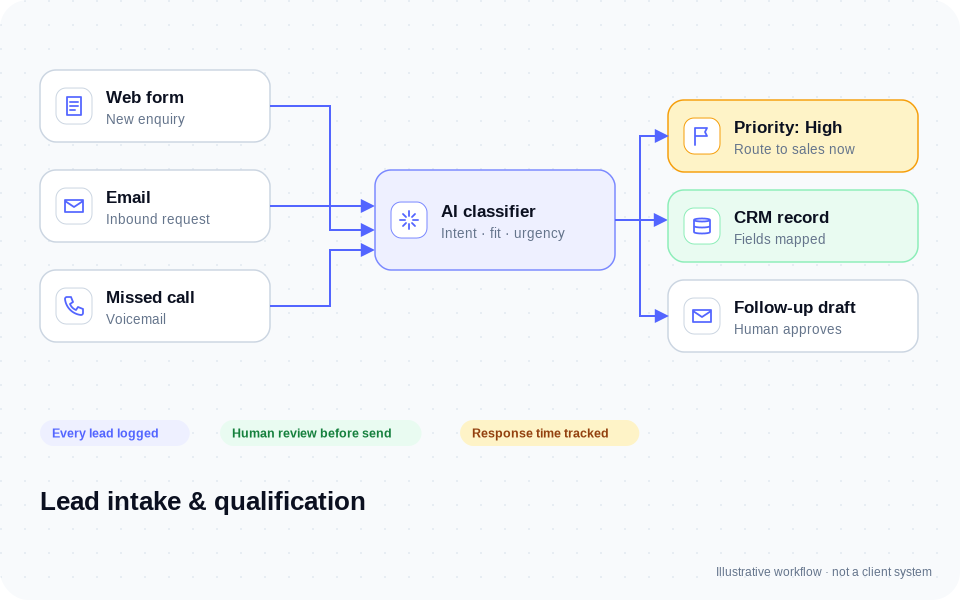
Step through "Practice-area intake" one stage at a time. Click any step.

Diagram: enquiries from a web form, email and missed calls are classified by AI, prioritized, logged in a CRM and given a follow-up draft for human approval

ROI estimate

A starting ROI estimate for law firms

Preset for a small team. Change the numbers to match your business.

Quick estimate

Estimate

Capacity / month

Capacity / year

Calculate Potential Savings →

How we implement

Built around how work actually runs in law firms

Intake scripts are drafted from your existing screening and approved by an attorney. Nothing that could be legal advice is automated.

Discovery call: We walk through your current process and tools (free, 30 minutes).

Workflow map & fixed quote: Written scope, software costs listed separately, compliance notes included.

Build in a test environment: Your accounts, test data first, then a supervised pilot.

Handover: Documentation, training and an optional support plan.

Limitations & compliance notes

  • ABA Model Rules 1.1 (competence), 1.6 (confidentiality) and 5.3 (supervision) apply to AI tools; ABA Formal Opinion 512 (2024) covers generative AI. Check your state bar's guidance.
  • The assistant never gives legal advice or evaluates case merit for the prospect; it collects information and books consults.
  • Attorney advertising rules apply to automated outreach; texts require TCPA consent.

General information, not legal advice. Confirm requirements with your own counsel or compliance officer.

Want these automations running in your business?

Tell us your tools and the one task you'd remove first. We reply with a plan.

By specialty

Automation for your corner of law firms

Each specialty runs on different calls, paperwork and software. Pick the one closest to how your business works.

FAQ

Common questions

Yes, Clio has an open API and a large integration marketplace. MyCase, PracticePanther and Smokeball also integrate.

Only through tools reviewed for confidentiality under Rule 1.6, with data minimization. Your firm approves each data flow.

No. It applies your screening criteria and the attorney decides.

Next step

Tell us how law firms work flows today

Two short steps. We reply by email, usually to set up a 30-minute discovery call.

What happens after you submit

  1. 1

    We read it personally

    A person reviews your note. No automated sales sequence.

  2. 2

    We reply by email

    Usually with 2–3 clarifying questions and times for a 30-minute call.

  3. 3

    You get a written plan

    Workflow map, fixed quote and listed software costs before any build. No obligation.

Prefer to talk? Call (214) 891-5650 or email info@fullstopsolutions.com.

Not ready to talk? Try the ROI calculator or readiness check. No email needed.

Request a consultation

Step 1 of 2

Your details

What do you want help with? *

About your project

We reply by email. No automated sales sequences.

Calculate Savings Get My Automation Plan

Fullstop automation assistant

Instant answers · humans on request

Automated assistant. A specialist confirms pricing and project details. Privacy