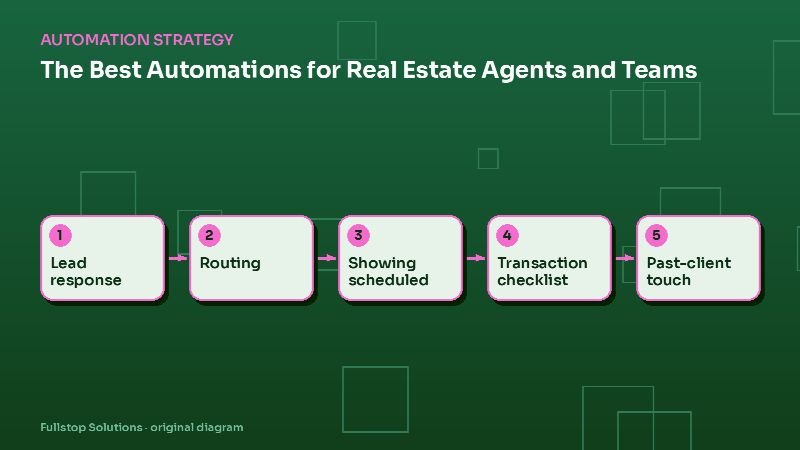
Short answer: real estate agents and teams gain the most from automating six workflows: instant response to portal and website leads, lead routing on teams, showing scheduling, transaction milestone checklists, document collection, and long-term past-client follow-up. Automation handles timing and reminders; agents handle relationships and negotiation.
The agent's juggling act
On any given day, an agent might be fielding new leads, setting showings, managing several transactions at different stages, and trying to stay in touch with past clients for referrals. Things slip, usually lead follow-up and past-client contact, because transactions demand attention now. Automation keeps the slipping parts moving.
1. Instant lead response
Leads from portals, your website and ads receive an immediate, personal-sounding reply referencing the property or search they asked about, with a question that invites a response and a link to book a call. If they reply, the agent is alerted. See real estate web lead automation.
Consent matters for automated texts and calls. The FCC's telemarketing and robocalls page summarizes federal rules; collect clear consent on your forms and honor opt-outs. See SMS follow-up compliance.
2. Lead routing on teams
Teams need rules: round-robin, by area, by price range, by language, or by agent availability. If the assigned agent does not respond within a set time, the lead moves to the next agent and the team lead is alerted. See real estate team automation.
3. Showing scheduling
Buyers request showings through a form or text; the automation checks agent availability, coordinates with your showing service where integrated, confirms with the buyer and sends reminders. After the showing, a short feedback question goes to the buyer and the agent sees the answer.
4. Transaction milestone checklists
From contract to close, every transaction follows a timeline: earnest money, inspections, appraisal, financing, title, final walkthrough and closing. An automation creates the checklist from the contract dates, sends reminders to the agent, client and coordinator before each deadline, and flags overdue items. Dates come from the contract; the automation does not interpret it.
5. Document collection
Pre-approval letters, IDs, disclosures and signed addenda are requested through secure links with checklists and reminders. Files are saved to the transaction folder with consistent names.
6. Past-client follow-up
Past clients are a major source of referrals and repeat business. Automate a long-term plan:
- closing anniversary messages,
- a yearly home value update offer,
- seasonal home maintenance reminders,
- an occasional personal check-in task for the agent.
Keep it helpful and infrequent. A message that feels like spam damages the relationship it is meant to protect.
Commercial real estate
Commercial agents need different workflows: inquiry qualification by property type and size, offering memorandum requests with NDA e-signature, tour scheduling and deal pipeline updates. See commercial real estate automation.
Sequencing
- Month 1: instant lead response and routing.
- Month 2: showing scheduling and transaction checklists.
- Month 3: document collection and past-client follow-up.
What to measure
Time to first response, lead-to-appointment rate, missed transaction deadlines, coordinator hours per transaction, and referrals from past clients. Your CRM and transaction management system hold the baseline.
Mistakes to avoid
Robotic first messages. Reference the property and sound like a person.
No routing fallback. Leads must not sit with an unavailable agent.
Too many past-client emails. Fewer, more useful messages work better.
Ignoring consent. Get it on every form that leads to texts.
Questions to settle before you build
Which CRM and transaction management tools do you use? How are leads assigned on your team, and what is the fallback? Who maintains transaction checklists? What past-client touches do you want each year? These choices shape a system that fits your business.
A day with the automations running
At 7:40 a.m., a buyer fills in a portal inquiry about a three-bedroom listing. Within a minute they get a text from the team number naming the property, asking whether they are pre-approved and offering two showing times. The lead lands in the CRM with the source "portal", assigned by area to the agent who covers that zip code.
At 9:15 the buyer replies with a preferred time. The agent gets a push notification, confirms the showing, and the showing service request goes out. The buyer receives a confirmation and a reminder an hour before.
Meanwhile, a transaction under contract hits its inspection deadline in two days. The agent, the buyer and the transaction coordinator each receive a reminder with the date taken from the contract. The coordinator sees one open item: the inspection report has not been uploaded.
In the afternoon, a past client from three years ago receives a short closing-anniversary note with an offer of a home value update. They reply that a neighbor is thinking of selling. That reply creates a task for the agent to call.
None of this replaced the agent's judgment; it just made sure nothing waited.
Choosing what each message says
Write every template yourself, in your voice, and keep each one short. Reference specifics the customer gave you: the property, the neighborhood, the date. Avoid claims about market conditions unless you can point to a source the reader can check, such as your local MLS statistics page.
Fair housing and automated messages
Automated templates are still advertising and communication from your brokerage, so fair housing rules apply to them. Avoid wording that describes who a neighborhood is "right for", stick to facts about the property, and have your broker review templates. Routing rules should never use protected characteristics; route by area, price range, language preference the client chose, or availability.
Where to start
Check response times for your last 20 portal leads and count how many past clients heard from you this year. Our real estate automation page and lead intake and follow-up service cover each workflow.