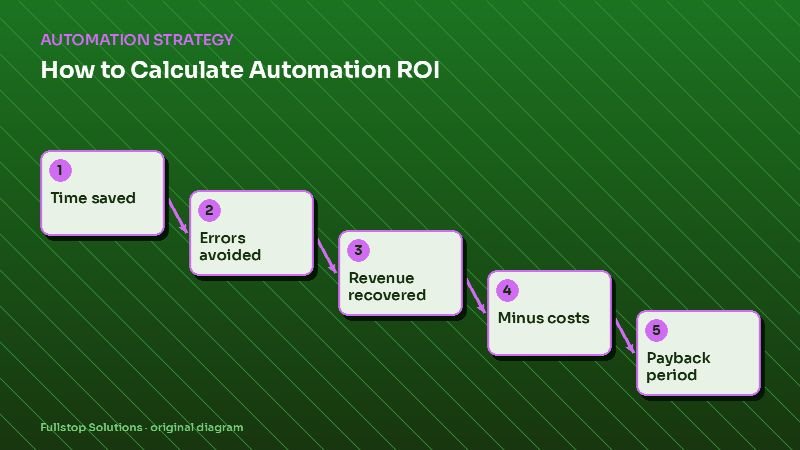
Short answer: automation ROI = (value of time saved + cost of errors avoided + margin on revenue recovered − running costs) over a period, compared with the one-time build cost. Divide the build cost by monthly net benefit to get the payback period. Then rerun it with conservative assumptions; if it still works, it is a good project.
The formula
Monthly benefit
- Time saved = hours saved per month × loaded hourly cost × utilization factor
- Errors avoided = errors prevented per month × average cost to fix one
- Revenue recovered = additional customers won per month × average job value × gross margin
Monthly cost
- Running costs = software + usage (texts, minutes, AI calls) + maintenance
One-time cost
- Build cost = setup fees + internal time for setup and training
Results
- Net monthly benefit = (1 + 2 + 3) − 4
- Payback period (months) = 5 ÷ net monthly benefit
- First-year ROI = (12 × net monthly benefit − 5) ÷ 5
The ROI calculator runs these numbers for you.
Part 1: Time saved
Measure the workflow today: how many times it runs per month and how long each takes, including switching between tools and fixing small problems. Estimate how much of that time automation removes; rarely all of it.
Loaded hourly cost includes wages plus payroll taxes and benefits. Your accountant or payroll reports can give you the real figure.
Utilization factor is the honest part. If saved time goes to valuable work, use something close to 1. If it is scattered into small gaps, use a lower factor such as 0.5. This keeps the estimate grounded.
Part 2: Errors avoided
Manual data entry and handoffs produce errors: wrong addresses, duplicate invoices, missed follow-ups, scheduling clashes. For each type, estimate how often it happens and what it costs: rework time, refunds, lost customers. Count only errors the automation actually prevents.
Part 3: Revenue recovered
This is often the largest number, and the one most likely to be exaggerated, so be careful.
Common sources:
- Missed calls answered or followed up. See the cost of missed calls.
- Faster lead follow-up. See automated lead follow-up.
- Fewer no-shows through reminders. See salon no-show automation.
- Reactivated past customers.
- More reviews, which can support future demand, though this is hard to quantify.
Formula: additional customers per month × average job value × gross margin. Use gross margin, not revenue, because extra jobs also have costs.
Estimate "additional customers" conservatively. If you currently miss 20 calls a month, you will not win all 20 back; some were spam, some would never have booked. Use your own close rate on answered calls and apply it to the fraction you realistically expect to recover.
Part 4 and 5: Costs
List everything:
- setup or project fee,
- monthly software subscriptions, including any upgrades to existing tools,
- usage costs, such as SMS, voice minutes, AI usage,
- your team's time for setup, testing and training,
- ongoing maintenance and changes.
Leaving out internal time is the most common mistake.
A worked example with placeholder numbers
Replace each value with your own.
| Input | Your value |
|---|---|
| Hours saved per month | H |
| Loaded hourly cost | C |
| Utilization factor | U |
| Errors prevented per month | E |
| Cost per error | F |
| Extra customers per month | N |
| Average job value | V |
| Gross margin | M |
| Monthly running cost | R |
| Build cost | B |
Net monthly benefit = (H × C × U) + (E × F) + (N × V × M) − R
Payback months = B ÷ net monthly benefit
If H = 20, C = 30, U = 0.7, E = 4, F = 50, N = 2, V = 800, M = 0.4, R = 300 and B = 3,000, then net monthly benefit = 420 + 200 + 640 − 300 = 960, and payback = 3,000 ÷ 960 ≈ 3.1 months. These are example inputs for the arithmetic only; your numbers will differ.
Sensitivity check
Rerun the formula with:
- half the expected time saved,
- half the expected recovered customers,
- running costs 25% higher.
If the project still pays back within a period you are comfortable with, it is robust. If it only works with optimistic numbers, look for a smaller or cheaper first version.
Measuring after launch
Estimates are a starting point. After launch, track the same inputs: actual hours, errors, recovered leads and costs. Compare monthly with your baseline. This is how you decide whether to expand, adjust or stop.
Mistakes to avoid
Counting revenue instead of margin.
Assuming 100% of saved time is productive.
Ignoring internal setup time.
No baseline. Measure before you build.
Questions to settle before you calculate
Which workflow are you evaluating, and what is its current baseline? Where will your numbers come from: call logs, CRM, payroll, invoices? What payback period is acceptable for your business? Who will measure results after launch, and how often? With these answered, the formula becomes a decision tool rather than a guess.
Comparing two projects with the same formula
The formula is most useful when you compare options. Suppose you are choosing between missed-call text-back and invoice processing automation. Fill in the table for each using your own baseline:
| Input | Missed-call text-back | Invoice processing |
|---|---|---|
| Time saved per month | Small | Large |
| Errors avoided | Few | Several (duplicates, typos) |
| Revenue recovered | Potentially large | None |
| Running cost | SMS usage | Extraction usage |
| Build cost | Low | Moderate |
The first project is mostly a revenue story, and the second a time-and-accuracy story. Run both through the formula; the one with the shorter payback under conservative assumptions usually goes first. In many service businesses, revenue recovery from calls and leads pays back faster, while back-office automation produces steadier savings. Your own numbers decide.
Presenting ROI to a partner or manager
Show three things on one page: the baseline you measured, the formula with each input labeled with its source, and the conservative and expected results side by side. People trust an ROI estimate when they can see where each number came from and that the case still holds with the cautious assumptions.
Where to start
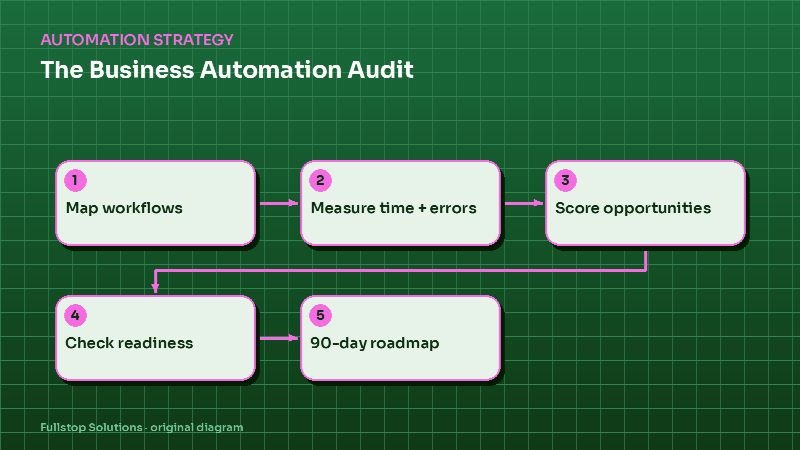
Pick the workflow from your automation audit with the highest score, gather a month of baseline numbers, and run the formula. Our free automation audit includes this calculation for your top opportunities, and a consultation can cover typical build and running costs for your case.