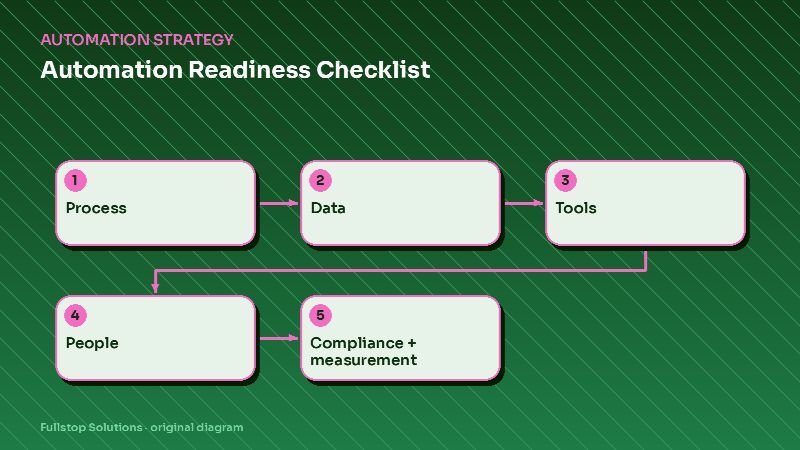
Short answer: you are ready to automate a workflow when you can answer yes to most questions in five areas: the process is clear and agreed, the data is usable, your tools can connect, someone owns it, and you can measure the result while meeting compliance requirements. The 25 questions below show where you stand and what to fix first.
How to use this checklist
Pick one workflow you are considering, such as lead follow-up, appointment reminders or invoice processing, and answer each question for that workflow only. Readiness is per workflow, not per business. A "no" is not a failure; it is a to-do item before or during the project.
Section 1: Process clarity
- Can you describe the workflow's trigger, steps and outcome in a few sentences?
- Does everyone who does the work do it the same way?
- Are the decision rules written down (who gets what, when, and why)?
- Do you know what the exceptions are and who handles them?
- Is the process worth keeping, or should it be redesigned before automating?
If question 2 is a no, agree on one way first. Automating three different versions of a process automates confusion.
Section 2: Data quality
- Is the data the workflow needs stored in a system, not in someone's inbox or notebook?
- Is there one source of truth for customer records?
- Are key fields (phone, email, status, owner) filled in consistently?
- Are duplicates under control?
- Do you know where data enters the business and who enters it?
See CRM setup for automation for practical cleanup steps.
Section 3: Tools and integrations
- Do the tools involved have native integrations or APIs?
- Does your current plan include the features or API access you need?
- Are you using built-in automation features already available?
- Are logins for business systems owned by the business, not individuals?
- Is there a password manager or similar for shared credentials?
See build vs buy automation if your tools fall short.
Section 4: People and ownership
- Is there a named owner for this workflow after launch?
- Have the people who do the work today been involved in planning?
- Is there time set aside for testing and training?
- Will someone receive alerts when the automation fails?
- Is there a plan for what staff will do with the time saved?
The last question matters for adoption: people support automation that removes their worst tasks, and resist it when it feels like a threat.
Section 5: Compliance and measurement
- Do you have consent for any automated texts, calls or marketing emails? See SMS follow-up compliance.
- Does the workflow touch regulated data (health, financial, legal) that requires vendor agreements or specific safeguards? See HIPAA and automation.
- Do you have a baseline measurement for the workflow today?
- Have you defined what success looks like in numbers?
- Do you know how you will review results after launch, and how often?
Scoring your answers
- Mostly yes: start building. Resolve the remaining no's during setup.
- No's in process or ownership: fix these first. They are the most common causes of failed projects.
- No's in data: do targeted cleanup for this workflow.
- No's in tools: check plans, integrations or a different approach.
- No's in compliance: resolve before any messages go out.
- No's in measurement: take a baseline now; it takes a week or two.
The AI readiness assessment gives a scored version focused on AI projects.
A worked example: appointment reminders
A practice considering automated reminders might find: the process is clear (yes), the scheduling system holds all appointments (yes), phone numbers are inconsistent for older records (no, so clean them up), the scheduling tool has a reminder feature not yet enabled (yes, so try it first), consent for texts is unclear for some patients (no, so update intake forms), and no-show rate is known from reports (yes). Two to-dos, then launch.
Mistakes to avoid
Assessing the whole business at once. Go workflow by workflow.
Ignoring the people section. Ownership gaps sink more projects than technical gaps.
Skipping the baseline. Without it, you cannot show results.
Questions to discuss with your team
Which workflow frustrates people most? Who would own it? What would success look like in three months? What could go wrong, and how would you notice? These conversations often reveal more than the checklist itself.
Turning no's into a short action plan
Once you have answered the 25 questions, sort each "no" into one of three buckets:
- Fix before building: anything in process clarity, ownership or compliance. These problems compound once automation is running.
- Fix during setup: data cleanup, missing integrations or plan upgrades, which can happen alongside the build.
- Fix after launch: reporting refinements and the plan for using saved time, which improve with real results.
For each item, write the owner and a target date. Most teams end up with five to eight items, and most of them take days rather than weeks.
A second worked example: lead follow-up for a contractor
A remodeling contractor considering automated lead follow-up answers the questions. Process: leads are handled differently by the owner and the office manager (no, so agree one approach). Data: leads arrive by phone, form and email, and only form leads reach the CRM (no, so route calls and emails in too). Tools: the CRM has sequences and a texting add-on (yes). People: the office manager will own it (yes). Compliance: the web form has no consent wording for texts (no, so update it). Measurement: nobody knows the current response time (no, so measure two weeks first).
Four items, two of them simple form and routing changes. The contractor can be live within a few weeks, with a baseline to prove the result.
Where to start
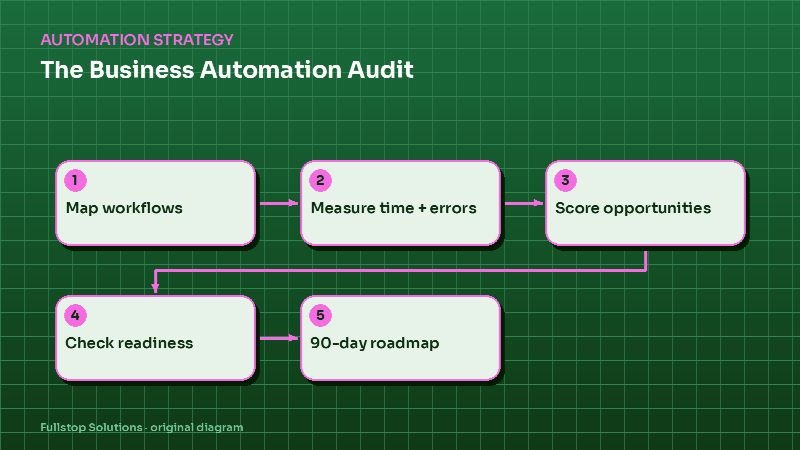
Answer the 25 questions for your top candidate workflow, list the no's and decide which to fix before building. The automation audit guide helps choose the workflow, and our automation audit service can run the checklist with you.