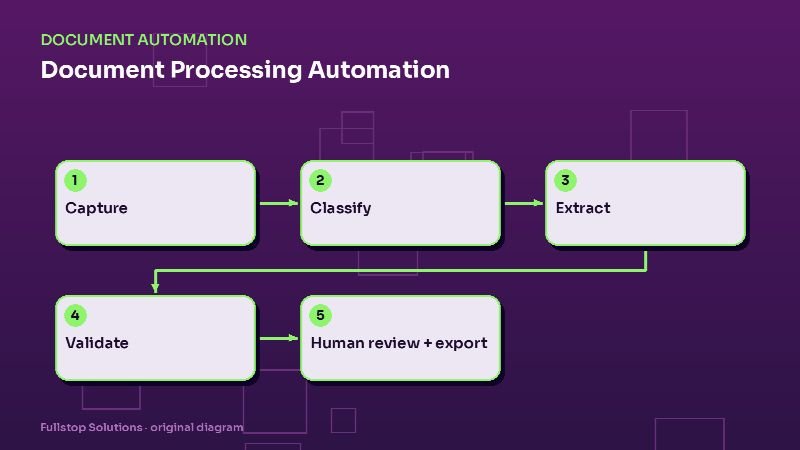
Short answer: document processing automation captures paperwork from wherever it arrives (email, upload portals, scans, photos), identifies what each document is, extracts the fields you need, checks them against rules and your existing data, sends uncertain items to a person, and exports clean data into your accounting, CRM or practice software. The goal is not zero humans; it is humans only where judgment is needed.
This is the hub of our document automation cluster.
Why paperwork still eats small-business time
Even fully digital businesses run on documents: vendor invoices, receipts, customer intake packets, signed agreements, insurance certificates, tax forms, bills of lading, timesheets, applications. Someone opens each one, reads it, types the important parts into another system, and files it. It is slow, error-prone and nobody's favorite job.
The five stages
1. Capture
Documents arrive in many ways. Capture brings them into one pipeline:
- a dedicated email address (invoices@yourcompany) that forwards attachments,
- a secure upload portal for customers or clients,
- a mobile photo upload for drivers, technicians or field staff,
- scanning for paper mail,
- direct pulls from systems where documents already live.
2. Classification
The system identifies what each document is: invoice, receipt, W-2, 1099, bank statement, signed contract, proof of delivery, ID document. Classification decides which extraction rules apply and where the document goes. Mixed PDFs (several documents in one file) are split.
3. Extraction
For each document type, the system pulls out specific fields: vendor, invoice number, date, line items, totals and tax for an invoice; employer, wages and withholding for a W-2; shipper, consignee and signatures for a bill of lading. Modern extraction combines OCR (reading the text) with AI models that understand layouts, so it handles documents it has not seen before better than old template-based tools.
4. Validation
This is where reliability comes from. Each extracted field is checked:
- Confidence scores: low-confidence fields are flagged.
- Format rules: dates are dates, totals are numbers, tax IDs have the right shape.
- Math checks: line items add up to the subtotal; subtotal plus tax equals total.
- Cross-checks: the vendor exists in your system; the PO number matches an open order; the client name matches an active client.
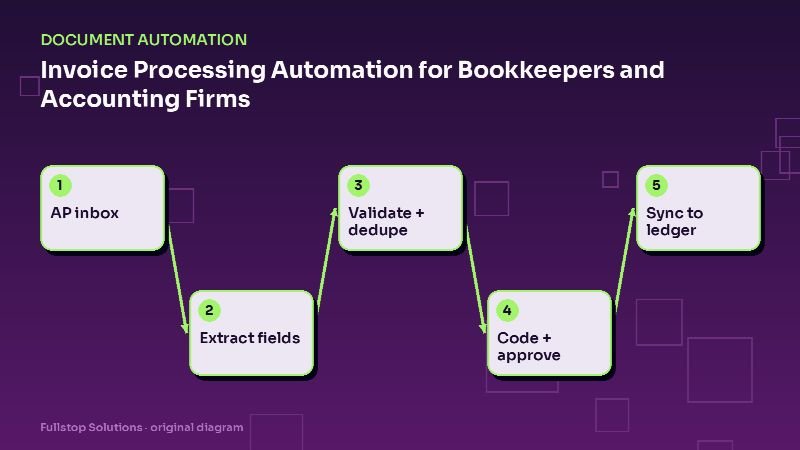
- Duplicate detection: the same invoice number from the same vendor is not processed twice.
5. Human review and export
Anything that fails validation goes to a review queue where a person sees the document side by side with the extracted fields, corrects them and approves. Everything that passes goes straight to the target system: accounting, CRM, practice management, TMS, or a database. Every document is filed with its data and an audit trail.
What to automate first
Score your document types by volume, consistency and pain:
| Document type | Typical volume | Consistency | Good first project? |
|---|---|---|---|
| Vendor invoices | High | Medium | Often yes |
| Receipts | High | Low | Yes, with review |
| Client tax documents | Seasonal, high | High (standard forms) | Yes for tax preparers |
| Intake packets | Medium | High (your own forms) | Yes |
| Bills of lading, PODs | High in logistics | Medium | Yes for freight |
| Contracts | Low to medium | Low | Usually later |
Your own forms are often the easiest win, because you control the layout. If you can, move paper forms to secure digital intake first, which avoids extraction altogether.
Security and compliance
Documents often contain the most sensitive data you hold. Build the pipeline accordingly:
- Approved vendors only. If you handle protected health information, extraction vendors are typically business associates, and HHS describes the required contract terms. If you are a covered financial institution, such as a tax preparer or mortgage broker, the FTC Safeguards Rule requires encryption, access controls, multi-factor authentication and oversight of service providers.
- Data minimization. Extract only what you need. Do not store full Social Security numbers in systems that do not need them.
- Retention rules. Delete processing copies after export, and follow your record-retention policy for originals. The Safeguards Rule, for example, describes secure disposal of customer information no later than two years after last use, with exceptions.
- Access logs. Know who viewed which document.
Measuring the payoff
Before building, measure for one or two weeks:
- documents processed per week by type,
- minutes per document by hand,
- error or correction rate,
- turnaround time from arrival to data in the system.
After launch, track the same numbers plus the share of documents that pass straight through without review. That share usually grows as rules are tuned.
Go deeper in this cluster
- Invoice processing automation for bookkeepers and accounting firms
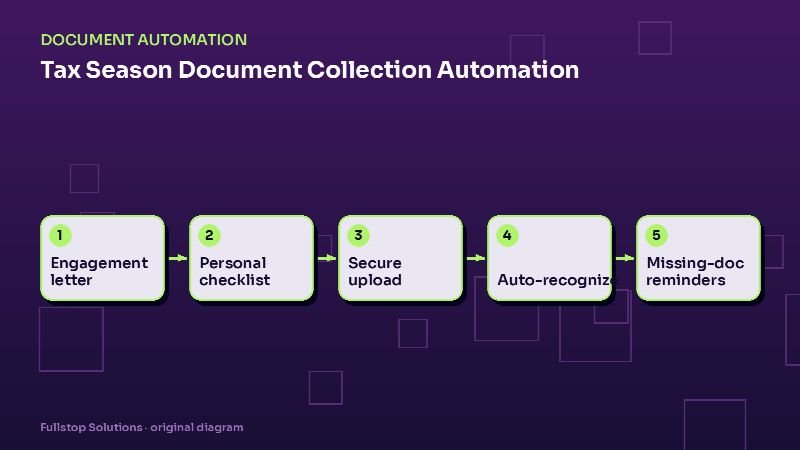
- Tax season document collection automation
- Personal injury intake and document automation
- Freight broker paperwork automation
- Staffing agency onboarding paperwork
- HIPAA considerations for automation in healthcare practices
Choosing your first document workflow
Look for a document type that is high in volume, has a fairly consistent layout, and feeds a system you already use. Good first candidates often include:
- vendor invoices feeding accounting software,
- intake or application forms feeding a CRM or case system,
- delivery documents such as bills of lading and proofs of delivery,
- onboarding paperwork for new hires or clients.
Avoid starting with documents that are rare, wildly varied or legally sensitive, such as one-off contracts. They are harder to automate and the payback is slower.
A worked example in your own numbers
Pick a document type. Count how many you process each month and time a few to get average minutes per document, including filing and fixing mistakes. Multiply volume by minutes, divide by 60 and multiply by your loaded hourly cost. That is your monthly processing cost.
Then estimate the share the system can process with only a quick review (the high-confidence cases) and the review time those still need. The difference between today's cost and the new cost, minus software and usage fees, is your monthly saving. Test on a batch of your real documents before trusting the estimate, since accuracy depends heavily on your documents' quality and variety.
Where to start
Pick one high-volume document type, define the fields you need and the validation rules, and build capture-to-export for just that type with a review queue. Expand once the straight-through rate is stable. Our document processing service follows exactly that approach.