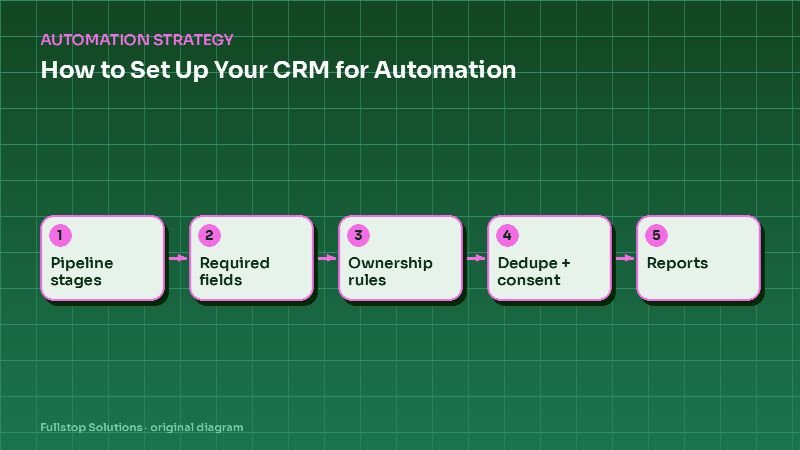
Short answer: set up your CRM for automation by defining pipeline stages with clear entry rules, making a small set of fields required, recording lead source on every contact, writing ownership and reassignment rules, deduplicating records, tracking consent per channel, and building the reports you will use to judge results. Then automate. Skipping this is the most common reason automations misfire.
Why CRM setup comes first
Automations act on data. If a lead's stage is wrong, the wrong message goes out. If the phone field holds an email address, the text fails. If two records exist for the same person, they get two sequences. If consent is unknown, you risk sending messages you should not. A few hours of setup prevent months of quiet errors.
Step 1: Define pipeline stages
Write the stages a lead or deal actually moves through, with a clear entry condition for each. An example for a service business:
| Stage | Entry condition |
|---|---|
| New | Inquiry received, not yet contacted |
| Contacted | First two-way conversation happened |
| Qualified | Meets your criteria (service, area, timing) |
| Appointment set | Consultation, estimate or visit booked |
| Quote sent | Written quote or proposal delivered |
| Won | Signed or paid |
| Lost | Declined, unresponsive after the sequence, or disqualified, with a reason |
Adapt the names to your business, but keep the entry conditions explicit. Automations will trigger on stage changes.
Step 2: Choose required fields
Pick a short list of fields that must be filled for automation to work: name, phone, email, lead source, owner, stage, service or interest, and consent status. Make them required in forms and integrations. Use picklists rather than free text where possible, so "HVAC repair", "hvac", and "AC fix" do not become three values.
Step 3: Record lead source
Every contact should carry its source (website form, phone call, portal, referral, ad campaign). This lets automations tailor messages, and it lets you see later which sources are worth the money. Use hidden fields or tracking parameters on forms, and set the source automatically for calls via your phone system integration.
Step 4: Ownership and reassignment
Write the rules: who owns new leads, by territory, service or round-robin; what happens when the owner does not respond within a set time; what happens when someone leaves. Automate assignment and the reassignment fallback.
Step 5: Deduplicate
Run your CRM's duplicate tools, merge obvious duplicates and set rules for incoming records: match on email or phone and update the existing record instead of creating a new one. Duplicates are the main cause of customers receiving the same message twice.
Step 6: Track consent per channel
Record consent separately for marketing email, marketing texts, and calls, with the date, source and wording. Federal rules differ by channel: the FCC's telemarketing and robocalls page covers calls and texts, and the FTC's CAN-SPAM compliance guide covers commercial email, including honoring opt-outs within 10 business days. Make opt-outs update the CRM automatically and stop every sequence. See SMS follow-up compliance.
Step 7: Build the reports first
Before automating, build the reports that will show whether it worked: response time to new leads, conversion by stage, conversion by source, and lost reasons. Record a baseline. See the automation ROI formula.
Then automate
With the foundation in place, typical first automations are:
- instant response and assignment for new leads,
- follow-up sequences while a lead sits in Contacted or Quote sent,
- tasks for the owner when a lead replies,
- reactivation of Lost leads after a set period, where consent allows.
See the automated lead follow-up guide.
Mistakes to avoid
Too many stages and fields. Complexity reduces data quality.
Free-text fields for key data. Use picklists.
Consent stored as a note. Use fields that automations can read.
Personal inboxes outside the CRM. Conversations that never reach the CRM cannot trigger anything.
Questions to settle before you build
What are your stages and their entry conditions? Which fields are required? How are leads assigned, and what is the fallback? Where does consent get captured, and in what wording? Which reports will you review weekly? These decisions turn the CRM into a reliable engine for automation.
A one-week cleanup plan
Day 1: export active contacts and deals. Count records missing a phone number, email, owner, source or stage.
Day 2: agree on the stage list and entry conditions with the people who use the CRM daily. Write them down where everyone can see them.
Day 3: convert key free-text fields to picklists, and map existing values to the new options. "AC repair", "air conditioning" and "cooling" become one value.
Day 4: run duplicate detection, merge obvious duplicates and set matching rules for new records coming from forms and integrations.
Day 5: add consent fields per channel, backfill them where you have records of consent, and mark the rest as unknown so automations skip them.
Day 6: build the four baseline reports: response time, conversion by stage, conversion by source and lost reasons.
Day 7: test one simple automation, such as instant assignment and acknowledgment for new web leads, and check the records it touched.
How to tell your CRM is ready
You are ready when a new lead arrives with source, owner and consent filled in automatically; when nobody has to ask which stage a deal is in; and when the reports match what the team believes is happening. If any of these fail, fix them before adding more automations.
Where to start
Export your active contacts and check how many lack a phone, owner, source or stage. That number tells you how much setup is needed. Our lead intake and follow-up service and sales and lead management solutions include CRM setup.