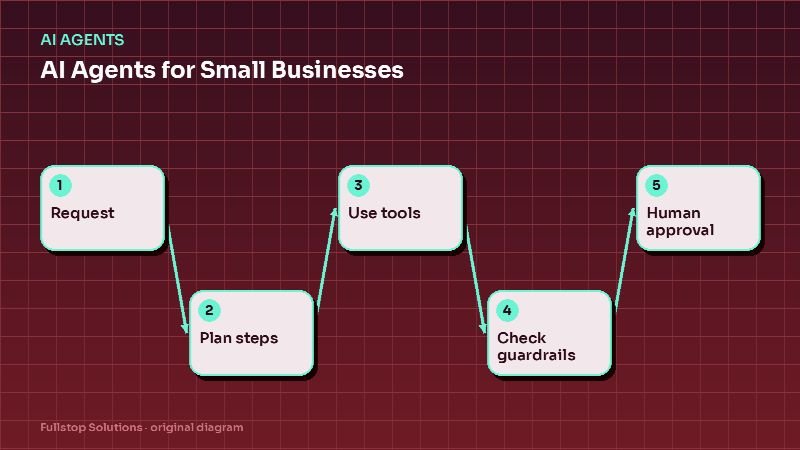
Short answer: an AI agent is software that takes a request, works out which steps are needed, uses your tools to carry them out (look something up, draft a document, update a record) and reports back, within limits you define. For small businesses, the safest and most useful agents work from approved information, have narrow permissions, log every action and ask a human to approve anything that matters.
This is the hub of our AI agents cluster.
Chatbots, automations and agents
These terms get blurred, so here is a working distinction:
| Fixed automation | Chatbot | AI agent | |
|---|---|---|---|
| Input | A known trigger | A question | A request in plain language |
| Behavior | Same steps every time | Answers in conversation | Chooses steps from allowed actions |
| Uses your tools | Yes, fixed | Sometimes, limited | Yes, flexibly |
| Best for | Predictable processes | FAQs and guidance | Varied tasks with clear boundaries |
| Main risk | Breaks on unexpected input | Wrong answers | Wrong actions |
A good rule: use fixed automations wherever the process is predictable, and use an agent only where requests genuinely vary.
What agents do well for small businesses
- Customer email and chat triage: read incoming messages, classify them, look up the relevant order or job, draft a reply for staff to approve. See AI customer service for e-commerce.
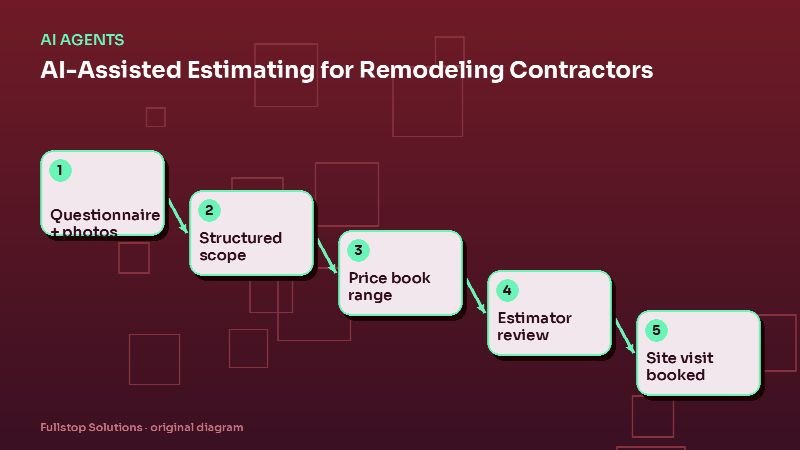
- Quote preparation: turn a customer's description and photos into a structured quote draft using your price book. See AI estimating for remodeling contractors.
- Research and summarizing: summarize a long email thread, a set of documents or a call transcript into next steps.
- Internal assistants: answer staff questions from your SOPs and policies.
- Data clean-up: match duplicate records, standardize addresses, suggest corrections for review.
What agents should not do (yet)
- Make financial commitments, issue refunds above small limits, or sign anything.
- Give medical, legal or financial advice.
- Act on customer accounts without verification.
- Send messages to customers without review in sensitive situations.
- Operate with broad admin access to your systems.
Guardrails that make agents safe
Treat an agent like a new hire on their first week: helpful, fast, and closely supervised.
- Approved knowledge only. The agent answers from your documents, policies and data, not from its general training. See AI knowledge bases explained.
- Narrow permissions. Read-only where possible; write access only to specific fields and actions.
- Action limits. For example, refunds up to a set amount, discounts never, account changes only after verification.
- Human approval for anything above the limits, or anything customer-facing in sensitive categories.
- Logging. Every input, decision and action recorded and reviewable.
- Escalation. A clear path to a person when the agent is unsure. See AI agent guardrails and human handoff.
The NIST AI Risk Management Framework is a useful public reference for thinking about AI risks systematically, even for small deployments.
How to pilot an agent
Week 1: choose and define
Pick one task. Write down the inputs, the allowed actions, the information sources, what "done" looks like, and what must go to a human.
Week 2: build in draft mode
The agent prepares drafts and suggested actions, but a person approves every one. This builds a record of how often it is right.
Weeks 3 and 4: measure
Track approval rate without edits, edit rate, rejection rate and reasons, and time saved per item. Only move a category to automatic once its approval-without-edit rate is consistently high and the risk is low.
Costs to consider
- Model usage: many AI services charge per amount of text processed; volume drives cost.
- Integration work: connecting the agent to your systems safely is often the bigger cost.
- Review time: in early weeks, staff time to review drafts.
- Maintenance: keeping knowledge and rules current.
The automation ROI formula helps estimate payback with your own numbers.
Website chat: a special case
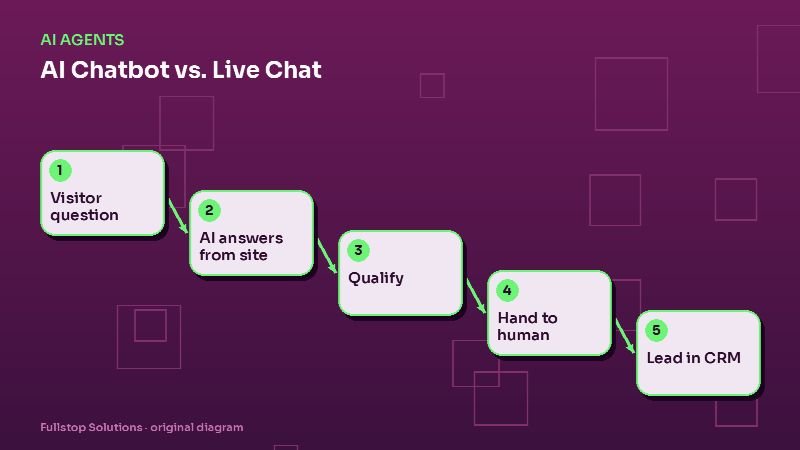
A website chat assistant is often the first agent-like tool a small business deploys. Done well, it answers from your site content, qualifies visitors and books calls. Done badly, it invents prices and promises. See AI chatbot vs. live chat for how to choose and set one up.
Go deeper in this cluster
- AI chatbot vs. live chat for your website
- AI estimating and quoting for remodeling contractors
- AI customer service for e-commerce stores
- AI agent guardrails and human handoff
- AI knowledge bases explained for business owners
Assistant, workflow or agent: telling them apart
People use "AI agent" for very different things, so it helps to sort what you are buying into three levels:
- Assistant: answers questions and drafts text from approved content. A person decides what to do with the output. Example: a website chat that answers service questions and hands off.
- Workflow with AI steps: a fixed sequence of steps, some of which use AI to read, classify or draft. Example: inbound emails are classified, data is extracted and a record is created, always in the same order.
- Agent: given a goal and a set of tools, it chooses which steps to take and in what order, within limits. Example: an assistant that checks availability, books, reschedules and updates the CRM depending on the conversation.
The further down the list, the more guardrails, testing and monitoring you need. Many small-business needs are met at the first two levels, which are cheaper to build and easier to trust.
A worked example in your own numbers
Pick one job an agent could take on, such as answering and booking routine inquiries. Count how many arrive per month, the average minutes staff spend per inquiry, and your loaded hourly cost. Multiply them to get the monthly cost today. Then estimate the share an agent could fully handle, conservatively, and subtract the agent's monthly running cost. If the remainder is small, a simpler assistant may be the better first step.
Where to start
Choose one varied, low-risk task, run the agent in draft mode with human approval, and measure for a month. Our AI agents service follows that approach, and the Experience Lab has interactive demos you can try.