
AI automation services
AI automation that removes manual work, not just adds a chatbot
Fullstop Solutions designs and builds AI automation for US small businesses: we connect the tools you already use and add AI where it helps, such as reading enquiries, extracting documents and drafting replies, with a person in control where it matters.
Last updated: · About us · How pricing works
- Best for
- US businesses with repetitive intake, admin or follow-up work
- First step
- Discovery call, then a written workflow map and fixed quote
- You keep
- The accounts, the automations and the documentation

Services
Choose a service
Workflow automation & integrations
Workflow automation connects the CRM, forms, email, calendars, accounting and spreadsheets you already use so records are created, updated and synced automatically. We add AI steps only where text needs to be understood, and we document the build so your team can maintain it.
AI agents & assistants
Custom AI agents do a defined job: answering questions from your approved documents, qualifying enquiries, or preparing work for a person to approve. Each one has clear limits, a fallback to a human and a log of what it did, so the agent cannot quietly act outside the brief you set.
Lead intake & follow-up
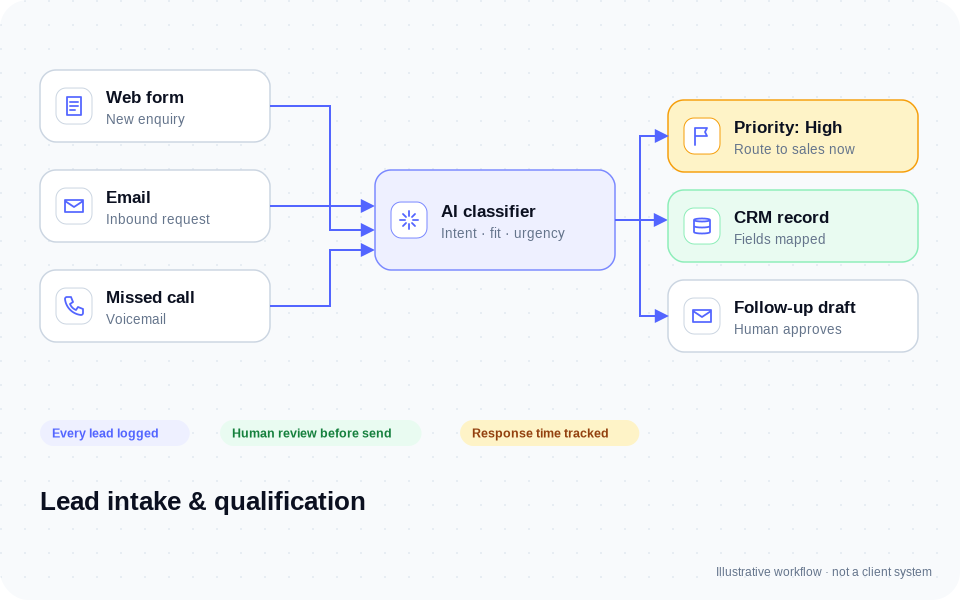
Lead intake and follow-up automation replies to every enquiry quickly and consistently. We automate the first response, qualification questions, routing to the right person and follow-up reminders, so leads you paid for do not go cold. Form, phone, email or chat can all feed the same path.
Document & data processing
AI document processing turns PDFs, scans, emails and forms into structured data. We extract the fields you need, validate them against rules, and push them into accounting, CRM or case-management systems, with exceptions sent to a person. Your team still approves anything that does not match the rules.
AI voice receptionist
An AI voice receptionist answers calls you would otherwise miss. It greets callers, captures their details and need, answers common questions and books or routes them, then sends your team a summary and transcript. It is built for after-hours and overflow, with a person taking over when the call needs one.
Automation audit & roadmap
Not sure where to start? We interview your team, map how work actually flows, and give you a ranked list of automation opportunities with effort, risk and expected value, so you invest in the right first project.
Looking for a done-for-you partner rather than a menu of services? Read how we work as an AI automation agency.
Who it's for
Signs you're ready for automation
- →Staff spend hours a week copying data between systems
- →Enquiries wait hours or days for a first response
- →The same documents are read and re-keyed every day
- →Reports are assembled by hand from several tools
- →Follow-ups depend on someone remembering
- →You have tried AI tools but nothing is wired into real work
What we automate
Common AI automation use cases
Lead intake & routing
Classify enquiries, enrich contact data, create CRM records and assign the right owner instantly.
Follow-up & reminders
Personalised follow-ups, appointment reminders and re-engagement for leads that went quiet.
Document extraction
Pull fields from invoices, forms and contracts; validate and push them to accounting or case systems.
Inbox triage
Sort shared inboxes, tag urgency, draft replies for review and escalate exceptions.
Knowledge assistants
Internal or customer-facing assistants that answer from your approved documents and cite sources.
Reporting automation
Scheduled reports that pull from your tools and summarise what changed and what needs attention.
Phone overflow is covered in our AI receptionist for small business guide and the comparison of an AI receptionist vs answering service. Before you automate SMS follow-ups, review TCPA text consent and A2P 10DLC.
Deliverables
What you receive
Every project includes the same core deliverables, so nothing is left in someone's head.
- ✓Workflow map (current vs automated)
- ✓Written scope and fixed quote
- ✓Working automation in your accounts
- ✓Test cases and results
- ✓Run-book and admin guide
- ✓Training session for your team
- ✓Running-cost estimate
- ✓Optional support plan
Process
From first call to handover
- 01
Discovery
- 02
Map & scope
- 03
Build
- 04
Test & review
- 05
Handover
Integrations
We connect platform types such as CRMs, email and calendars, forms, accounting, phone/SMS, scheduling and document storage, using official APIs wherever available. Tool names are examples of compatibility, not partnerships.
Security & governance
- • Least-privilege access for every connection
- • Sensitive data minimised before it reaches an AI model
- • Human review for high-impact actions
- • Logs of what each automation did and when
- • Compliance review before any regulated-data project
Pricing
How pricing works
We quote a fixed price per scoped workflow after discovery. Platform subscriptions and AI usage are listed separately so you can see true running costs.
FAQ
AI automation questions
Next step
Get a workflow map and a fixed quote
Tell us about the work you want off your team's plate.
What happens after you submit
- 1
We read it personally
A person reviews your note. No automated sales sequence.
- 2
We reply by email
Usually with 2–3 clarifying questions and times for a 30-minute call.
- 3
You get a written plan
Workflow map, fixed quote and listed software costs before any build. No obligation.
Prefer to talk? Call (214) 891-5650 or email info@fullstopsolutions.com.