Short answer: workflow automation connects the software you already use so that one event (a form submission, a booking, a paid invoice, a completed job) automatically triggers the next steps in other systems. The best first automations are frequent, rule-based tasks that people currently do by copy-and-paste. Reliability comes from logging, retries, alerts and a clear owner.
This is the hub of our workflow automation cluster. Each section links to a deeper guide.
The anatomy of an automation
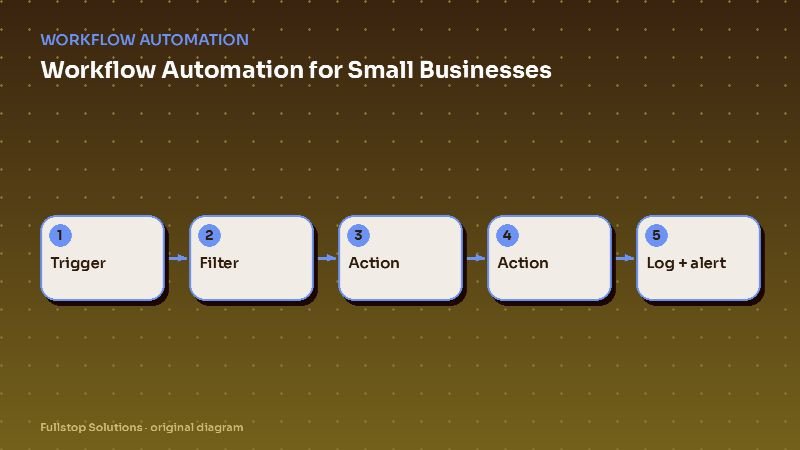
Every workflow, however complex, is built from four pieces:
- Trigger: the event that starts it. "New booking in the calendar", "invoice marked paid", "job status changed to complete", "new row in a spreadsheet".
- Filters and conditions: rules that decide whether and how it continues. "Only if the service type is maintenance", "only if the customer is new".
- Actions: what happens. "Create a job in the field-service app", "send a text", "add a row to the bookkeeping sheet", "post a message to the team chat".
- Logging and error handling: a record of each run, with retries and alerts when something fails.
If you can describe a task as "when X happens, do Y and Z", it can probably be automated.
Finding the right first automation
Walk through a typical week and list every time someone copies information from one place to another, sends the same message, or checks whether something happened. Then score each task:
| Question | Score 1 to 3 |
|---|---|
| How often does it happen? | |
| How rule-based is it (versus judgment)? | |
| How costly are mistakes or delays? | |
| How easy is it to access both systems? |
The highest total is your first project. Typical winners:
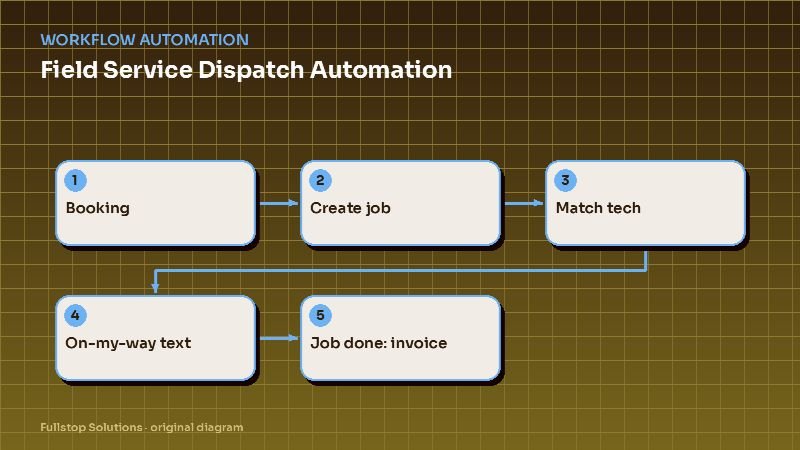
- Booking to job: a confirmed booking automatically creates the job, assigns it, and texts the customer.
- Job complete to invoice: finished work triggers the invoice and a payment link.
- Paid invoice to bookkeeping: payments sync to accounting with the right categories.
- Job complete to review request: a short, polite review ask after successful work. See review request automation.
- New hire to onboarding: paperwork, accounts and training tasks created on day one.
Choosing an automation platform
Three broad options:
- Built-in automations inside your existing tools (CRM workflows, field-service automations, e-commerce flows). Cheapest and simplest when they cover what you need.
- Integration platforms such as Zapier, Make or n8n, which connect thousands of apps with visual builders. See our Zapier vs. Make vs. n8n comparison.
- Custom code for high volume, complex logic, or systems without good connectors. More upfront work, lower per-run cost, full control.
Most small businesses use a mix: built-in where possible, an integration platform for cross-app flows, and custom code only where it clearly pays.
Designing for reliability
Automations fail in predictable ways: an API is down, a field is empty, a customer record is duplicated, someone renames a column. Build for that from the start:
- Validate inputs. If the phone number is missing, do not send a text; flag it.
- Make actions idempotent. If a run repeats, it should not create a second invoice. Check for an existing record first.
- Retry temporary failures with sensible delays.
- Alert a person when a run fails after retries, with enough detail to fix it.
- Log everything. A searchable run history saves hours of guesswork.
- Document each workflow: what it does, the trigger, the systems involved, and the owner.
Data hygiene comes first
Automation amplifies whatever data you feed it. If customer records are duplicated, service types are inconsistent, or half your jobs have no address, automation will spread those problems faster. Before building, agree on:
- one system of record for customers,
- consistent naming for services, statuses and tags,
- required fields at the point of entry.
Our CRM setup for automation article covers this.
Security basics
Automation tools hold keys to your systems. Treat them carefully:
- Use dedicated integration accounts with only the permissions needed.
- Turn on multi-factor authentication for the automation platform.
- Do not pass sensitive data (health, financial, ID numbers) through tools that are not approved for it.
- Review who can edit workflows, and remove access when people leave.
In regulated industries, check whether your automation vendor needs a formal agreement, for example a HIPAA business associate agreement or vendor oversight under the FTC Safeguards Rule for covered financial businesses.
Measuring the payoff
For each automation, estimate before you build and measure after:
- Time saved: runs per month × minutes the manual task took.
- Errors avoided: mistakes per month before versus after.
- Speed: how long the step took end to end, before versus after.
The automation ROI formula guide shows how to turn these into a payback period.
Go deeper in this cluster
- Zapier vs. Make vs. n8n: which automation platform fits?
- Field service dispatch automation for HVAC and electrical contractors
- Maintenance request automation for property managers
- Scheduling automation for cleaning businesses
- Reducing no-shows at salons and barbershops
- Member onboarding automation for gyms and studios
- Review request automation for local businesses
- Shopify order operations automation
A worked example: one workflow from trigger to report
A small landscaping company automates new customer setup. The trigger is a signed estimate in the CRM. The workflow creates the customer in the scheduling tool with the service address and frequency, creates the customer in accounting with billing terms, schedules the first visit in the right route, sends a welcome email with the first visit date and what to expect, and adds the customer to the review request list for after the third visit.
Before, the office typed the same details into three systems and occasionally scheduled a visit at the wrong address. Now one signature does it all, and a failure alert goes to the office manager if any step fails, for example because an address could not be validated.
The company measures it simply: setup time per new customer, data entry errors per month, and days from signature to first visit.
Where to start
Pick one high-scoring task, document it in plain language ("when this happens, do these steps"), and automate only that. Run it for two weeks with alerts on, fix what breaks, then move to the next. Our workflow automation service follows the same approach, and the AI readiness assessment helps you check whether your systems are ready.