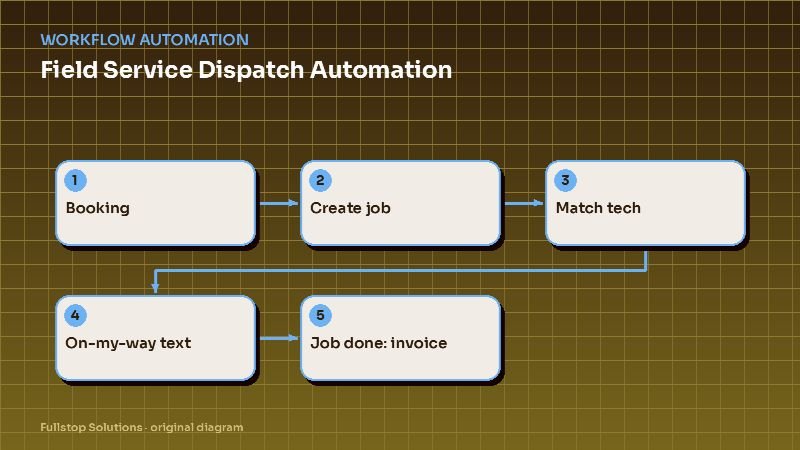
Short answer: field service dispatch automation turns a confirmed booking into a ready-to-run job without manual re-entry. It creates the job, suggests the best technician by skill, location and workload, confirms with the customer, sends an on-my-way text with arrival details, flags parts that need to be picked up, and triggers the invoice and payment link when the job is marked complete. Dispatchers keep control; they just stop doing data entry.
Where dispatch time goes
In most contractor offices, the dispatcher is the busiest person in the building. A day typically includes:
- re-keying bookings from phone, web and email into the job system,
- matching jobs to technicians by skill and area, often from memory,
- calling customers to confirm and again when the tech is running late,
- answering "when will they get here?" calls,
- chasing technicians for job notes and completion,
- handing paperwork to whoever does invoicing.
Every one of those steps has a rule behind it. Rules can be automated.
The automated dispatch flow
1. Booking to job
Whether the booking came from your website, an AI receptionist, a phone call or a service agreement renewal, it lands as a job with all required fields: customer, address, service type, equipment details, and notes. Missing required information triggers a quick text to the customer before the job is scheduled.
2. Technician matching
Rules suggest the best technician:
- Skill and certification: for example, only certain technicians handle commercial refrigeration, panel upgrades or EV charger installations.
- Location: technicians already working nearby that day.
- Workload: balance jobs, respect maximum daily hours.
- Customer history: the same tech who serviced the equipment before, when possible.
Start with suggestions the dispatcher approves with a click. Move to auto-assignment for routine job types once the suggestions are consistently right.
3. Confirmations and reminders
The customer gets a confirmation with the arrival window, a reminder the day before, and a way to reschedule by text. Reschedules update the board automatically and alert the dispatcher.
4. On-my-way and arrival
When the technician taps "on my way" in the mobile app, the customer gets a text with the technician's name, photo if you use them, and estimated arrival. If the previous job runs long, a "running late" text can be sent with one tap, rather than a dispatcher phone call.
5. Parts and preparation
If the job type usually requires specific parts or the booking mentions equipment details, the system can check inventory or flag a parts pickup for the technician before they leave. This prevents the "I'll need to come back with a part" second visit.
6. Job complete to invoice
The technician marks the job complete with line items, photos and notes. That triggers:
- the invoice and a payment link to the customer,
- a thank-you text and, a little later, a review request,
- a maintenance or follow-up reminder where relevant,
- sync of payment to your accounting system once paid.
Industry notes
HVAC: seasonality changes everything. During peaks, rules should prioritize no-heat and no-cooling calls and fill gaps with maintenance; in shoulder seasons, maintenance agreements drive the board. See HVAC automation and the missed-call text back guide.
Electrical: permit and inspection steps add stages. Automation can track permit status and schedule inspections, and send customers status updates as each stage completes. See electrical contractor automation.
Plumbing: emergencies interrupt the schedule. A clear "emergency insert" rule (which tech can absorb it, which job gets moved, who gets the "running late" text) keeps the rest of the day intact. See plumbing automation.
Connecting the systems
Most contractors use a field-service platform plus accounting (often QuickBooks), a phone system and a texting tool. Many field-service platforms include basic automations. Cross-system flows (for example, from a phone-system call event to a job, or from a supplier's inventory to a parts list) usually need an integration platform or a small custom service. See the workflow automation guide.
Measuring the impact
Track, before and after:
- minutes of dispatcher time per job,
- "where is my tech?" calls per day,
- first-time fix rate (fewer return trips for parts),
- days from job complete to invoice sent, and to payment received.
Mistakes to avoid
Auto-assigning too early. Earn trust with suggestions first.
Ignoring the technician app. If technicians do not tap "on my way" or "complete", nothing downstream fires. Make those taps easy and part of the routine.
Messy service types. If "AC repair", "A/C repair" and "cooling repair" are three different service types, matching rules break. Clean them up first.
Questions to settle before you start
Which job types need a specific skill or certification, and who holds each one? What counts as a full day for each technician? How should emergencies be inserted, and which jobs can be moved to make room? Who approves assignment suggestions, and how quickly? What should the on-my-way and running-late texts say, and should they include the technician's photo? When a job is completed, who reviews line items before the invoice goes out, or should it go automatically? These decisions are the real design work; the automation simply carries them out every time.
A dispatcher's morning with automation
At 7 a.m., the board shows the day's jobs with technicians assigned overnight by the suggestion rules: skills matched, routes grouped by area, and capacity respected. Two jobs are flagged: one needs a part not on the assigned truck, and one customer has not confirmed. The dispatcher swaps the first job to a technician with the part and calls the second customer.
At 9:30, an emergency comes in: a water heater leaking into a finished basement. The system suggests the nearest qualified technician whose next job can move without missing its window. The dispatcher approves; the affected customer gets an updated window automatically.
At noon, a technician finishes early. The system offers the next unassigned job nearby. By the afternoon, on-the-way texts, job completion notes and invoices have gone out without phone calls.
Measuring with your own field data
Compare jobs per technician per day, drive time between jobs and on-time arrival before and after. Your field service platform already holds these numbers.
Where to start
Start with booking-to-job and on-my-way texts. They save dispatcher time on day one and cut inbound calls. Add technician suggestions next, and job-complete invoicing third. Our workflow automation service covers how we scope these builds, and the best automations for HVAC companies puts them in priority order.