Short answer: a cleaning business can automate most of the path from first inquiry to repeat customer: an instant estimate from home details, online booking of recurring visits, crew assignment, room-by-room checklists with photos, automatic payment, and follow-ups for reviews and rebooking. Owners spend less time on scheduling and more on hiring and quality.
Where cleaning businesses lose time
Cleaning is a high-repeat, thin-margin business. The work is predictable, but the admin is constant:
- quoting by phone or text, often after hours,
- juggling recurring schedules when someone skips a week,
- telling crews where to go, what to clean and what the customer asked for,
- chasing payments,
- remembering to ask happy customers for reviews,
- re-engaging one-time customers who never rebooked.
Each of these follows clear rules.
The automated flow
1. Instant estimate
A quote form asks for home size (bedrooms, bathrooms, square footage), type of clean (standard, deep, move-in or move-out), frequency, pets, and add-ons (inside oven, inside fridge, interior windows, laundry). Your pricing rules calculate the estimate immediately and show it with a booking button. For anything unusual (very large homes, post-construction, hoarding situations), the form routes to a walkthrough booking instead.
Instant estimates matter because people asking for cleaning quotes often contact several companies at once. The one that answers immediately with a clear price and a "book now" button has a real advantage.
2. Booking and recurring series
The customer picks a date and frequency. The system creates the recurring series, assigns a preferred crew and time window, and sends a confirmation with what to expect: arrival window, what crews bring, how to provide access, and your cancellation policy.
Skips and reschedules are handled by text or a link without breaking the series. Holidays can be handled with an automatic "your visit falls on a holiday; reply 1 to move it to the day before" message.
3. Crew assignment and routing
Rules assign crews by area, skills (some crews do carpet or windows), and customer preference. Day sheets with addresses, access codes (stored securely), notes and checklists go to each crew's phone.
4. Checklists and photos
Each visit has a room-by-room checklist based on the clean type and add-ons. Crews check items and upload before-and-after photos of key areas. If a customer later reports a missed spot, you have a record, and you can quickly schedule a touch-up.
5. Payment
Cards on file are charged automatically after each visit, with a receipt. Failed payments trigger a friendly update-your-card message, and repeated failures alert the office before the next visit.
6. Reviews and rebooking
A day after the clean, a short satisfaction check: "How did we do?" A happy response gets a link to leave a review; an unhappy one alerts the owner immediately to make it right. See review request automation for how to do this fairly.
One-time customers get a rebooking offer a few weeks later, and lapsed recurring customers get a check-in.
Commercial and specialty cleaning
Commercial janitorial: contracts, multiple sites, after-hours work and supply tracking. Automation helps with site checklists, supply reorder alerts, inspection reports for clients and issue tickets from client staff. See commercial janitorial automation.
Carpet cleaning: quotes by room count and stains, plus drying-time instructions after service and maintenance reminders. See carpet cleaning automation.
Window cleaning and pressure washing: seasonal demand, weather rescheduling and photo-based quotes. See window cleaning and pressure washing automation.
Security and trust
Customers trust cleaning crews with their homes. Handle that carefully:
- store access codes and key information in a secure field, visible only to the assigned crew on the day,
- remove access when a crew member leaves,
- never send codes in group chats or plain text messages that persist on many phones.
Measuring the impact
Track, before and after:
- quote-to-booking rate,
- time from inquiry to quote,
- recurring customer retention after 90 days,
- hours per week spent on scheduling,
- payment failures and days to collect.
Mistakes to avoid
Prices that do not match reality. If instant quotes are often wrong, crews end up overworked or customers feel tricked. Review a batch of quotes against actual time spent each month.
No buffer for travel. Day sheets need realistic drive times.
Asking for reviews without checking satisfaction. Always check first and fix problems quickly.
A worked example with your numbers
Suppose you currently quote Q new residential customers a month, a share B of them book, and a share R of those become recurring customers worth an average of V a month. If instant quotes raise B, and checklists plus follow-ups raise R, the value compounds, because each extra recurring customer pays every month. Write down your current Q, B, R and V before you change anything. After two or three months of the new flow, recalculate. The difference in recurring revenue is the real measure of whether the automation was worth it.
A week of schedules for a residential cleaning company
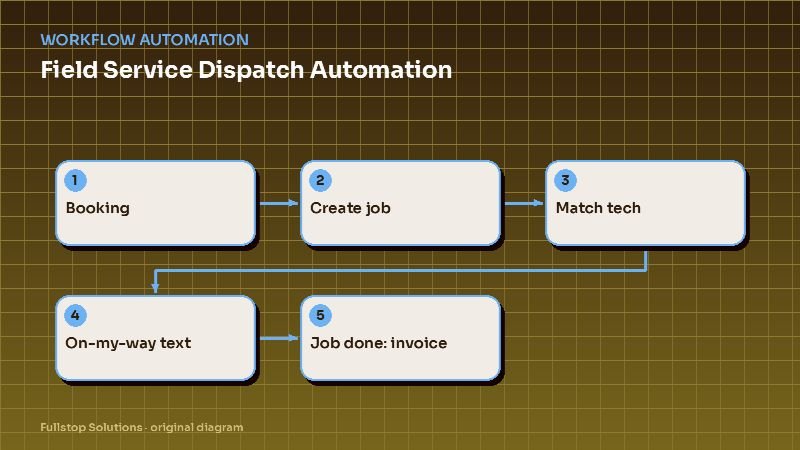
On Sunday evening, recurring clients receive a reminder of their visit day and window for the coming week. One client replies that they will be away on Wednesday; the system offers the next two available slots, the client picks Thursday, and the route is updated.
On Monday morning, the office reviews the week's routes. A cleaner has called in sick for Tuesday. The system lists the affected clients and suggests reassignments to other teams with capacity nearby. The office approves, and the clients receive a notice with the new team's name.
On each visit day, clients get an on-the-way text. After the clean, a short message asks how it went with a one-tap rating. A low rating creates a task for the office to call and offer a touch-up; a high rating, for clients who have not reviewed before, comes with the review link.
On Friday, new inquiries that came in during the week have received quotes based on home size and service type, with booking links. Those who have not booked receive a follow-up.
Measuring with your own schedule data
Count last month's reschedules, lockouts and same-day cancellations, and the office hours spent shuffling routes. Multiply the lost visits by your average visit price and the hours by your loaded office cost. Those two numbers show what scheduling automation can save your business.
Where to start
Start with instant estimates and online recurring booking; they directly increase bookings. Add crew checklists and automatic payments next, then reviews and rebooking. Our cleaning and janitorial automation page and house cleaning page list the full set of workflows, and the workflow automation guide explains the general approach.