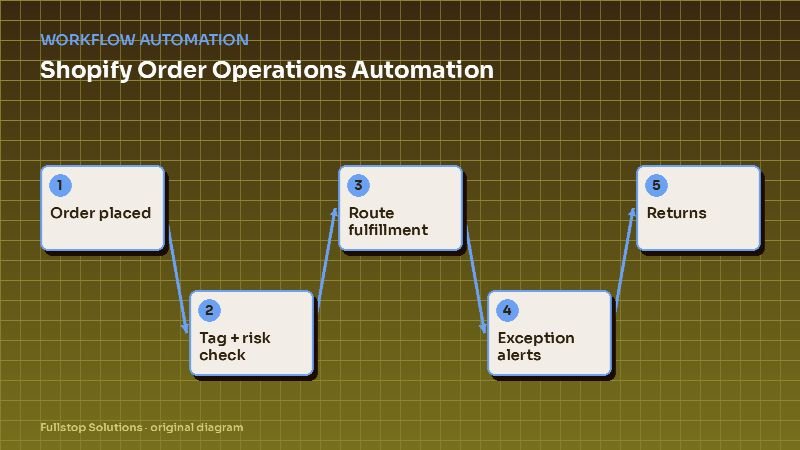
Short answer: Shopify brands can automate most routine order operations: tagging orders by type and destination, holding risky orders for review, routing fulfillment to the right warehouse or 3PL, alerting on low stock, catching delivery exceptions before customers complain, and running returns through a self-service portal. Start with Shopify Flow where your plan supports it, and add external tools or custom code where Flow stops.
The order-ops problem
When a store is small, the founder checks every order. As volume grows, that becomes a part-time job, then a full-time one: looking for risky orders, splitting shipments, telling the warehouse about special requests, answering "where is my order?", processing returns, and updating inventory spreadsheets.
Most of this work follows rules. Automating it lets a small team handle more orders without hiring at the same pace.
What to automate, in order
1. Order tagging
Tags make everything downstream easier. Automatically tag orders by:
- first order versus repeat customer,
- domestic versus international,
- contains a pre-order or backordered item,
- gift order (gift message present),
- high value,
- wholesale or B2B customer.
Tags drive routing, packing instructions and customer messaging.
2. Risk review
Shopify provides order risk analysis. Automation can hold orders flagged as high risk for manual review, notify the team, and cancel or release based on the decision. Combine with your own signals, such as mismatched billing and shipping countries for certain products, or unusual quantities. Keep a human on borderline cases.
3. Fulfillment routing
If you ship from more than one location (your own warehouse, a 3PL, a dropship supplier), rules route orders by item, stock location and destination. Split shipments trigger a "your order is arriving in two packages" message so customers are not confused.
4. Inventory alerts
Low-stock alerts per SKU, based on recent sales velocity rather than a fixed number, give you time to reorder. Automation can also hide or mark out-of-stock items, switch to pre-order where allowed, and notify customers who signed up for back-in-stock alerts.
5. Delivery exceptions
Carriers report exceptions (failed delivery attempts, address problems, delays). Automation watches tracking events and contacts the customer proactively, before they contact you: "Your package had a delivery issue. Here's what to do." This prevents many "where is my order?" tickets.
6. Returns and exchanges
A returns portal checks the order against your policy (return window, final-sale items), offers exchange or store credit first if you prefer, generates a label, and processes the refund or credit when the return is scanned or received. Exceptions such as damaged items go to a person with photos.
7. Customer service hand-offs
Order-status questions can be answered automatically from order data; see AI customer service for e-commerce. Everything else routes to your helpdesk with order context attached.
Subscriptions and DTC
Subscription boxes: renewals, skips, swaps and failed payments are the core operations. Automation adds churn signals (multiple skips in a row), pre-renewal reminders and inventory forecasting from upcoming renewals. See subscription box automation.
DTC brands: launch days and promotions create surges. Automation can tag and route launch orders, monitor inventory in real time and throttle certain alerts. See Shopify and DTC brand automation.
Wholesale and B2B orders
If you sell wholesale, automation can tag B2B orders, apply net terms, send invoices through accounting, and route large orders to a separate packing process. Keep wholesale and retail customer communications separate.
Tools
- Shopify Flow for in-store events, on eligible plans.
- Your 3PL's or warehouse system's integrations for fulfillment status.
- A returns app for the customer-facing portal.
- An integration platform (Zapier, Make, n8n) for cross-system flows; see Zapier vs. Make vs. n8n.
- Custom code for high volume or unusual routing, often as part of e-commerce development.
Measuring the impact
Track monthly:
- staff hours on order operations,
- orders held for risk and the outcome,
- "where is my order?" tickets per 100 orders,
- return processing time,
- stockouts on top SKUs.
Mistakes to avoid
Over-automating fraud decisions. Auto-cancelling too aggressively loses good customers.
Ignoring split-shipment messaging. Two packages without explanation generates tickets.
Inventory alerts on fixed numbers. Base them on sales velocity and lead time.
Returns that are too hard. A difficult returns process costs repeat purchases.
A worked example with your numbers
Count last month's orders (O) and the minutes your team spent on manual order work: checking risk, routing, answering status questions, processing returns. Divide to get minutes per order (m). If automation removes a share X of that work, the hours saved each month are about O × m × X ÷ 60. Multiply by your loaded hourly cost. Then add the harder-to-see benefits: fewer stockouts on top sellers and fewer late-delivery tickets. Measure the same numbers again after a month of running the automations.
A day of orders with Flow and integrations running
An order comes in at 10:02 a.m. with a high fraud risk indicator. Shopify Flow tags it and holds fulfillment; the support lead gets an alert to review. Another order includes an item that is low in stock after this sale; Flow tags the product and alerts purchasing. A third order is a first purchase over a threshold you set; it gets a "VIP-first" tag, so the packing team adds a handwritten card.
At noon, a customer asks to change the shipping address on an order that has not been fulfilled. The support assistant checks the status, updates the address and confirms. At 3 p.m., the warehouse marks orders packed; tracking numbers sync, and customers receive shipping confirmation.
Overnight, a carrier marks a package delayed. The customer receives a delay notice with the carrier's information and the options your policy allows, in line with the FTC rule on shipping delays. A return request arrives through the returns portal; the label is issued because the item is within the window, and the restock task is created when the return is scanned.
Estimating the value for your store
Count weekly orders that need any manual touch: holds, tags, address changes, delay messages, return approvals. Multiply by minutes per touch and your loaded hourly cost. Add the support tickets about order status. These are the numbers order automation reduces, in your store's own terms.
Where to start
Start with order tagging and delivery exception alerts; they reduce tickets quickly. Add fulfillment routing and inventory alerts next, then a returns portal. Our e-commerce store automation page lists the full workflow set.