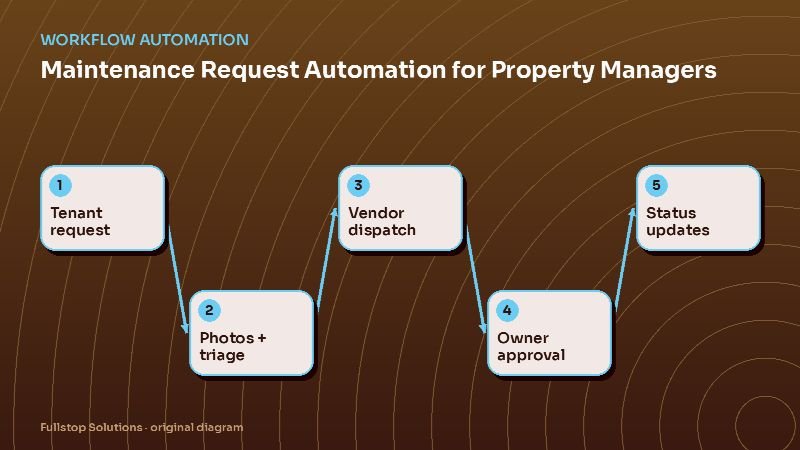
Short answer: maintenance automation turns a vague "something's leaking" call into a complete work order with photos, applies your emergency rules, dispatches the right vendor, asks the owner for approval when costs exceed their limit, and sends status updates to the tenant and owner at each step. Managers handle exceptions instead of relaying messages.
Why maintenance overwhelms small PM teams
For most property management companies, maintenance generates more calls, texts and emails than anything else. A single leaky faucet can involve the tenant, the manager, a vendor, and an owner, with each one asking for updates. Multiply by hundreds of doors and the team spends its day as a switchboard.
The work itself follows rules: categorize the issue, decide urgency, pick a vendor, check the spending limit, schedule access, confirm completion, pay the invoice. That makes it a strong candidate for automation.
The automated maintenance flow
1. Complete intake
Tenants submit requests through your portal, a text line or a phone assistant. The intake asks structured questions by category (plumbing, electrical, appliance, HVAC, pest, locks), requests photos or a short video, and collects access preferences and pet information. Incomplete requests get an automatic follow-up before they reach a manager.
2. Emergency triage
Your emergency rules come first. Common emergencies include active water leaks, sewage backups, no heat in freezing weather, gas smells (tell the tenant to leave and call the gas utility or 911), electrical hazards and broken exterior doors or locks. Emergencies trigger the on-call process immediately, with acknowledgment and escalation, and send the tenant safety instructions you have approved.
3. Vendor selection and dispatch
Rules pick the vendor by category, property, and vendor availability or rotation. The vendor receives the work order with photos, tenant contact and access details, and a link to accept, schedule and update status. If they do not accept within a set time, the next vendor is offered the job.
4. Owner approval
Each owner or property has a spending limit. If the vendor's estimate exceeds it, the owner gets a short summary with photos and approve or decline links. Approval dispatches the work; no response within the deadline escalates to the manager.
5. Status updates
At each change (vendor assigned, appointment scheduled, work completed), the tenant receives an update, and the owner gets updates according to their preference. This alone cuts a large share of "any update?" messages.
6. Completion and invoicing
The vendor marks the job complete with photos and uploads the invoice. The tenant gets a "was this fixed?" check; a "no" reopens the work order. The invoice routes to accounts payable with the work order attached and syncs to the owner statement.
Portfolio differences
Residential long-term rentals: volume and tenant communication dominate. The flow above fits well. See residential property management automation.
HOA and community associations: requests often concern common areas, and board approval may be required above certain amounts. Automation can route to the board, track architectural review requests and send community notices. See HOA management automation.
Short-term rentals: turnovers drive maintenance. Automation ties cleaning schedules to bookings, collects cleaner checklists and photos, and opens work orders when a cleaner reports damage or a missing item. Guest-facing issues during a stay need a faster path. See short-term rental management automation.
Preventive maintenance
Once reactive requests run smoothly, add scheduled work: HVAC filter changes, smoke and CO detector checks, gutter cleaning, seasonal inspections. Automation creates the work orders on schedule, notifies tenants about access, and tracks completion per unit.
Compliance and habitability
Landlord-tenant law is state and often city specific, including timelines for certain repairs and rules about entry notice. Build your automation around your counsel's guidance: encode required notice periods for entry, flag habitability issues for priority handling, and keep a complete timestamped record of every request and response. That record is valuable if a dispute ever arises.
Integrations
Property management platforms such as AppFolio, Buildium, Rent Manager and Yardi have maintenance modules. Automation typically extends them with smarter intake (structured questions and photos via text), vendor rotation and acceptance timers, owner approval links, and tenant status messaging, while keeping the platform as the system of record.
Measuring the impact
Track, before and after:
- maintenance-related calls and messages per week,
- time from request to vendor assigned,
- time from request to completion, by category,
- reopened work orders,
- owner approval turnaround.
Mistakes to avoid
Skipping photos. Photos let vendors bring the right parts and help managers judge urgency.
One vendor per category with no backup. Build rotation and acceptance timers.
Updating owners too much or too little. Ask each owner what they want: every update, only approvals, or a monthly summary.
Questions to settle before you build
What exactly counts as an emergency in your portfolio, and who is on call? What spending limit applies to each owner, and what happens if the owner does not respond in time? Which vendors cover which categories and areas, and who is the backup? How much notice do you give tenants before entry, according to your counsel? Do you want tenants to rate completed work? Which updates do owners want, and through which channel? Answering these turns maintenance automation from a software project into a written operating procedure that the system simply follows.
One maintenance request, end to end
At 9 p.m., a tenant submits a request through the portal: the kitchen sink is leaking under the cabinet. The form asks whether water is actively leaking and whether it can be stopped by closing the valve, with a photo upload. The tenant says it is a slow drip and attaches a photo.
The request is classified as plumbing, priority "next business day" under the company's rules, because it is a slow, contained leak. The tenant receives a confirmation with instructions to place a bowl under the drip and shut the valve if it worsens, plus the emergency number.
In the morning, the system assigns the request to the plumbing vendor for that property, sends the details and photo, and asks for a visit window. The vendor accepts; the tenant receives the window and the entry notice the lease requires. After the repair, the vendor uploads the invoice and a photo. The property manager approves, the work order closes and the owner's report records the cost.
Where to start
Begin with structured intake and emergency triage; they reduce risk and cut calls immediately. Add vendor dispatch with acceptance timers next, then owner approvals and tenant updates. Our property management automation page lists the full workflow set, and the workflow automation guide explains the general approach.