Short answer: salons, barbershops and nail studios can reduce no-shows with a few simple automations: a clear confirmation at booking, a reminder a day or two before that asks clients to confirm or reschedule, a short same-day reminder, deposits for the services and clients where you choose to require them, an automatic waitlist that fills cancellations, and a rebooking prompt before the client leaves. Measure your own no-show rate before and after; it is the only number that matters.
Why no-shows hurt so much
A no-show costs the service revenue, the stylist's time and, often, a client who wanted that slot and booked elsewhere. For a stylist on commission or booth rent, it is income that does not come back.
Most no-shows are not malicious. People forget, double-book or feel awkward cancelling. Good automation makes it easy to remember and easy to cancel early, which turns many no-shows into cancellations you can refill.
Measure your baseline
Before changing anything, pull the last two or three months from your booking software: total appointments, no-shows, late cancellations (inside your policy window). Calculate your no-show rate and note which services, days and client types are most affected. This tells you where to focus.
The no-show toolkit
1. Confirmation at booking
Immediately after booking: date, time, service, stylist, address, parking tips and your cancellation policy in plain language. Offer an "add to calendar" link. Clients who put it in their own calendar are less likely to forget.
2. Confirm-or-reschedule reminder
One or two days before, a reminder that asks for action:
"Hi Dana, see you Thursday at 2:00 pm with Marco for a cut and color. Reply C to confirm or R to reschedule."
The reply matters. An unconfirmed appointment can trigger a second reminder or a call from the front desk, and an R reply opens the slot early enough to refill.
3. Same-day reminder
A short note a few hours before: time, address, and "running late? reply here". Keep it brief.
4. Deposits, used fairly
Deposits are effective but can feel unfriendly if applied to everyone. Common approaches:
- deposits for long or high-value services (color corrections, extensions, bridal),
- deposits for new clients only,
- deposits for clients with a past no-show,
- a card on file with a clear late-cancel fee instead of an upfront deposit.
Automation applies whichever rule you choose and explains it at booking. Give your front desk the ability to waive it when it makes sense.
5. Waitlist auto-fill
Clients who want an earlier slot join a waitlist for specific services, stylists and times. When someone cancels, the system texts waitlisted clients in order, and the first to accept gets the slot. Late cancellations become filled chairs instead of empty ones.
6. Rebooking before they leave
The best defense against the next no-show is a rebooked client. At checkout (or in a text right after), prompt the next appointment based on the service's typical interval: "Your color usually looks best refreshed in about six weeks. Want us to hold Tuesday, March 4 at 2 pm?" Clients who leave with the next appointment booked are easier to retain.
Shop-specific tips
Hair salons: long services make no-shows expensive; deposits for color and chemical services are common. Patch tests and consultations can be automated as pre-appointments. See hair salon automation.
Barbershops: shorter appointments and many walk-ins. Live wait-time texts and "you're next" alerts work well, along with reminder texts for booked regulars. See barbershop automation.
Nail studios: fill-ins at regular intervals make rebooking prompts especially effective; waitlists work well for popular techs. See nail salon automation.
Tone and consent
Reminders about appointments clients booked are service messages. Promotional texts ("20% off this weekend") are marketing and need separate, written consent. Keep your reminder flow clean, and see our texting compliance guide for details.
Keep the tone friendly. "We missed you today! Want to rebook?" works better than a stern policy reminder, especially for a first offense.
Tools
Salon booking platforms such as Vagaro, Boulevard, GlossGenius, Square Appointments and Fresha include many of these features. Automation fills the gaps: smarter waitlist logic, rebooking prompts tied to service intervals, two-way confirmation handling, and syncing with marketing tools.
Measuring the impact
Compare the same weeks before and after:
- no-show rate overall and by service,
- late-cancellation rate,
- cancelled slots refilled from the waitlist,
- share of clients leaving with the next appointment booked.
Mistakes to avoid
Too many reminders. Three touches is plenty for most appointments.
Rigid policies with no override. Life happens. Let staff use judgment.
Ignoring the waitlist. Many salons have one on paper. Automating it is where cancellations become revenue again.
A worked example with your numbers
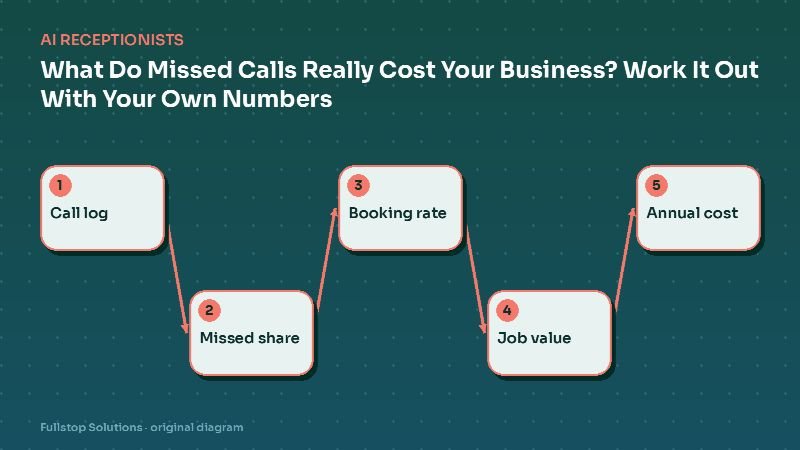
Take your monthly appointments (A), your current no-show rate (N), and your average service value (V). The monthly cost of no-shows is roughly A × N × V. If confirmations and waitlist fills recover a share X of those slots, the monthly gain is about A × N × X × V. You can pull A and N from your booking software in a few minutes. Use them to decide which tools matter most: if most of the loss is late cancellations, the waitlist is your priority; if it is pure no-shows, start with confirm-or-reschedule reminders.
A Saturday at a busy salon
On Thursday, every Saturday client receives a reminder with their stylist, time and service, and a one-tap confirm or reschedule. Two clients reschedule; their slots go out to the waitlist, and both are filled within an hour by clients who wanted Saturday.
On Friday, three Saturday clients still have not confirmed. They get a second reminder, and the front desk calls the one with a long color appointment. Bookings for long services required a card on file under the salon's posted policy, which the client agreed to when booking.
On Saturday, one client does not show. The no-show is logged, and on Monday the client receives a polite message offering to rebook and reminding them of the policy. The fee is applied only according to the policy and the owner's discretion.
After each appointment, clients receive a thank-you with a rebooking link timed to their usual interval, so the next visit is booked before they leave or soon after.
Measuring in your own numbers
Count last month's no-shows and late cancellations, multiply by the average service value, and you have the monthly cost of empty chairs in your salon.
Where to start
Turn on confirm-or-reschedule reminders first; they are low effort and immediately useful. Add the waitlist auto-fill next, then rebooking prompts and deposit rules. Our salons and spas automation page lists the full workflow set.