
Careful inquiry screening
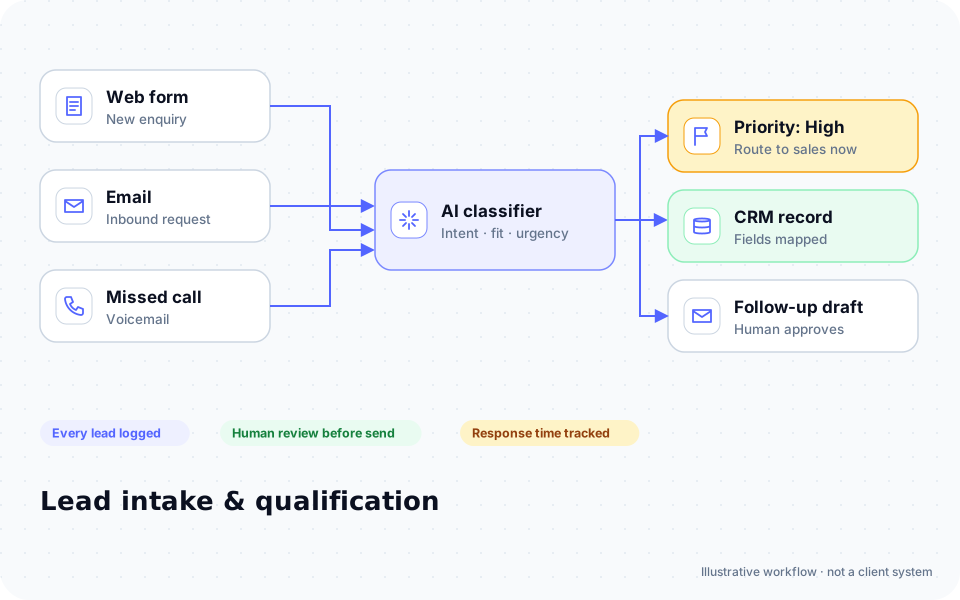
#1Trigger New inquiry
- Collects names for conflict check first
- Asks matter type and urgency
- Flags safety concerns to staff immediately
Outcome Consistent, safe first contact
Typical stack: Lawmatics or Clio Grow
Law firms · Family law
Handle sensitive divorce and custody inquiries with care, run conflict checks before anyone shares details, and collect financial disclosure documents without endless emails.
Where time leaks
Patterns we see in this industry. Your workflow will differ; discovery confirms which ones apply.
Many inquiries are emotional and need a careful, consistent first response.
Conflict checks must happen before detailed information is collected.
Financial disclosures require many documents from clients.
Consultation fees and scheduling add back-and-forth.
Named for compatibility only. No partnership or endorsement implied; we confirm API access for your plan during discovery.
Automation recipes
Trigger → steps → outcome. Each one is a scoped, fixed-price build.
Trigger New inquiry
Outcome Consistent, safe first contact
Typical stack: Lawmatics or Clio Grow
Trigger Names collected
Outcome Conflicts caught early
Typical stack: Clio or MyCase
Trigger Client retained
Outcome Complete disclosures faster
Typical stack: Client portal
Trigger Inquiry cleared
Outcome Paid consultations without phone tag
Typical stack: Calendar, LawPay
Interactive
Pick what starts it and what should happen next. Your workflow assembles live below. This is a planning tool; we confirm what your tools support during discovery.
Your workflow
Planning previewAdd at least one step on the left.
Tap "Start a missed call" and reply as the customer. Runs in your browser.
Incoming call…
Nobody can answer right now
Move the sliders to match your business.
Est. recovered / month
Est. per year
missed → re-engaged → won per month
Estimate = leads × missed % × re-engaged % × close % × deal value, using only the numbers you entered. Not a guarantee; excludes software and build costs.
Plan my text-back automationStep through "Careful inquiry screening" one stage at a time. Click any step.
ROI estimate
Preset for a small team. Change the numbers to match your business.
How we implement
We design the intake script with your attorneys, starting with conflict checks and safety routing. Every message is reviewed for tone, because many inquiries come at a hard moment.
Discovery call: We walk through your current process and tools (free, 30 minutes).
Workflow map & fixed quote: Written scope, software costs listed separately, compliance notes included.
Build in a test environment: Your accounts, test data first, then a supervised pilot.
Handover: Documentation, training and an optional support plan.
General information, not legal advice. Confirm requirements with your own counsel or compliance officer.
Want these automations running in your business?
Tell us your tools and the one task you'd remove first. We reply with a plan.
The broader playbook for the whole trade, including recipes that apply across specialties.
AI automation for Law firms →FAQ
Personal injury
Answer accident calls around the clock, screen cases with your intake criteria, and keep medical records requests and client updates moving while cases are pending.
Immigration law
Answer inquiries in your clients' languages, collect the long document lists each petition needs, and track case status and deadlines for every client.
Estate planning
Turn seminar attendees and web leads into consultations, collect detailed family and asset questionnaires, and follow up on trust funding after signing.
Criminal defense
Answer calls from arrested clients and their families at any hour, capture charges and court dates accurately, and remind clients of every hearing.
Workers' compensation
Screen injured-worker calls in English and Spanish, capture the injury and employer reporting dates that drive deadlines, and keep clients updated through treatment and hearings.
Employment law
Screen termination, discrimination and unpaid wage inquiries consistently, capture the agency filing deadlines that can end a case, and collect pay records and emails before the consult.
Bankruptcy
Pre-screen debt-relief inquiries with your questionnaire, collect tax returns, pay stubs and bank statements without chasing, and keep clients ready for the 341 meeting.
Free tools: ROI calculator · AI readiness assessment · Experience Lab
Next step
Two short steps. We reply by email, usually to set up a 30-minute discovery call.
What happens after you submit
We read it personally
A person reviews your note. No automated sales sequence.
We reply by email
Usually with 2–3 clarifying questions and times for a 30-minute call.
You get a written plan
Workflow map, fixed quote and listed software costs before any build. No obligation.
Prefer to talk? Call (214) 891-5650 or email info@fullstopsolutions.com.
Not ready to talk? Try the ROI calculator or readiness check. No email needed.