Skip to content
Fullstop Solutions

Home & field services

AI automation for remodeling and general contractors

Qualify kitchen and bath leads by budget, keep selections and subcontractor schedules moving and stop change orders from eating your margin.

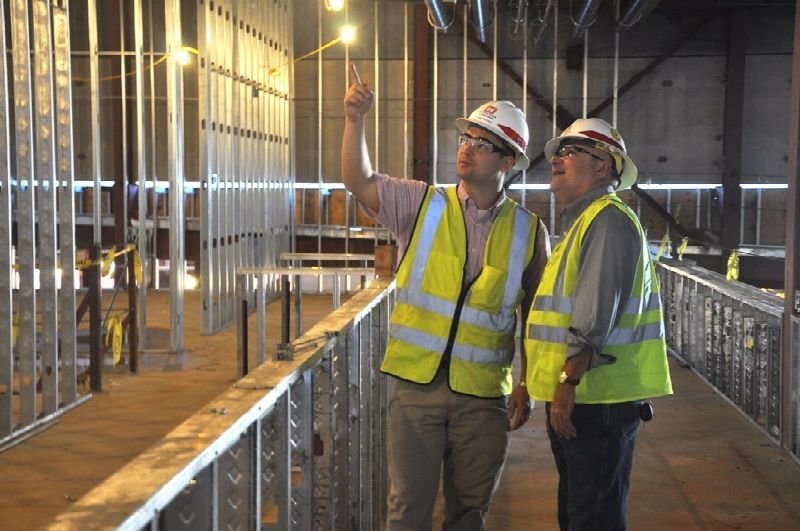
Two contractors in hard hats and safety vests reviewing a renovation site
Photo: U.S. Army Corps of Engineers Savannah District, CC BY 2.0.

Where time leaks

Where the hours go in remodeling & general contractors

Patterns we see in this industry. Your workflow will differ; discovery confirms which ones apply.

01

Most leads are tire-kickers with budgets far below a realistic project price.

02

Client selections (tile, fixtures, cabinets) are chased by email for weeks and delay the schedule.

03

Subcontractor schedules shift and nobody tells the next trade.

04

Change orders are discussed on site and billed weeks later.

Common tools in remodeling & general contractors:BuildertrendJobTreadCoConstructProcoreQuickBooksDocuSign

Named for compatibility only. No partnership or endorsement implied; we confirm API access for your plan during discovery.

Automation recipes

5 automations built for remodeling & general contractors

Trigger → steps → outcome. Each one is a scoped, fixed-price build.

Discuss This Solution

Budget-qualified lead intake

#1

Trigger Website or Houzz lead

  1. Asks project type, timeline and budget range
  2. Shares your typical project ranges you publish
  3. Books a design consult only for qualified fits; others get a helpful guide

Outcome Sales time spent on real projects

Typical stack: Buildertrend or JobTread, Calendly
Selections deadline tracker

#2

Trigger Project enters pre-construction

  1. Creates a selections list with due dates from the schedule
  2. Reminds the client 7 and 2 days before each deadline
  3. Alerts the PM when a late selection will move the schedule

Outcome Selections stop delaying start dates

Typical stack: Buildertrend, email

Subcontractor schedule sync

#3

Trigger Schedule item moves

  1. Notifies affected subs with the new date
  2. Requests confirmation
  3. Escalates unconfirmed trades to the PM

Outcome Trades show up on the right day

Typical stack: Buildertrend or Procore, SMS

Change order capture and billing

#4

Trigger PM logs a change

  1. Drafts change order with price from your cost book
  2. Sends for client e-signature
  3. Adds to the next draw invoice

Outcome Changes approved before work, billed on time

Typical stack: JobTread, DocuSign, QuickBooks

Lien waiver collection

#5

Trigger Draw payment scheduled

  1. Requests conditional waivers from subs
  2. Tracks receipt
  3. Holds payment release until complete

Outcome Clean paperwork on every draw

Typical stack: Google Drive, email

Interactive

Build your automation

Pick what starts it and what should happen next. Your workflow assembles live below. This is a planning tool; we confirm what your tools support during discovery.

2. …do these steps (up to 6)

Your workflow

Planning preview
  1. Trigger

Add at least one step on the left.

Demo

Try a missed-call text-back

Tap "Start a missed call" and reply as the customer. Runs in your browser.

MessagesDEMO
No messages yet

Incoming call…

Nobody can answer right now

Missed-lead revenue estimate

Estimate

Move the sliders to match your business.

Est. recovered / month

Est. per year

missed → re-engaged → won per month

Estimate = leads × missed % × re-engaged % × close % × deal value, using only the numbers you entered. Not a guarantee; excludes software and build costs.

Plan my text-back automation
Demo

Watch the workflow run

Step through "Budget-qualified lead intake" one stage at a time. Click any step.

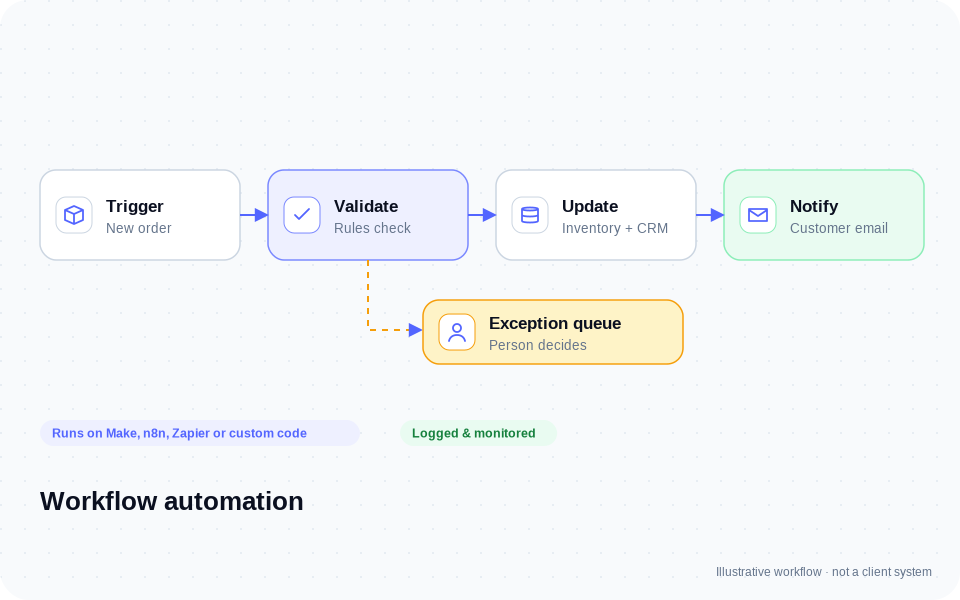
Diagram: a new order triggers validation, inventory and CRM updates and a customer email, with exceptions routed to a person

ROI estimate

A starting ROI estimate for remodeling & general contractors

Preset for a small team. Change the numbers to match your business.

Quick estimate

Estimate

Capacity / month

Capacity / year

Calculate Potential Savings →

How we implement

Built around how work actually runs in remodeling & general contractors

We use your real project ranges and cost book; nothing is estimated by AI on its own. Sales qualification goes first, then the pre-construction workflows.

Discovery call: We walk through your current process and tools (free, 30 minutes).

Workflow map & fixed quote: Written scope, software costs listed separately, compliance notes included.

Build in a test environment: Your accounts, test data first, then a supervised pilot.

Handover: Documentation, training and an optional support plan.

Limitations & compliance notes

  • Published price ranges must be your own and kept current; we don't generate pricing.
  • Some states require specific contract and change-order language for home improvement work. Your attorney approves templates.
  • Lead texts need consent and A2P 10DLC registration.

General information, not legal advice. Confirm requirements with your own counsel or compliance officer.

Want these automations running in your business?

Tell us your tools and the one task you'd remove first. We reply with a plan.

FAQ

Common questions

Asking for a range politely tends to filter rather than offend; we test the wording with you.

Buildertrend offers integrations and an API for some plans; we confirm during discovery.

No. It can assemble change orders from your cost book, but estimates stay with your team.

Next step

Tell us how remodeling & general contractors work flows today

Two short steps. We reply by email, usually to set up a 30-minute discovery call.

What happens after you submit

  1. 1

    We read it personally

    A person reviews your note. No automated sales sequence.

  2. 2

    We reply by email

    Usually with 2–3 clarifying questions and times for a 30-minute call.

  3. 3

    You get a written plan

    Workflow map, fixed quote and listed software costs before any build. No obligation.

Prefer to talk? Call (214) 891-5650 or email info@fullstopsolutions.com.

Not ready to talk? Try the ROI calculator or readiness check. No email needed.

Request a consultation

Step 1 of 2

Your details

What do you want help with? *

About your project

We reply by email. No automated sales sequences.

Calculate Savings Get My Automation Plan

Fullstop automation assistant

Instant answers · humans on request

Automated assistant. A specialist confirms pricing and project details. Privacy