
Skip to content
Fullstop Solutions

Real estate, finance & insurance

AI automation for accounting and bookkeeping firms

Collect client documents before deadlines, categorize transactions faster and spend tax season on review instead of chasing.

Hands using a calculator next to a laptop showing a spreadsheet

Where time leaks

Where the hours go in accounting & bookkeeping firms

Patterns we see in this industry. Your workflow will differ; discovery confirms which ones apply.

01

Tax season is spent chasing missing W-2s, 1099s and receipts.

02

Month-end close is delayed by uncategorized transactions and missing receipts.

03

Engagement letters and organizers are sent and tracked manually.

04

Client questions arrive by email and get buried.

Common tools in accounting & bookkeeping firms:QuickBooks OnlineXeroKarbonCanopyTaxDomeDext

Named for compatibility only. No partnership or endorsement implied; we confirm API access for your plan during discovery.

Automation recipes

5 automations built for accounting & bookkeeping firms

Trigger → steps → outcome. Each one is a scoped, fixed-price build.

Discuss This Solution

Tax document chaser

#1

Trigger Organizer sent

  1. Tracks which documents each client has uploaded
  2. Sends reminders with a checklist of what is missing
  3. Escalates to the preparer 2 weeks before deadline

Outcome Files complete earlier

Typical stack: TaxDome or Canopy
Transaction categorization assist

#2

Trigger New bank feed transactions

  1. Suggests categories from history and vendor names
  2. Requests receipts for transactions over your threshold
  3. Queues uncertain items for the bookkeeper

Outcome Faster month-end close

Typical stack: QuickBooks Online or Xero, Dext

Engagement onboarding

#3

Trigger New client signs up

  1. Sends engagement letter for e-signature
  2. Creates client workspace and recurring tasks
  3. Requests prior-year returns and access

Outcome Onboarding without spreadsheets

Typical stack: Karbon, DocuSign

Client email triage

#4

Trigger Email arrives in the shared inbox

  1. Classifies: document, question, billing, urgent
  2. Attaches documents to the client record
  3. Assigns questions to the right staff member

Outcome Nothing buried in the inbox

Typical stack: Karbon, Outlook or Gmail

Month-end close checklist

#5

Trigger Last business day of month

  1. Generates close tasks per client
  2. Checks reconciliations status
  3. Reports blockers to the manager

Outcome Visible close status

Typical stack: Karbon or spreadsheet

Interactive

Build your automation

Pick what starts it and what should happen next. Your workflow assembles live below. This is a planning tool; we confirm what your tools support during discovery.

2. …do these steps (up to 6)

Your workflow

Planning preview
  1. Trigger

Add at least one step on the left.

Demo

Try a missed-call text-back

Tap "Start a missed call" and reply as the customer. Runs in your browser.

MessagesDEMO
No messages yet

Incoming call…

Nobody can answer right now

Missed-lead revenue estimate

Estimate

Move the sliders to match your business.

Est. recovered / month

Est. per year

missed → re-engaged → won per month

Estimate = leads × missed % × re-engaged % × close % × deal value, using only the numbers you entered. Not a guarantee; excludes software and build costs.

Plan my text-back automation
Demo

Watch the workflow run

Step through "Tax document chaser" one stage at a time. Click any step.

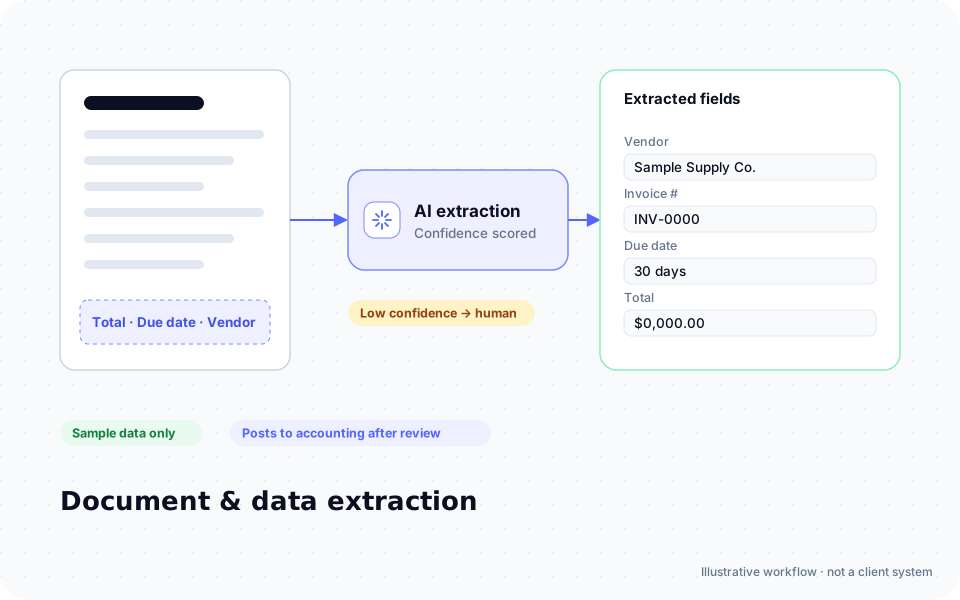
Diagram: an invoice is read by AI and vendor, invoice number, due date and total are extracted into fields, with low-confidence results sent to a person

ROI estimate

A starting ROI estimate for accounting & bookkeeping firms

Preset for a small team. Change the numbers to match your business.

Quick estimate

Estimate

Capacity / month

Capacity / year

Calculate Potential Savings →

How we implement

Built around how work actually runs in accounting & bookkeeping firms

We start outside tax season with onboarding and inbox triage, so document chasing is tested and ready before deadlines.

Discovery call: We walk through your current process and tools (free, 30 minutes).

Workflow map & fixed quote: Written scope, software costs listed separately, compliance notes included.

Build in a test environment: Your accounts, test data first, then a supervised pilot.

Handover: Documentation, training and an optional support plan.

Limitations & compliance notes

  • Tax preparers must follow the FTC Safeguards Rule (GLBA) and maintain a written information security plan (IRS Publication 4557 guidance).
  • Taxpayer data shared with AI tools requires consent under IRC §7216 rules for certain uses. We design around this with your firm.
  • AI suggestions are reviewed by qualified staff; no automated tax advice.

General information, not legal advice. Confirm requirements with your own counsel or compliance officer.

Want these automations running in your business?

Tell us your tools and the one task you'd remove first. We reply with a plan.

FAQ

Common questions

Yes, both have open APIs.

Only where your security plan and §7216 consent requirements allow; many workflows don't need the data at all.

No. It handles collection, categorization suggestions and admin.

Other industries

HVAC

Answer every no-heat and no-cool call, keep maintenance agreements renewing and stop re-typing jobs into ServiceTitan or Housecall Pro.

Plumbing

Triage burst-pipe emergencies from routine drips, quote water heaters faster and keep drain and jetting jobs flowing from call to invoice.

Electrical contractors

Qualify panel upgrades, EV charger installs and generator leads before a truck rolls, and keep permits, inspections and change orders on track.

Roofing

Turn storm-season lead floods into scheduled inspections, keep insurance claim paperwork moving and follow up every estimate without a bigger office.

Landscaping & lawn care

Fill routes, renew seasonal contracts and handle weather reschedules without the owner texting every client from the truck.

Cleaning & janitorial

Quote residential cleans instantly, keep commercial contracts staffed and prove every visit with checklists, without more office hours.

Pest control

Answer "I just saw a rat" calls instantly, keep quarterly service routes full and document treatments the way regulators and customers expect.

Remodeling & general contractors

Qualify kitchen and bath leads by budget, keep selections and subcontractor schedules moving and stop change orders from eating your margin.

Auto repair shops

Answer phones while bays are busy, send digital inspection approvals that customers actually read and bring cars back for due service.

Salons & day spas

Fill last-minute cancellations, cut no-shows and rebook clients before they drift, while stylists stay with the client in the chair.

Fitness studios & gyms

Convert trial sign-ups into members, catch at-risk members before they cancel and keep class waitlists full.

Restaurants

Take reservation and catering calls during service, reconcile third-party delivery payouts and keep inventory counts from becoming a Sunday-night chore.

Real estate agents & teams

Respond to Zillow and website leads in minutes, keep Follow Up Boss current and move every transaction from contract to close without a missed deadline.

Property management

Triage maintenance requests 24/7, answer prospective tenants instantly and keep renewals, inspections and owner reports on schedule.

Mortgage brokers & loan officers

Collect borrower documents without chasing, keep realtors updated on every milestone and follow up on pre-approvals that haven't converted.

Insurance agencies

Gather quote information once, speed up renewals and certificate requests, and keep every client touchpoint logged in your agency management system.

Law firms

Qualify intake calls by practice area, run conflict checks before the consult and keep Clio matters, deadlines and billing current without more paralegal hours.

Staffing agencies

Screen applicants in minutes, fill shift requests faster and keep onboarding paperwork and timesheets moving without recruiters drowning in admin.

Dental practices

Keep the schedule full, verify insurance before the visit and reactivate overdue hygiene patients, designed around HIPAA requirements from the start.

Chiropractic & physical therapy

Keep patients on their care plans, handle visit authorizations and fill the schedule, with HIPAA requirements built into every workflow.

Med spas & aesthetic clinics

Turn consult inquiries into booked treatments, run package and membership follow-ups and keep consent forms complete, with HIPAA and medical oversight in mind.

Veterinary clinics

Answer the phone during surgery hours, keep vaccine reminders and refill requests moving, and send discharge instructions that owners actually read.

E-commerce stores

Answer "where is my order?" automatically, catch inventory and fulfillment problems early and turn reviews and returns into data you can act on.

Trucking & logistics

Process rate confirmations and PODs automatically, keep shippers updated on every load and get invoices out the day a load delivers.

Free tools: ROI calculator · AI readiness assessment · Experience Lab

Next step

Tell us how accounting & bookkeeping firms work flows today

Two short steps. We reply by email, usually to set up a 30-minute discovery call.

What happens after you submit

  1. 1

    We read it personally

    A person reviews your note. No automated sales sequence.

  2. 2

    We reply by email

    Usually with 2–3 clarifying questions and times for a 30-minute call.

  3. 3

    You get a written plan

    Workflow map, fixed quote and listed software costs before any build. No obligation.

Prefer to talk? Call (214) 891-5650 or email info@fullstopsolutions.com.

Not ready to talk? Try the ROI calculator or readiness check. No email needed.

Request a consultation

Step 1 of 2

Your details

What do you want help with? *

About your project

We reply by email. No automated sales sequences.

Calculate Savings Get My Automation Plan