
Skip to content
Fullstop Solutions

Law firms · Employment law

AI automation for employee-side employment law firms

Screen termination, discrimination and unpaid wage inquiries consistently, capture the agency filing deadlines that can end a case, and collect pay records and emails before the consult.

Office workers at a desk with paperwork
Photo: ell brown, CC BY 2.0.

Where time leaks

Where the hours go in employment law

Patterns we see in this industry. Your workflow will differ; discovery confirms which ones apply.

01

Many inquiries do not meet the firm's case criteria, and attorneys spend hours on calls that end in referrals.

02

Discrimination claims often require an EEOC or state agency charge within strict time limits.

03

Pay stubs, offer letters, performance reviews and termination emails decide the case, and clients do not know to save them.

04

Wage claims have different rules from discrimination claims.

Common tools in employment law:ClioLawmaticsMyCaseFilevineDocuSignCalendly

Named for compatibility only. No partnership or endorsement implied; we confirm API access for your plan during discovery.

Automation recipes

4 automations built for employment law

Trigger → steps → outcome. Each one is a scoped, fixed-price build.

Discuss This Solution

Criteria-based screening

#1

Trigger New inquiry

  1. Asks employer size, employment dates, claim type and termination date
  2. Applies your firm's criteria
  3. Books consults for fits, sends referral info for others

Outcome Attorneys spend time on viable cases

Typical stack: Lawmatics, web form
Filing deadline capture

#2

Trigger Discrimination or retaliation inquiry

  1. Records the last adverse action date
  2. Calculates the agency deadline your attorneys configured
  3. Flags urgent cases for same-day review

Outcome Close deadlines reviewed immediately

Typical stack: Calendar, CRM

Evidence checklist

#3

Trigger Consult booked

  1. Sends a list of documents to gather, such as pay stubs and emails
  2. Accepts uploads
  3. Reminds the client to keep copies of messages

Outcome Better-prepared consults

Typical stack: Client portal

Wage claim intake

#4

Trigger Unpaid overtime or wage inquiry

  1. Asks pay type, schedule and hours worked
  2. Requests pay stubs
  3. Routes to the wage-and-hour attorney

Outcome Wage cases organized from the start

Typical stack: CRM

Interactive

Build your automation

Pick what starts it and what should happen next. Your workflow assembles live below. This is a planning tool; we confirm what your tools support during discovery.

2. …do these steps (up to 6)

Your workflow

Planning preview
  1. Trigger

Add at least one step on the left.

Demo

Try a missed-call text-back

Tap "Start a missed call" and reply as the customer. Runs in your browser.

MessagesDEMO
No messages yet

Incoming call…

Nobody can answer right now

Missed-lead revenue estimate

Estimate

Move the sliders to match your business.

Est. recovered / month

Est. per year

missed → re-engaged → won per month

Estimate = leads × missed % × re-engaged % × close % × deal value, using only the numbers you entered. Not a guarantee; excludes software and build costs.

Plan my text-back automation
Demo

Watch the workflow run

Step through "Criteria-based screening" one stage at a time. Click any step.

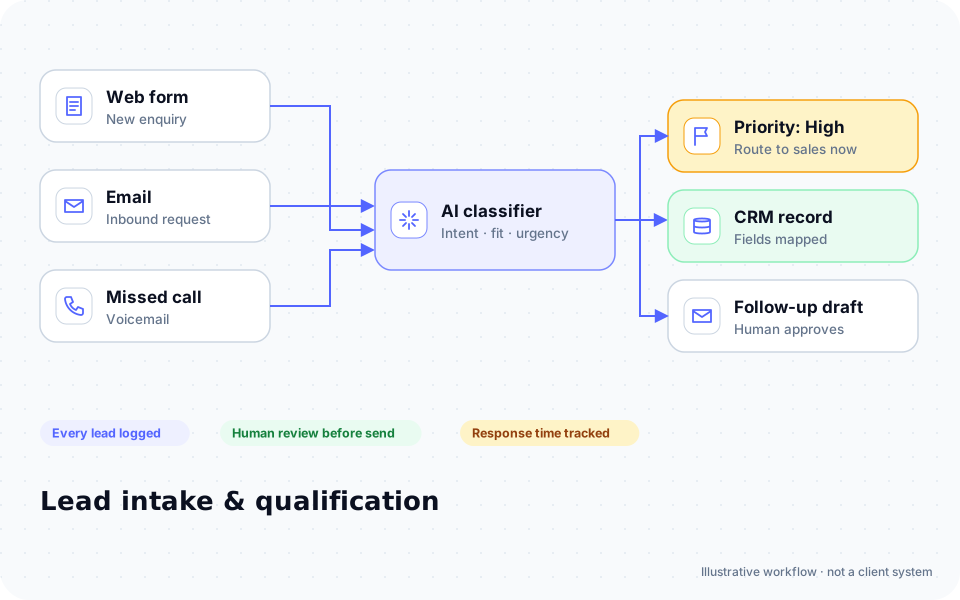
Diagram: enquiries from a web form, email and missed calls are classified by AI, prioritized, logged in a CRM and given a follow-up draft for human approval

ROI estimate

A starting ROI estimate for employment law

Preset for a small team. Change the numbers to match your business.

Quick estimate

Estimate

Capacity / month

Capacity / year

Calculate Potential Savings →

How we implement

Built around how work actually runs in employment law

We start with your written case criteria and deadline rules, then connect intake to your case management system.

Discovery call: We walk through your current process and tools (free, 30 minutes).

Workflow map & fixed quote: Written scope, software costs listed separately, compliance notes included.

Build in a test environment: Your accounts, test data first, then a supervised pilot.

Handover: Documentation, training and an optional support plan.

Limitations & compliance notes

  • Deadline calculations use rules your attorneys configure and are reviewed by an attorney.
  • The assistant gives no legal advice and does not tell anyone whether they have a case.

General information, not legal advice. Confirm requirements with your own counsel or compliance officer.

Want these automations running in your business?

Tell us your tools and the one task you'd remove first. We reply with a plan.

Part of Law firms

The broader playbook for the whole trade, including recipes that apply across specialties.

AI automation for Law firms →

Related industries

Services behind these automations

FAQ

Common questions

No. It applies your screening questions; attorneys decide.

This flow is for employee-side firms. Employer-side intake is different.

Data is kept in your systems with access controls you set.

Next step

Tell us how your employment law work flows today

Two short steps. We reply by email, usually to set up a 30-minute discovery call.

What happens after you submit

  1. 1

    We read it personally

    A person reviews your note. No automated sales sequence.

  2. 2

    We reply by email

    Usually with 2–3 clarifying questions and times for a 30-minute call.

  3. 3

    You get a written plan

    Workflow map, fixed quote and listed software costs before any build. No obligation.

Prefer to talk? Call (214) 891-5650 or email info@fullstopsolutions.com.

Not ready to talk? Try the ROI calculator or readiness check. No email needed.

Request a consultation

Step 1 of 2

Your details

What do you want help with? *

About your project

We reply by email. No automated sales sequences.

Calculate Savings Get My Automation Plan