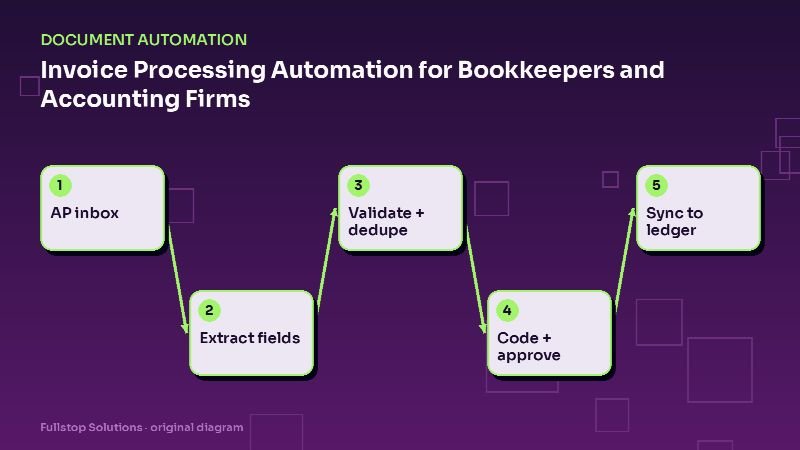
Short answer: invoice processing automation gives each client a dedicated AP inbox, extracts vendor, invoice number, dates, line items and totals from every invoice, checks the math and looks for duplicates, suggests account and class coding from the vendor's history, routes approvals by the client's rules, and syncs the bill to QuickBooks Online or Xero with the PDF attached. Bookkeepers review exceptions instead of keying every bill.
The AP problem in a bookkeeping practice
For a firm handling many small-business clients, vendor bills arrive everywhere: forwarded emails, photos from the client's phone, vendor portals, paper mail. Each one needs to be entered, coded, attached, and often approved. Multiply that by dozens of clients and month-end becomes a scramble.
The work is repetitive and rule-based, which makes it a strong automation candidate, but accuracy matters. The design goal is high straight-through processing on routine bills, with careful review of the rest.
The automated AP flow
1. One inbox per client
Give each client an address such as clientname-bills@yourfirm. Clients forward bills there, vendors can send directly, and photos can be uploaded from a phone. Every attachment enters the pipeline tagged with the client.
2. Extraction
For each invoice, extract: vendor name and address, invoice number, invoice date and due date, PO number if any, line items (description, quantity, unit price, amount), subtotal, tax, shipping and total. Multi-page and multi-invoice PDFs are split.
3. Validation
- Math: line items sum to subtotal; subtotal plus tax and shipping equals total.
- Duplicates: same vendor and invoice number already posted? Same vendor, amount and date within a short window?
- Vendor match: does the vendor exist in the client's ledger? New vendors go to review.
- Dates: invoice dates far in the past or future are flagged.
- Confidence: any low-confidence field goes to review.
4. Coding
Coding suggestions come from the vendor's posting history: the electric company always goes to utilities, the software vendor to subscriptions. Rules can split line items (for example, materials versus labor) and assign classes or locations. Consistent vendors can be auto-coded once they have a clean history; everything else is suggested for a bookkeeper to confirm.
5. Approval
Each client gets approval rules: invoices under a threshold auto-approve; above it, the owner gets an email or app notification with the PDF and approve or reject buttons. Rejected bills come back with a note.
6. Sync and payment scheduling
Approved bills sync to the ledger with the PDF attached and the due date set. If the firm or client uses a bill-pay service, payments can be scheduled according to terms. Once paid, the bill is marked paid and reconciled.
Receipts and expenses
Receipts are messier than invoices: crumpled photos, thermal paper, no invoice number. The same pipeline works with more human review. Card transactions can be matched to receipts by amount, date and merchant, with unmatched transactions sent back to the client for a receipt.
Month-end benefits
With AP flowing daily instead of in a month-end rush:
- the ledger is closer to current at any point in the month,
- cash-flow reports for clients are more accurate,
- missing documents surface early, when clients can still find them,
- close takes fewer late nights.
Security and client data
Accounting firms hold sensitive financial information. The FTC's Safeguards Rule guide lists tax preparation firms among covered financial institutions and describes required safeguards such as access controls, encryption, multi-factor authentication and service-provider oversight. Whether your specific services bring you under the rule is a question for your compliance advisor, but those safeguards are good practice for any firm automating client documents:
- restrict each staff member's access to the clients they serve,
- enforce MFA on the AP tool and accounting integrations,
- vet each tool as a service provider,
- log document access and changes.
Choosing tools
Options range from AP features built into accounting platforms, to dedicated AP automation tools, to custom pipelines for firms with unusual needs. Ask:
- How are duplicates detected?
- Can I see confidence per field and correct it easily?
- Does it learn coding per vendor, per client?
- How are multi-client approval rules handled?
- Where is data stored, and what happens to documents after sync?
Measuring the impact
Track, for a handful of clients:
- bills processed per month,
- minutes per bill before and after,
- share of bills processed without manual correction,
- duplicate payments caught,
- days to close the month.
Mistakes to avoid
Auto-coding new vendors. Let history build first.
No duplicate checks. Duplicate payments are expensive and embarrassing.
Skipping approvals to save time. Approval rules protect your clients and your firm.
A worked example with your numbers
Multiply your monthly bill volume across clients (B) by the minutes each bill takes today (m) and your loaded staff cost per hour (c). The current monthly cost is about B × m × c ÷ 60. If automation lets a share S of bills go straight through, and the rest take about half as long to review, you can estimate the new cost the same way. Use real figures from a timed batch of 30 bills; most firms underestimate how long the small interruptions take.
One client's invoices through the month
A bookkeeping client's vendors email invoices to a dedicated inbox. Each invoice is read: vendor, invoice number, date, due date, line items and total. The system matches the vendor to the accounting file, suggests the expense category from history and checks for a duplicate invoice number.
A new vendor's invoice cannot be matched, so it goes to the review queue with a note. The bookkeeper adds the vendor and category once; future invoices from that vendor flow straight through. An invoice whose total differs from the purchase order by more than the threshold is flagged for the client to approve.
Approved bills are entered in the accounting software as drafts with the original attached. The bookkeeper reviews the batch, approves and schedules payment according to the client's terms. At month-end, unpaid bills and upcoming due dates appear in the client's report.
Estimating time with your own numbers
Count invoices processed per month across clients, time a batch to get minutes per invoice including fixes, and multiply by your loaded hourly cost. That is the current cost of manual entry.
Where to start
Pilot with two or three clients with steady vendor bills. Set up their inboxes, extraction, duplicate checks and approvals, and sync to the ledger. Expand client by client. Our bookkeeping services page and accounting firm page describe the full set of workflows, and the document processing guide explains the pipeline in depth.