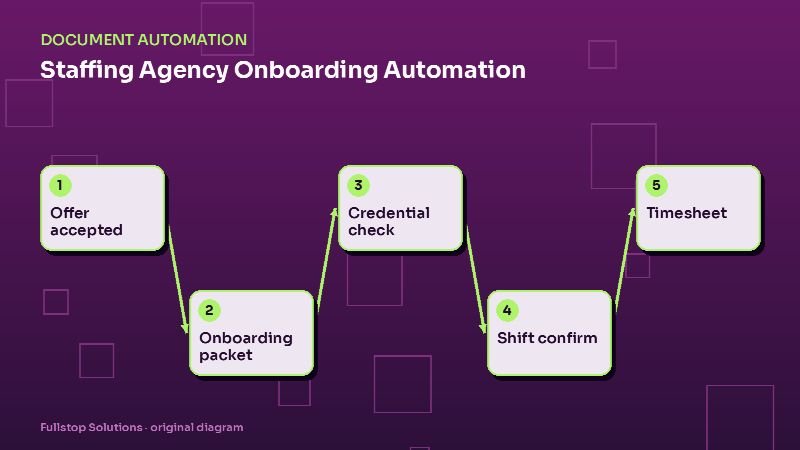
Short answer: staffing agencies can automate most of the paperwork between "offer accepted" and "first shift": onboarding packets with e-signature, tax and policy forms, preparation of Form I-9 for the required in-person or approved alternative review, credential and expiration tracking, shift confirmations with backup alerts, and timesheet collection with client approval. Recruiters spend their time finding and keeping good people.
Why speed to first shift matters
Staffing clients often send the same order to several agencies. The agency that fills it first, with a candidate who actually shows up, gets the business. Meanwhile, candidates are juggling offers from other agencies too. Every day spent waiting for a form or a missing certificate is a day the candidate might take another job.
The onboarding flow
1. Offer and packet
When a recruiter marks a candidate as offered and accepted, the system sends the onboarding packet: employment agreement, policies, W-4 and state tax forms, direct deposit, emergency contact and any client-specific acknowledgments. Everything is mobile-friendly, because many candidates complete onboarding on their phones.
2. Form I-9
Form I-9 has specific rules. USCIS sets the requirements: the employee completes Section 1 by the first day of employment, and the employer must examine the employee's documents and complete Section 2 within the required timeframe, using the review methods USCIS allows. Automation can send Section 1, schedule the document review with an authorized representative, and track completion, but it must not short-cut the examination itself. If you use E-Verify, the case steps follow its rules.
3. Credentials and screenings
Depending on the role: licenses, certifications, background checks, drug screens, health records and safety training. The system requests uploads, tracks screening vendors' results, and records expiration dates.
4. Ready-to-work status
When every required item for a job type is complete, the candidate is marked ready to work and the recruiter is alerted. Missing items trigger targeted reminders ("We still need your forklift certification") rather than generic nags.
Scheduling and shifts
Shift offers and confirmations
Open shifts can be offered by text to qualified, available workers. Confirmations come back by reply. Unconfirmed shifts alert the recruiter early enough to find a backup, which is critical for clients who depend on full crews.
Day-before and day-of reminders
Location, start time, parking, what to wear or bring, and who to report to. A simple "reply HERE when you arrive" can double as a check-in.
Timesheets, payroll and billing
Workers submit hours through a mobile link or the client's system. The client supervisor approves; reminders go out to both sides as payroll cutoff approaches. Approved hours flow to payroll and to client invoicing, with differences flagged.
Healthcare staffing specifics
Healthcare staffing carries heavier credentialing: state licenses, certifications such as BLS or ACLS, immunization and TB records, skills checklists and facility-specific requirements. Expirations are constant. Automation tracks each credential, reminds clinicians in advance, and blocks scheduling into facilities whose requirements are not met. Health records require careful privacy handling and restricted access. See healthcare staffing automation.
Light industrial specifics
High volume, frequent new starts, and safety requirements. Fast mobile onboarding, safety-training acknowledgment, PPE requirements in shift details, and attendance tracking matter most. See light industrial staffing automation.
Data protection
Onboarding collects Social Security numbers, bank details, identity documents and sometimes health information. Keep it in your ATS or HR system with role-based access, avoid emailing documents, encrypt storage, and limit who can view identity documents. Retain records for the periods required by law and dispose of them securely afterward.
Systems
Agencies commonly use ATS and front-office platforms such as Bullhorn, Avionté, JobDiva, Tempworks and others. Automation typically extends them with mobile onboarding, document classification, credential tracking and text-based shift confirmation.
Measuring the impact
Track, before and after:
- days from offer to ready-to-work,
- onboarding packets abandoned before completion,
- shifts unfilled due to late confirmations,
- credential lapses discovered after scheduling,
- timesheet approval delays at payroll cutoff.
Mistakes to avoid
Automating the I-9 review. Follow USCIS rules for document examination.
One-size-fits-all packets. Ask only for what each job type requires.
Ignoring mobile. If forms do not work well on a phone, many candidates will not finish them.
Questions to settle before you build
Which documents and credentials does each job type require? Who is authorized to complete the I-9 document review, and how is it scheduled? How far in advance should credential expiration reminders go out? How many hours before a shift must a worker confirm, and who gets alerted if they do not? Which clients approve timesheets in their own systems? Agreeing on these rules makes the automation predictable for recruiters, workers and clients alike.
One placement from offer to first shift
A recruiter marks a candidate as hired for a warehouse assignment starting Monday. Within minutes, the candidate receives a welcome text with a link to their onboarding checklist: personal details, tax withholding form, direct deposit, the I-9 section they must complete, and the site's safety acknowledgment. Each item shows as done or pending.
By Thursday evening, the candidate has finished everything except the direct deposit form. A reminder goes out Friday morning, and the recruiter sees the open item on a dashboard. The candidate completes it at lunch.
The I-9 document review is scheduled for the first day, since USCIS requires employers to examine documents within set time frames. The onsite coordinator gets a task with the candidate's name and time. Meanwhile, the client site receives the worker's name, start time and assignment details in the format they asked for.
On Monday at 6 a.m., the worker gets a reminder with the site address, parking instructions and who to ask for. After the first shift, a short check-in asks how it went; a reply mentioning a problem creates a task for the recruiter.
Measuring the onboarding bottleneck
Count last month's hires who missed or delayed a start date because paperwork was incomplete. Multiply by the average billable hours lost per delayed start and your gross margin per hour. That is the monthly cost of slow onboarding in your agency, using your own records.
Where to start
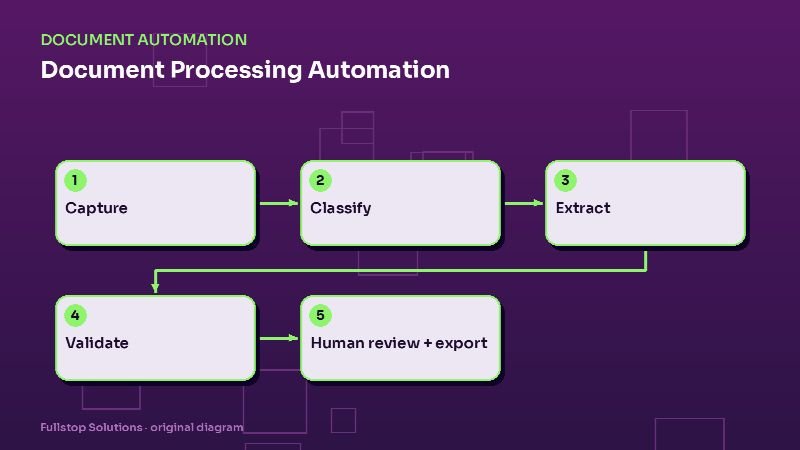
Start with mobile onboarding packets and ready-to-work alerts; they shorten time to first shift immediately. Add shift confirmations next, then credential tracking and timesheets. Our staffing agency automation page lists the full set of workflows, and the document processing guide explains the underlying pipeline.