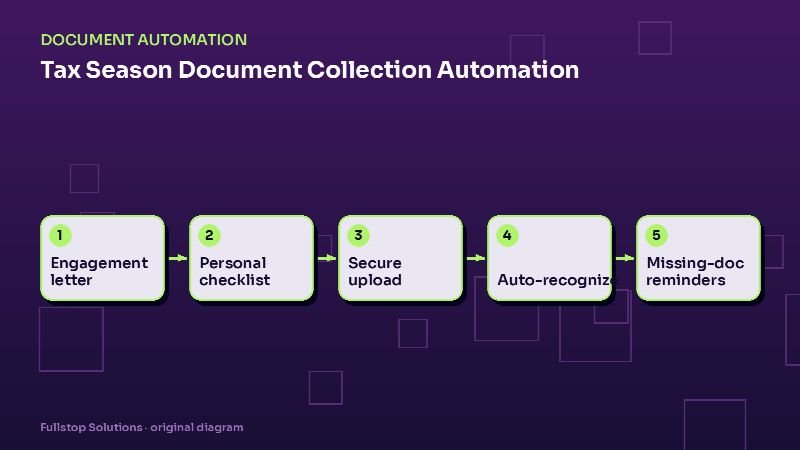
Short answer: tax season automation removes most of the document chase. It sends engagement letters and organizers at the start of the season, generates a personalized checklist for each client from last year's return, collects documents through a secure portal, recognizes which forms arrived and checks them off, sends targeted reminders for what is missing, and keeps clients updated on their return's status. Preparers spend their time preparing.
Where tax season time really goes
Ask any preparer what they dread about tax season and "chasing documents" is usually near the top. A typical client sends some documents in January, a few more in February, forgets the brokerage 1099 that arrives in mid-February, and emails a phone photo of a 1098 in March. Staff spend hours sorting attachments, figuring out what is still missing and sending "just checking in" emails.
All of that follows predictable patterns. Last year's return tells you what to expect this year.
The automated season
1. Kickoff
At the start of the season, each returning client gets:
- the engagement letter for e-signature,
- the organizer or questionnaire (life changes, new accounts, dependents, home purchase or sale),
- a link to their secure portal.
Reminders go out until the engagement letter is signed.
2. Personalized checklist
From the prior-year return and the organizer answers, the system builds a checklist specific to the client: "W-2 from Acme Corp, W-2 from Beta LLC, 1099-INT from First Bank, 1099-B from your brokerage, 1098 mortgage interest, property tax statement." New items from the organizer (a new job, a sold rental) are added.
Clients see exactly what is expected, and what they have already sent.
3. Secure upload
Clients upload through the portal from a computer or phone. Email attachments are discouraged; tax documents contain Social Security numbers and income details. The IRS's Publication 4557 on safeguarding taxpayer data is a useful reference for setting expectations with staff and clients.
4. Recognition and check-off
Each upload is classified (W-2, 1099-NEC, 1099-INT, 1099-DIV, 1099-B, 1098, 1095, K-1 and so on), matched to the checklist item by payer name, and checked off. Unrecognized documents and poor photos go to a staff review queue. Key fields can be extracted for the preparer's software where integrations exist.
5. Targeted reminders
Instead of generic "please send your documents" emails, the reminders list exactly what is missing: "We still need your 1099-B from your brokerage. Most brokerages make these available by mid-February." Reminders stop as soon as the item arrives, or when the client marks it "not applicable this year".
6. Status updates
Clients receive updates at key stages: all documents received, in preparation, questions from your preparer, ready for review and signature, filed, accepted. Each update cuts "where's my return?" calls.
Business returns and K-1s
Business clients bring different documents: bookkeeping closes, payroll reports, fixed-asset additions, K-1s from partnerships. The same checklist approach works, keyed to entity type. For pass-through entities, automation can track which K-1s are needed for which individual returns and alert preparers when they arrive.
Extensions and deadlines
As deadlines approach, the system can identify clients with incomplete documents, notify them that an extension may be needed, and create tasks for staff to file extensions where the engagement allows. Clear, early messaging prevents last-minute surprises.
Security requirements
Tax preparers are explicitly named in the FTC's list of examples of financial institutions covered by the Safeguards Rule. The rule requires a written information security program with a qualified individual, a risk assessment, access controls, encryption in transit and at rest, multi-factor authentication, staff training, service-provider oversight, an incident response plan, and, since 2024, notification to the FTC of certain breaches affecting 500 or more consumers. For document automation, that means:
- portal and processing tools with MFA and encryption,
- no tax documents left in general email inboxes,
- tools vetted and contracted as service providers,
- secure disposal of documents according to policy.
Measuring the season
Compare with last season:
- average days from engagement to all documents received,
- staff hours spent on document follow-up,
- extensions filed because of missing documents,
- client calls asking for status.
Mistakes to avoid
Generic checklists. Personalized ones are what make clients act.
Reminders that keep going after the document arrives. Recognition must update the checklist in real time.
Accepting documents by email "just this once". It becomes the default. Make the portal easy instead.
Questions to settle before the season
Which client groups start first, and on what date? What should the engagement letter and organizer include this year? How many reminders will clients receive for missing documents, and how far apart? Who reviews unrecognized uploads, and how fast? At what date does an incomplete file trigger an extension conversation? Which status updates do clients receive, and by email, text or both? Setting these in December avoids redesigning the process in the middle of February.
A client's tax season, step by step
In January, each returning individual client receives a personalized checklist built from last year's return: the W-2 employers, the brokerage accounts, the mortgage lender, the childcare provider. The checklist shows what the firm expects to receive and asks the client to confirm changes, such as a new job or a sold rental.
As forms become available, the client uploads them through the portal from their phone. Each upload is classified and checked off. A brokerage 1099 arrives in late February; the system notices that a corrected form is common for that account type, so the preparer sees a note to watch for one.
By early March, the client has one item missing. Reminders go out weekly; a staff member calls if the item is still missing by the firm's cutoff date for filing on time. Once complete, the return moves to preparation, and the client receives a status update.
When the return is ready, the e-file authorization goes out for e-signature, with the payment or refund summary. After acceptance, the client receives a confirmation and a note about estimated tax payments if applicable.
Estimating the time chasing documents
Count last season's returns that waited on missing documents, and estimate the staff minutes spent following up on each. Multiply by your loaded hourly cost. Add the returns pushed to extension only because documents came in late. That is the cost of document collection to your firm.
Where to start
Before next season, set up the portal with personalized checklists and targeted reminders. Add automatic recognition and status updates once the basics run smoothly. Our tax preparation page and CPA firm page list the full workflow set, and the document processing guide explains the underlying pipeline.