
Skip to content
Fullstop Solutions

Remodeling & general contractors · Kitchen remodeling

AI automation for kitchen remodeling contractors

Separate serious kitchen projects from browsers, keep cabinet and finish selections on schedule, and send clients weekly updates that cut down on calls.

Two people shaking hands across a desk during a consultation

Where time leaks

Where the hours go in kitchen remodeling

Patterns we see in this industry. Your workflow will differ; discovery confirms which ones apply.

01

Many kitchen leads have no budget in mind, and design consultations go to people not ready to build.

02

Cabinet, countertop and appliance selections have long lead times, and late decisions delay the schedule.

03

Clients living through a remodel call often for updates.

04

Mid-project changes are agreed verbally and not billed.

Common tools in kitchen remodeling:BuildertrendJobTreadChief ArchitectHouzz ProQuickBooksDocuSign

Named for compatibility only. No partnership or endorsement implied; we confirm API access for your plan during discovery.

Automation recipes

4 automations built for kitchen remodeling

Trigger → steps → outcome. Each one is a scoped, fixed-price build.

Discuss This Solution

Budget and timeline qualifier

#1

Trigger New remodel inquiry

  1. Asks scope, budget range and target start
  2. Shares your typical project ranges if you publish them
  3. Books a consult for qualified leads and nurtures others

Outcome Designers spend time with ready clients

Typical stack: CRM, web form, calendar
Selections deadline tracker

#2

Trigger Contract signed

  1. Builds a selections list with due dates from lead times
  2. Reminds the client before each deadline
  3. Alerts the PM when a selection is late

Outcome Fewer delays from late decisions

Typical stack: Buildertrend or JobTread selections

Weekly client update

#3

Trigger Every Friday during the project

  1. Collects the week's photos and log notes
  2. Writes a short update with next week's plan
  3. Sends it to the client for questions

Outcome Clients feel informed without daily calls

Typical stack: Project management daily logs, email

Change-order capture

#4

Trigger Field note or client message mentions a change

  1. Drafts a change order with description
  2. Sends it for client e-signature after PM pricing
  3. Updates the budget

Outcome Changes approved and billed before work

Typical stack: E-signature, PM software

Interactive

Build your automation

Pick what starts it and what should happen next. Your workflow assembles live below. This is a planning tool; we confirm what your tools support during discovery.

2. …do these steps (up to 6)

Your workflow

Planning preview
  1. Trigger

Add at least one step on the left.

Demo

Try a missed-call text-back

Tap "Start a missed call" and reply as the customer. Runs in your browser.

MessagesDEMO
No messages yet

Incoming call…

Nobody can answer right now

Missed-lead revenue estimate

Estimate

Move the sliders to match your business.

Est. recovered / month

Est. per year

missed → re-engaged → won per month

Estimate = leads × missed % × re-engaged % × close % × deal value, using only the numbers you entered. Not a guarantee; excludes software and build costs.

Plan my text-back automation
Demo

Watch the workflow run

Step through "Budget and timeline qualifier" one stage at a time. Click any step.

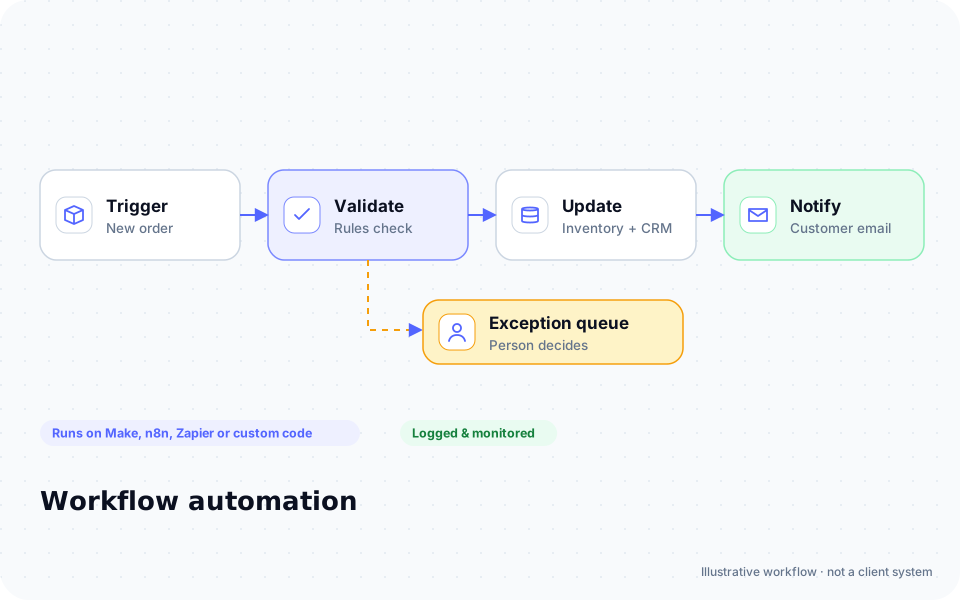
Diagram: a new order triggers validation, inventory and CRM updates and a customer email, with exceptions routed to a person

ROI estimate

A starting ROI estimate for kitchen remodeling

Preset for a small team. Change the numbers to match your business.

Quick estimate

Estimate

Capacity / month

Capacity / year

Calculate Potential Savings →

How we implement

Built around how work actually runs in kitchen remodeling

We start with your lead intake and selections process, using the project software you already have.

Discovery call: We walk through your current process and tools (free, 30 minutes).

Workflow map & fixed quote: Written scope, software costs listed separately, compliance notes included.

Build in a test environment: Your accounts, test data first, then a supervised pilot.

Handover: Documentation, training and an optional support plan.

Limitations & compliance notes

  • Project ranges are shown only if you provide them; the assistant never quotes a price.
  • Homes built before 1978 may need EPA RRP lead-safe practices; your certified renovator handles that.

General information, not legal advice. Confirm requirements with your own counsel or compliance officer.

Want these automations running in your business?

Tell us your tools and the one task you'd remove first. We reply with a plan.

Part of Remodeling & general contractors

The broader playbook for the whole trade, including recipes that apply across specialties.

AI automation for Remodeling & general contractors →

Related industries

Services behind these automations

FAQ

Common questions

Buildertrend offers integrations; we use what your account supports and email for the rest.

No. It handles communication and tracking around your designers.

Updates are drafted from your logs and can be reviewed by the PM before sending.

Next step

Tell us how your kitchen remodeling work flows today

Two short steps. We reply by email, usually to set up a 30-minute discovery call.

What happens after you submit

  1. 1

    We read it personally

    A person reviews your note. No automated sales sequence.

  2. 2

    We reply by email

    Usually with 2–3 clarifying questions and times for a 30-minute call.

  3. 3

    You get a written plan

    Workflow map, fixed quote and listed software costs before any build. No obligation.

Prefer to talk? Call (214) 891-5650 or email info@fullstopsolutions.com.

Not ready to talk? Try the ROI calculator or readiness check. No email needed.

Request a consultation

Step 1 of 2

Your details

What do you want help with? *

About your project

We reply by email. No automated sales sequences.

Calculate Savings Get My Automation Plan