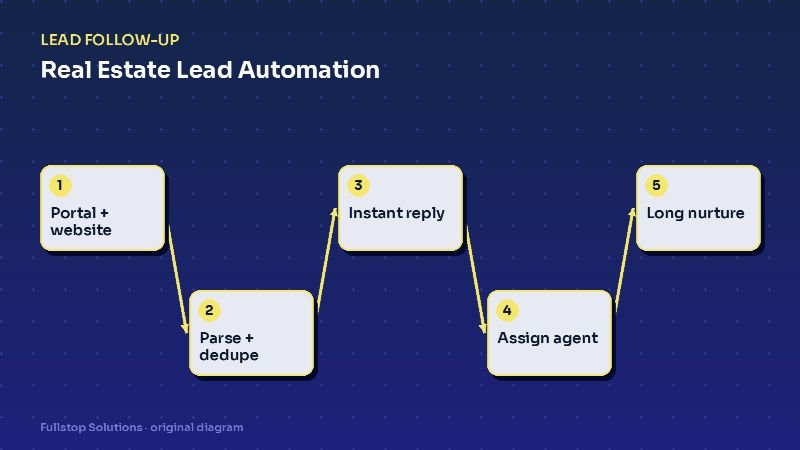
Short answer: real estate lead automation pulls every inquiry (portal, website, open house, sign call, social) into one CRM, removes duplicates, replies within seconds, assigns the right agent by your team's rules, and keeps long-timeline buyers and sellers in a relevant, low-frequency nurture. The goal is that no lead waits for an agent to finish a showing before hearing back.
The real estate lead problem
Agents and teams pay for leads in many ways: portal fees, ads, sign riders, open houses, referrals. Each source arrives differently. A portal sends a formatted email or pushes into a CRM. Your IDX website sends a form. An open-house sign-in sheet is a clipboard or a tablet. A sign call rings the listing agent's cell.
The result is scattered data and inconsistent response. An agent showing homes all afternoon may not see a portal inquiry for hours. Two agents call the same lead. A seller who said "maybe next spring" is never contacted again.
Automation fixes the plumbing, so agents can do what they do best: talk to people.
Step 1: One CRM, one record per person
Start by deciding where every lead lives. Most teams use a real estate CRM such as Follow Up Boss, kvCORE, Lofty or a general CRM. Then connect every source:
- Portals: use direct integrations where available, or parse lead-notification emails.
- Website forms: post directly into the CRM with source tags.
- Open houses: a tablet sign-in form that writes to the CRM, tagged with the property.
- Sign calls and texts: a tracking number per listing that logs the call and creates a lead.
Deduplication matters. If a buyer inquires on three homes, you want one person with three property interests, not three leads assigned to three agents.
Step 2: Instant, specific reply
The first reply should reference what the person asked about:
"Hi Maria, thanks for your interest in 412 Oak Street. I'm with the Harbor Homes team. Would you like to see it this week? Reply with a day that works, or tap here to pick a time: [link]."
Specific beats generic every time. The automation pulls the address from the inquiry and the showing link from your scheduling tool.
Step 3: Fair, fast assignment
Teams argue about lead distribution more than almost anything else. Automation enforces whatever your team agrees on:
- Round-robin among agents marked available,
- Area or price routing to specialists,
- First to claim, where the lead is offered to several agents and the first to accept within, say, five minutes gets it; if nobody claims, it escalates to the team lead.
The automation also enforces accountability: if an assigned agent has not logged contact within a set time, the lead is reassigned or escalated.
Step 4: Qualify lightly
Buyers and sellers do not want an interrogation. A few questions, asked over the first couple of messages, are enough: timeline, pre-approval status for buyers, whether they need to sell first, and preferred areas. Answers update CRM fields that drive the nurture path.
Step 5: Long-timeline nurture
Many leads are months away from moving. A respectful nurture keeps you present:
- Buyers: new listings matching their saved criteria, plus a short check-in every few weeks.
- Sellers: a periodic home value update and market notes for their neighborhood.
- Past clients: home anniversary notes and an annual check-in, which also drive referrals.
Every message must stop when the person replies, and every channel needs an opt-out. For email, the FTC's CAN-SPAM guide requires a working unsubscribe and a physical address in commercial messages. For texts, the FCC's guidance explains consent requirements.
Showings, offers and transaction updates
Lead automation does not end at the first appointment. The same system can:
- confirm and remind showings, and request feedback afterward,
- notify buyers when a saved listing changes price or status,
- send transaction milestone updates (inspection scheduled, appraisal received, closing date confirmed), triggered by status changes your coordinator enters.
That last one is often the biggest time-saver for transaction coordinators, who otherwise answer the same "any update?" message many times a week.
Common mistakes
Automating the conversation instead of the logistics. Let automation handle routing, reminders and data. Let agents handle relationships.
Over-mailing. Daily emails to a lead who is a year out get them unsubscribing. Match frequency to timeline.
No source tracking. If you cannot tell which source produced closings, you cannot decide where to spend. Tag every lead at entry.
Ignoring commercial inquiries. Commercial real estate leads need a different path: longer cycles, more parties, and usually a direct call.
An evening lead from a property website
At 8:20 p.m., a visitor on your website requests a showing for a listing. They receive a text within a minute naming the property, confirming the request and asking two questions: whether they are working with an agent, and whether they are pre-approved. The lead is created in the CRM with the property, source and the consent from the form, and routed to the listing team's on-duty agent.
The visitor replies that they are pre-approved and unrepresented. The agent receives a notification and replies personally that evening with showing times. The showing is booked for the next afternoon, with a confirmation and a reminder an hour before.
After the showing, the buyer receives a short feedback question. They reply that the kitchen is too small. The agent adjusts the saved search criteria, and the buyer starts receiving listings that match better.
Two weeks later, the buyer goes quiet. A follow-up sequence continues with new listings and a personal check-in from the agent. When they reply again, the agent is alerted.
Measuring with your own lead data
Pull the response time for your last 50 website leads, and how many became appointments. Compare leads answered within minutes against those answered after an hour or more. Your own numbers show how much response time matters for your business.
Measuring results
Track by source: time to first response, contact rate, appointment rate, and closings. Compare the same months year over year where you can, because real estate is seasonal. These are your numbers and they will tell you which sources and agents benefit most.
Where to start
Begin with source consolidation and instant replies. Add assignment rules second and nurture paths third. For teams, see our real estate teams page; for individual agents, the real estate automation page and the best automations for real estate agents show what usually comes next. The lead follow-up pillar guide covers the general framework.