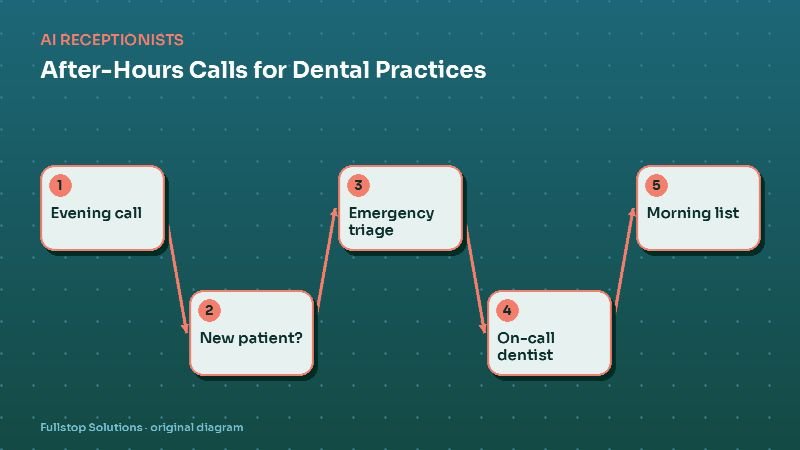
Short answer: dental practices can use automation to answer every evening and weekend call, book new patients into real openings, triage emergencies using criteria the dentists approve, page the on-call dentist only when it matters, and leave the front desk a tidy morning list. Because this involves patient information, the vendor setup must follow HIPAA, including a business associate agreement where required.
Why after-hours calls matter in dentistry
People call dental offices when they have time, which is often after work or on weekends, exactly when your front desk is closed. Three groups dominate after-hours calls:
- Prospective new patients who are comparing practices and will often book with the first one that offers a time.
- Existing patients with a problem: a toothache, a broken crown, a lost aligner, swelling.
- Existing patients with admin needs: rescheduling, confirming, asking about a bill.
A voicemail greeting serves none of them well. New patients move on, emergencies wait or go to an ER that cannot fix teeth, and admin calls turn into a stack of callbacks on Monday morning.
The after-hours flow
Greeting and disclosure
"Thank you for calling Bright Smile Dental. Our office is closed, and you're speaking with our automated assistant. If this is a medical emergency, hang up and call 911. Are you a new patient, an existing patient with a dental problem, or calling to change an appointment?"
New patients
The assistant collects name, contact details, reason for the visit, and insurance carrier if they have one, then offers new-patient openings according to your rules (appointment length, which providers see new patients, which days). It texts a confirmation and a link to your secure intake forms.
Dental problems: triage
Your dentists define the categories. A typical split:
- Urgent: facial swelling, trauma to teeth, bleeding that will not stop, severe pain not controlled by over-the-counter medication. The on-call dentist is paged with the details and a callback number.
- Can wait until morning: a lost filling without pain, a chipped tooth without pain, a loose bracket. The caller gets the first available urgent slot and simple comfort guidance your dentists wrote.
- Medical emergency signs: difficulty breathing or swallowing, swelling spreading to the eye or neck, high fever. The caller is told to call 911 or go to an emergency room immediately.
The assistant should never diagnose or recommend medication beyond what your dentists explicitly approved.
Rescheduling and confirmations
Existing patients can move or cancel appointments within your rules (for example, not within 24 hours without a call). Freed slots can trigger a short-notice list, offering the opening to patients who asked to come in sooner.
The morning list
At opening, the front desk sees: new patients booked overnight, urgent cases and what the on-call dentist did, reschedules, and messages needing a call. No voicemail transcription required.
Integrating with your practice software
Dental practice management systems vary in how open they are. Some have APIs or partner programs; some work through third-party scheduling layers that sync availability. During scoping we confirm:
- whether the assistant can read real-time availability,
- whether it can create appointments directly or only requests,
- how new-patient records are created,
- how call notes attach to the patient record.
If direct booking is not possible, the fallback is a structured request that staff confirm first thing, still much better than voicemail.
Privacy and HIPAA
A dental practice is typically a HIPAA covered entity, and an AI receptionist that handles patient names, appointment details and symptoms is handling protected health information. Practical requirements:
- Business associate agreement. HHS explains that a business associate contract must set permitted uses, require safeguards, require breach reporting and flow down to subcontractors. Do not sign up with a vendor that will not sign one.
- Minimum necessary. The assistant needs schedule access, not full charts.
- Secure links, not texts, for health details. Intake forms and medical history go through your secure forms.
- Access and retention. Know who can listen to recordings and how long they are kept.
Our HIPAA and automation guide covers this in more depth.
Specialty differences
Pediatric dentistry: callers are parents. The triage should account for children's injuries (knocked-out baby teeth versus permanent teeth, as your dentists define) and use reassuring language. See pediatric dentistry automation.
Orthodontics: after-hours calls are often about broken brackets or poking wires: rarely urgent, but stressful. Approved comfort instructions and a next-day repair slot handle most. See orthodontics automation.
Implant and cosmetic practices: consult requests are high value and often come from people researching at night. Fast booking matters most.
Measuring the impact
Compare four weeks before and after launch:
- new-patient appointments booked outside office hours,
- after-hours emergency calls and how they were handled,
- Monday-morning callback volume,
- new-patient no-show rate (confirmation texts help).
Common mistakes
Letting the assistant answer clinical questions. Keep it to logistics and approved comfort guidance.
No on-call acknowledgment. If the on-call dentist does not respond, the page must escalate.
Unclear new-patient rules. If only certain providers see new patients, or certain appointment lengths are required, encode it, or the morning will start with reshuffles.
A night of calls at a dental office
At 7:30 p.m., a patient calls about a cleaning appointment. The AI receptionist checks the schedule and books a slot next week, then sends a confirmation. At 9:10 p.m., a parent calls because their child knocked out a permanent tooth playing basketball. That matches the office's emergency list, so the assistant gives the on-call instructions the dentist wrote, including how to reach the on-call dentist, and the call is escalated immediately.
At 10:45 p.m., a patient with mild sensitivity asks whether to come in. The assistant does not assess it; it offers the next available appointment and notes that the patient can call the on-call number if pain becomes severe, according to the office's rules.
In the morning, the front desk sees a summary: one booking, one emergency escalation with the on-call dentist's note, and one appointment request. Nothing waited in a voicemail box.
Where to start
Start with after-hours coverage only: new-patient booking, triage and the morning list. Expand to daytime overflow once you have reviewed a few weeks of transcripts. The AI receptionist guide covers rollout, the best automations for dental practices shows what to build next, and our dental practice automation page lists the full set of workflows.