
Skip to content
Fullstop Solutions

Dental practices · Pediatric dentistry

AI automation for pediatric dental practices

Book visits around school schedules, coordinate siblings into back-to-back appointments, and keep six-month recall reminders going out to parents.

Professional reviewing paperwork on a clipboard at an office desk

Where time leaks

Where the hours go in pediatric dentistry

Patterns we see in this industry. Your workflow will differ; discovery confirms which ones apply.

01

Parents want after-school appointments, which are limited.

02

Siblings should be booked together.

03

Recall reminders often go unanswered.

04

Forms must be completed by parents.

Common tools in pediatric dentistry:DentrixEaglesoftOpen DentalCurve DentalWeaveNexHealth

Named for compatibility only. No partnership or endorsement implied; we confirm API access for your plan during discovery.

Automation recipes

4 automations built for pediatric dentistry

Trigger → steps → outcome. Each one is a scoped, fixed-price build.

Discuss This Solution

School-aware booking

#1

Trigger Parent request

  1. Offers after-school and school-holiday slots first, since those are scarce
  2. Holds school-day morning slots for parents who say they can pull kids out
  3. Texts the confirmation to the parent with what to bring, such as the insurance card

Outcome Better use of peak slots

Typical stack: Practice software
Sibling scheduling

#2

Trigger Multiple children

  1. Asks how many children need visits and their ages
  2. Books them back to back or in parallel chairs, by your rules
  3. Sends one combined confirmation instead of one per child

Outcome Easier for parents

Typical stack: Scheduling

Recall reminders

#3

Trigger Six months since last visit

  1. Texts the parent when each child's six-month visit is due
  2. Offers the next after-school openings
  3. Moves to email and then a front-desk call task if there is no reply

Outcome Higher recall rates

Typical stack: Weave or NexHealth

Parent forms

#4

Trigger Visit booked

  1. Sends medical history and consent forms to the parent or guardian
  2. Tracks which child's forms are still incomplete
  3. Reminds the parent the evening before the visit

Outcome Forms done before arrival

Typical stack: Forms

Interactive

Build your automation

Pick what starts it and what should happen next. Your workflow assembles live below. This is a planning tool; we confirm what your tools support during discovery.

2. …do these steps (up to 6)

Your workflow

Planning preview
  1. Trigger

Add at least one step on the left.

Demo

Try a missed-call text-back

Tap "Start a missed call" and reply as the customer. Runs in your browser.

MessagesDEMO
No messages yet

Incoming call…

Nobody can answer right now

Missed-lead revenue estimate

Estimate

Move the sliders to match your business.

Est. recovered / month

Est. per year

missed → re-engaged → won per month

Estimate = leads × missed % × re-engaged % × close % × deal value, using only the numbers you entered. Not a guarantee; excludes software and build costs.

Plan my text-back automation
Demo

Watch the workflow run

Step through "School-aware booking" one stage at a time. Click any step.

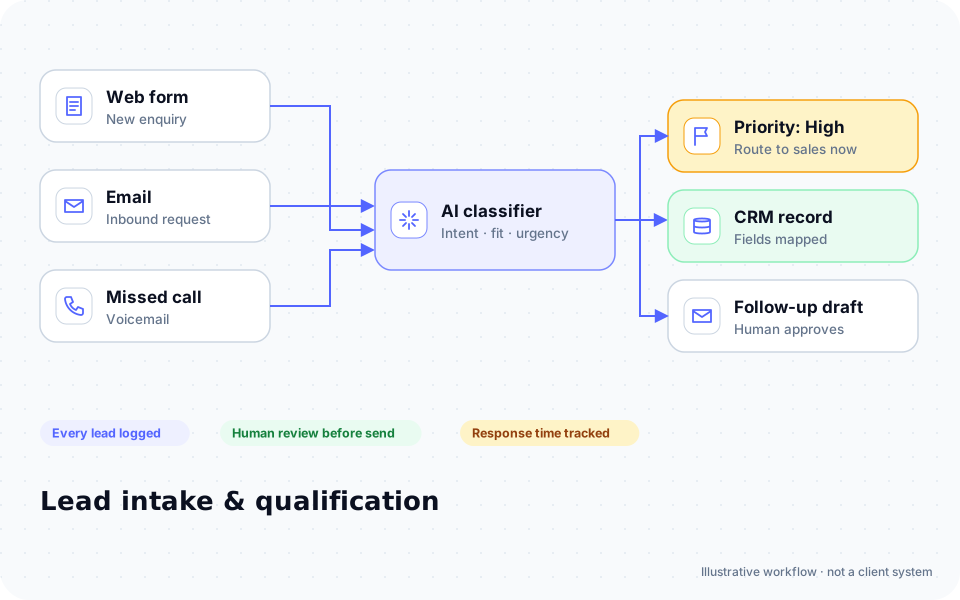
Diagram: enquiries from a web form, email and missed calls are classified by AI, prioritized, logged in a CRM and given a follow-up draft for human approval

ROI estimate

A starting ROI estimate for pediatric dentistry

Preset for a small team. Change the numbers to match your business.

Quick estimate

Estimate

Capacity / month

Capacity / year

Calculate Potential Savings →

How we implement

Built around how work actually runs in pediatric dentistry

We start with your scheduling rules: which providers see which ages, how long each visit type takes and which slots are held for school-day visits. Recall messages are drafted with your front desk.

Discovery call: We walk through your current process and tools (free, 30 minutes).

Workflow map & fixed quote: Written scope, software costs listed separately, compliance notes included.

Build in a test environment: Your accounts, test data first, then a supervised pilot.

Handover: Documentation, training and an optional support plan.

Limitations & compliance notes

  • All messages go to parents or guardians, never to children.
  • Texts carry minimal health information; we sign a BAA where required.

General information, not legal advice. Confirm requirements with your own counsel or compliance officer.

Want these automations running in your business?

Tell us your tools and the one task you'd remove first. We reply with a plan.

Part of Dental practices

The broader playbook for the whole trade, including recipes that apply across specialties.

AI automation for Dental practices →

Related industries

Services behind these automations

FAQ

Common questions

We do not claim that. We sign BAAs where required and configure safeguards; your practice remains responsible for its HIPAA program.

Those are routed to your staff for scheduling because they need clinical review.

Both have integration options; we confirm what your version supports.

Only with wording your dentists approve, as part of the recall message.

Next step

Tell us how your pediatric dentistry work flows today

Two short steps. We reply by email, usually to set up a 30-minute discovery call.

What happens after you submit

  1. 1

    We read it personally

    A person reviews your note. No automated sales sequence.

  2. 2

    We reply by email

    Usually with 2–3 clarifying questions and times for a 30-minute call.

  3. 3

    You get a written plan

    Workflow map, fixed quote and listed software costs before any build. No obligation.

Prefer to talk? Call (214) 891-5650 or email info@fullstopsolutions.com.

Not ready to talk? Try the ROI calculator or readiness check. No email needed.

Request a consultation

Step 1 of 2

Your details

What do you want help with? *

About your project

We reply by email. No automated sales sequences.

Calculate Savings Get My Automation Plan