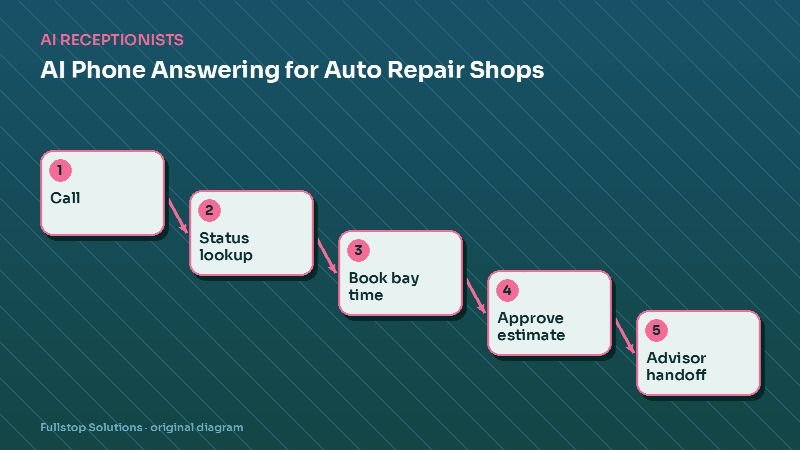
Short answer: in most auto repair shops, the phone is the service advisor's biggest interruption. An AI receptionist connected to your shop management software can answer "is my car ready?", book bay time for routine services, resend estimate-approval links, and take tow-in details, then transfer anything that needs judgment to an advisor with the context already gathered. The result is fewer interruptions at the counter and fewer missed booking calls.
The phone problem in auto repair
Picture a typical morning: two customers at the counter, a technician waiting on approval for a brake job, and three lines ringing. One is a customer asking whether their car is ready. One wants an oil change today. One is a new customer whose check-engine light just came on.
The advisor can only do one thing at a time. Either the counter waits, or the phone does. Missed booking calls go to the shop down the road, and repeated status calls eat the advisor's day.
What to automate first
1. Status calls
These are usually the most common calls, and the easiest to automate if your shop software has the data. The assistant identifies the customer by caller ID or asks for a name, finds the open repair order, and reads the status in plain language: "Your 2018 Camry is in the bay now; the technician expects to finish this afternoon. We'll text you when it's ready."
Pair this with automatic "your car is ready" texts triggered when the repair order status changes. That stops many status calls from happening at all.
2. Booking routine services
Oil changes, tire rotations, inspections, alignments, and diagnostic appointments can be booked into real availability by service type and duration. Rules prevent overbooking a bay or a technician with a specific skill.
3. Estimate approvals
Most modern shop systems send digital inspections and estimates by text. When customers call about them, the assistant can resend the link, explain how to approve or decline items, and transfer questions about specific repairs to the advisor. Approved items show up for the technician without the advisor having to call back.
4. New-customer intake
A new caller with a problem ("grinding noise when I brake") gets intake questions: vehicle year, make, model, mileage, symptoms, when it started. The assistant offers a diagnostic appointment and texts a confirmation with your address and drop-off instructions.
5. Tow-ins
For breakdowns, the assistant collects location, vehicle and problem, explains how tows work with your shop (your preferred tow partner, or the customer's roadside assistance), and alerts the shop so the car is expected and the key drop process is clear.
What should go to an advisor
- Price questions on diagnostic repairs.
- Warranty and comeback discussions.
- Upset customers.
- Fleet and commercial account requests.
- Anything the assistant cannot match to a rule.
The transfer includes a summary, so the advisor does not start from zero.
Connecting to shop software
Shops use systems such as Tekmetric, Shopmonkey, Mitchell1 and others. Integration depth varies by system and plan. During scoping we check:
- whether repair-order status can be read,
- whether appointments can be created directly,
- whether customer and vehicle records can be created or matched,
- whether the system can trigger texts on status changes.
Where a system cannot be reached, the assistant falls back to a structured message for the advisor and an honest callback promise.
Tire shops and collision repair
Tire shops: calls are dominated by "do you have this size in stock and how much?" If your inventory and pricing are accessible, the assistant can check by tire size and quote installed prices you have approved; otherwise it collects the size and vehicle and gets an advisor to call back quickly. See tire shop automation.
Collision repair: long repair cycles and insurance involvement mean frequent "where are we?" calls. Status updates triggered by stage changes (parts ordered, in body, in paint, reassembly, ready) dramatically reduce calls. Estimate appointments and photo-estimate links are the main booking flows. See collision repair automation.
Measuring the impact
Use your phone logs and shop reports, before and after:
- inbound calls per day and share answered,
- status calls (these should fall once ready-texts are on),
- appointments booked by phone outside business hours,
- advisor interruptions, measured informally by asking your advisors.
Mistakes to avoid
Quoting diagnostic repairs. "How much to fix my noise?" has no honest phone answer. Book a diagnosis.
No ready-texts. If you only answer status calls instead of preventing them, you are leaving the bigger win on the table.
Overbooking. Encode bay and technician capacity, including which techs can do alignments or diagnostics.
Questions to settle before setup
Which services have fixed prices you are happy for the assistant to quote? How many bookings per hour can each bay take, by service type? Which technicians handle diagnostics, electrical work or alignments? Who receives transfers when both advisors are busy, and what happens if nobody picks up? Do you want the assistant to mention your warranty, shuttle or loaner policies, and what exactly should it say? Writing these answers down takes an hour and makes the difference between an assistant that helps and one that creates rework at the counter.
A Monday morning at the shop
The shop opens at 7:30, and the phones are busy with weekend breakdowns. The AI phone assistant answers the overflow. A caller describes a grinding noise when braking; the assistant collects the vehicle year, make, model and mileage, books a brake inspection and texts a confirmation with the shop's address and drop-off instructions. It does not diagnose.
Another caller asks for a status update on their car. The assistant looks up the repair order and reads the status the service advisor set: "waiting on parts, expected tomorrow". A third caller wants a price for a timing belt. The assistant explains that the advisor will quote after confirming the vehicle details, and creates a callback task with the details.
By 10 a.m., the service advisors have handled the counter without interruption, and the callback list holds four quotes to prepare. When a repair is finished, the customer receives a text that the car is ready, with the invoice and a payment link.
Measuring with your own call data
Count calls that went unanswered or to voicemail last month during open hours, and how many of those callers booked elsewhere if you can tell. That is the call-handling gap to close.
Where to start
Turn on ready-texts and automated status answers first; they relieve the most pressure. Add routine booking and new-customer intake next. Our auto repair automation page lists the full workflow set, and the AI receptionist guide covers rollout and rules.