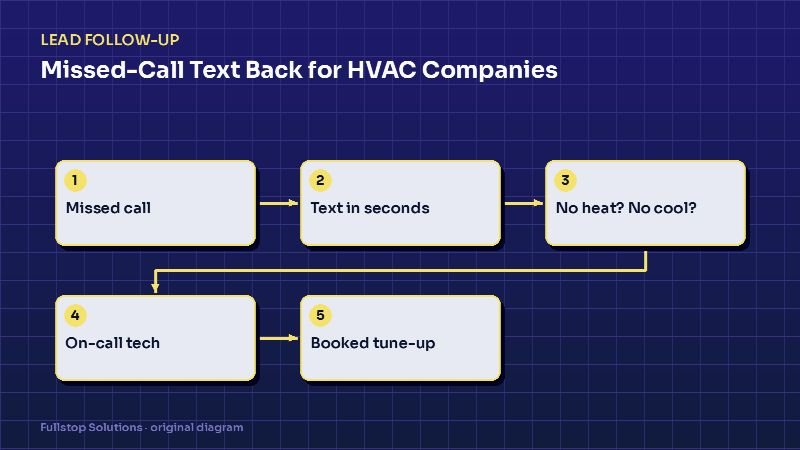
Short answer: missed-call text back is an automation that texts anyone whose call you did not pick up, within seconds, and starts the booking conversation by text. For an HVAC company it should do one job above all else: figure out quickly whether this is a no-heat or no-cooling emergency, and if so, get it to the on-call technician.
Why HVAC phones leak more than most
HVAC demand is lumpy. The first cold snap or the first heat wave of the season can flood your phones in a single morning, at exactly the moment your dispatcher is busiest. Those are also your highest-value calls: someone whose system just failed is ready to book now, and if they reach voicemail, they call the next contractor on the list.
Outside the peaks, the leak is quieter but steady: calls during lunch, during a dispatcher's other call, after hours and on weekends.
You do not need a statistic to see your own leak. Pull last month's call log from your phone provider and count calls with no answer and no callback within 15 minutes. That number is your starting point.
The flow, step by step
Step 1: The instant text
The moment a call goes unanswered (or hits voicemail), the system sends:
"Hi, this is Comfort Air. Sorry we missed your call! Is your heat or AC out right now? Reply 1 for NO HEAT / NO COOLING, 2 for a repair that can wait, 3 for a tune-up or quote."
Short, branded, and it asks one routing question. Numbers work better than open questions on a phone keyboard.
Step 2: Triage
- Reply 1 (emergency): the system asks for the address and best callback number, then alerts the on-call tech or after-hours dispatcher by text and app notification, with the conversation attached. The customer gets: "Thanks. Our on-call technician will call you within [your promise] minutes."
- Reply 2 (repair): offer the next available repair windows from your scheduling tool, or a call-back during business hours.
- Reply 3 (maintenance or quote): send a booking link for tune-ups, or collect system age and home size for a replacement estimate.
Only promise response times you can keep. If your after-hours coverage is "next morning", say so honestly.
Step 3: The hand-off
Every branch ends in one of two places: a confirmed appointment in your field-service software, or a named human who has been alerted. The text thread is saved to the customer record so the tech is not asking the same questions again.
Step 4: The quiet follow-up
If the person never replies, one gentle nudge after an hour or two ("Still need help? Reply here or call us back at ...") is reasonable. More than that, for a single missed call, starts to feel like spam.
Wiring it into your tools
Most HVAC shops run on a field-service platform such as ServiceTitan, Housecall Pro or Jobber, plus a business phone system. There are three common ways to connect missed-call text back:
- Built-in features. Some phone systems and field-service platforms include a missed-call auto-text. Check this first; it is often the cheapest path, though branching triage may be limited.
- A calling provider with webhooks. A provider such as Twilio or a VoIP system emits a "call missed" event, which triggers a workflow in Zapier, Make or n8n that sends the text and runs the triage.
- A custom intake service. For multi-location or high-volume shops, a small dedicated service handles routing, on-call schedules and logging, and talks to the field-service platform's API.
Your texting number should normally be the same number customers called. A text from a random number looks like spam and gets ignored.
Seasonal tuning
HVAC is seasonal, and your automation should be too:
- Heating season: move the no-heat option to the top, mention carbon monoxide safety guidance if a customer reports a gas smell (tell them to leave the home and call the gas utility or 911), and lengthen on-call coverage messages.
- Cooling season: prioritize no-cooling calls for homes with elderly residents or infants if your policy does that, and offer same-day windows only when the board actually has them.
- Shoulder seasons: this is when tune-up and membership campaigns make sense. The missed-call text can offer a maintenance booking link instead of a repair slot.
Texting rules for HVAC companies
A customer who just called you and receives a reply about that call is in a different position from someone receiving a marketing blast. Still, keep it clean. The FCC's guidance notes that autodialed texts to mobile numbers require consent and that marketing texts require written consent, and people can opt out in any reasonable way. So:
- Keep missed-call replies about the call itself, not promotions.
- Include "Reply STOP to opt out" and make sure STOP actually works.
- Get explicit consent before adding someone to seasonal marketing texts.
Read our texting compliance article for the details.
Mistakes we see in HVAC setups
Over-promising response times. "A tech will call in 5 minutes" at 2 am, when nobody is on call, turns a lost lead into an angry review.
Generic replies. "Thanks for contacting us" does not route anything. Ask the triage question.
No link to the board. If a booked tune-up does not appear on the dispatch board, someone has to re-key it, and eventually someone forgets.
Ignoring commercial callers. A property manager calling about a rooftop unit needs a different branch from a homeowner. If you serve commercial HVAC, add a fourth option.
Keep it simple
Start with one text template and one follow-up, then refine from replies.
What a good result looks like
Do not judge the system on a promise; judge it on your own before-and-after numbers. Compare four weeks before launch with four weeks after for:
- missed calls with no contact within 15 minutes,
- missed calls that turned into a booked job,
- after-hours emergency calls captured.
If those move in the right direction, expand: add AC repair and furnace repair specific branches, tune-up reminders, and post-job review requests. Our HVAC industry page lists the other automations that tend to pay off next, and the best automations for HVAC companies ranks them.