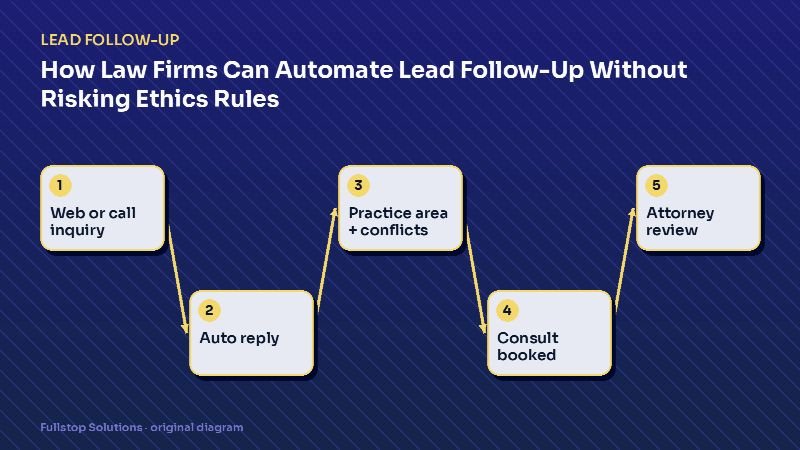
Short answer: a law firm can safely automate the administrative side of intake: instant acknowledgment, collecting practice area, jurisdiction and adverse-party names, booking the consultation, sending reminders and following up if the prospect goes quiet. What it should never do is give legal advice or imply an attorney-client relationship exists. Build it with those two lines in mind and have your state's ethics rules checked before launch.
Why intake is where firms lose cases
Prospective clients for most consumer practices (injury, family, criminal defense, immigration, estate planning) contact several firms. The firm that answers first, clearly and calmly, has an obvious advantage, and the one that calls back two days later often finds the person has already signed elsewhere.
Inside the firm, intake is usually split between a receptionist, a paralegal and whichever attorney is free, all of whom have other jobs. Evening and weekend inquiries wait. Web forms land in a shared inbox. A caller who hits voicemail rarely leaves a detailed message.
Automation does not replace your intake specialist. It covers the hours and the overflow they cannot, and it makes sure every inquiry has a next step.
What to automate, and what to leave to people
| Automate | Keep with people |
|---|---|
| Instant reply to forms, chats and missed calls | Evaluating the merits of a matter |
| Collecting practice area, county or state, key dates | Advising on deadlines or options |
| Collecting adverse-party names for conflict checks | Clearing conflicts |
| Booking the consultation and sending reminders | Deciding whether to accept the matter |
| Sending intake questionnaires and document requests | Engagement letters and fee terms |
| Follow-up if the prospect does not book | Any discussion of likely outcomes |
A practical intake flow
1. Instant acknowledgment
Within seconds of a form, chat or missed call:
"Thank you for contacting Rivera Family Law. We received your message. To set up a consultation, please answer a few quick questions: [link]. If this is an emergency involving your safety, call 911."
Note what it does not say: it does not promise representation, and it does not comment on the matter.
2. Structured questions
A short form or text exchange collects: practice area, the state and county where the matter is, the names of other parties (for conflicts), whether there is a court date coming up, and preferred contact method. Keep it brief. Detailed questionnaires come after the consultation is booked.
3. Conflict check and routing
The adverse-party names go to your practice-management system. If there is a potential match, the automation pauses and alerts your intake lead to review before anything else happens. If the matter is outside your practice areas or jurisdiction, a polite decline and, if your firm does this, a referral resource goes out.
4. Booking
Qualified prospects get a booking link tied to the right attorney's calendar, by practice area. Rules prevent double booking, enforce prep time, and route urgent upcoming court dates to a same-week slot or a human call.
5. Reminders and preparation
Reminders go out a day before and an hour before, with a list of documents to bring. A secure upload link (not email attachments) reduces back-and-forth.
6. Follow-up for people who did not book
If someone starts intake and stops, one or two follow-ups over the next few days are reasonable: "We noticed you didn't finish scheduling. If you still want a consultation, here is the link." Then stop. Pushy follow-up reflects on your firm.
Ethics and compliance guardrails
Attorney advertising and solicitation are regulated by each state, usually based on the ABA Model Rules. Model Rule 7.3 addresses live, person-to-person solicitation, and the ABA comment to the rule notes that a communication made in response to a request for information is not a solicitation. Replying to someone who reached out to you is therefore a different situation, but the content of automated messages can still raise advertising-rule questions. Practical guardrails we build in:
- Clear identity. Messages name the firm and do not pretend an attorney is personally typing.
- No advice, no guarantees. Templates are written to avoid outcome language.
- Disclaimers where your state requires them. For example, that no attorney-client relationship exists until an engagement is signed.
- Consent and opt-out for texting. The FCC's guidance explains consent requirements for automated texts; prospects must be able to opt out easily.
- Confidentiality. Intake data is stored in your systems with access controls, and sensitive details are not sent in plain text messages.
Have your messages reviewed by whoever handles ethics compliance at your firm, under your state's rules. We provide the drafts; your firm approves them.
Practice-area differences
Personal injury: volume and speed matter most, and many inquiries arrive after hours. Collect incident date and type, and route potentially time-sensitive matters to a human quickly. See personal injury intake automation.
Family law: emotional situations and safety concerns. Messages should be calm, and the flow should surface safety resources early. See family law automation.
Immigration: multilingual intake and document checklists matter. Never let automation comment on eligibility.
Estate planning: longer decision cycles. A gentle educational nurture after the first inquiry works better than urgency.
Writing templates that pass ethics review
Keep templates factual: confirm receipt, explain next steps, offer a consultation time and include the firm's contact details. Avoid predicting outcomes, describing past results without your state's required disclaimers, or anything that could read as legal advice. Give your ethics counsel or managing partner the full set before launch.
Measuring whether it works
Track, before and after:
- time from inquiry to first response,
- percentage of inquiries that reach a booked consultation,
- consultation no-show rate,
- inquiries with no next step after 48 hours.
These are your numbers, measured in your systems. That is the only honest way to judge the change.
Getting started
Most firms start with three pieces: instant reply on every channel, structured intake with conflict-name collection, and consultation booking with reminders. That alone closes the after-hours and overflow gaps. Our law firm automation page lists what usually comes next, including document collection and matter updates, and the best automations for law firms prioritizes them. For the general framework, see the complete guide to automated lead follow-up.