Short answer: in storm season, roofing work goes to the contractor who responds first with a clear plan. Automation lets a small office acknowledge every lead within seconds, separate active leaks (urgent tarp or repair) from inspection requests, offer inspection slots by territory, and keep homeowners updated through the weeks of insurance back-and-forth, all without hiring temporary call staff.
Why storm leads are different
A normal week of roofing leads is manageable: a few replacement quotes, some repairs, a commercial bid. A hail or wind event changes everything at once. Phones ring all day for several days, web forms pile up overnight, and every homeowner on the street is calling three or four roofers.
Three things make this harder than ordinary lead volume:
- Urgency varies wildly. A ceiling leak during more rain needs a same-day tarp. Missing shingles visible from the street can wait for an inspection next week. If you treat them the same, you either miss the urgent ones or waste estimator time.
- Geography matters. Storm paths are uneven, so demand concentrates in certain ZIP codes. Booking estimators across town wastes the day.
- The cycle is long. From inspection to adjuster meeting to approval to install can take weeks. Homeowners who hear nothing in that gap drift to whoever calls them.
The storm-mode workflow
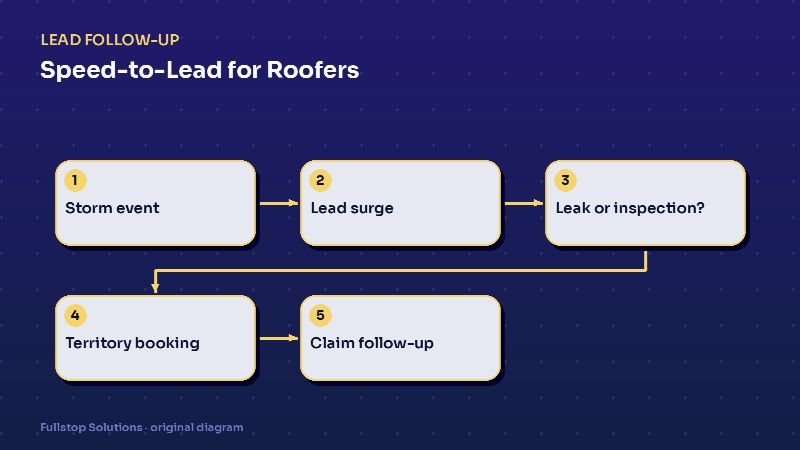
Step 1: Instant acknowledgment on every channel
Missed calls, web forms, Facebook lead forms and texts all get the same immediate reply:
"Thanks for contacting Summit Roofing. We're seeing a lot of storm calls and want to get to you fast. Is water coming into your home right now? Reply 1 for ACTIVE LEAK, 2 for DAMAGE INSPECTION, 3 for something else."
Step 2: Triage
- Active leak: collect the address and photos if they can safely take them, then alert the emergency crew lead. Send safety basics: stay out of rooms with sagging ceilings, keep away from wet electrical fixtures. Do not ask anyone to climb on a roof.
- Inspection: collect address, roof type if known and best times, then move to territory booking.
- Other: route to the office queue with an honest response time.
Step 3: Territory booking
The system checks the address against your estimator territories and offers only that estimator's open slots. When a territory fills up, it says so and offers the next available date or a waitlist. That one rule can save hours of windshield time per estimator per week.
Step 4: Pre-inspection preparation
Once booked, the homeowner gets a confirmation and a short checklist: have your insurance policy number handy, note the date the damage happened, clear access to the attic if possible. Reminders go out the day before and the morning of, with the estimator's name.
Step 5: Post-inspection follow-up
After the inspection, the automation sends a summary of next steps (as entered by the estimator), and then status check-ins at sensible intervals: after the adjuster visit, when the scope comes back, when materials are ordered, the week before install. Each message is triggered by a status change in your CRM, not a fixed timer, so it never says "your install is next week" when it is not.
Things to be careful about
Honest timing. If you are booked out two weeks, say so. People who are told the truth often wait; people who are ignored do not.
Insurance language. Many states regulate what contractors may say or do in relation to insurance claims. Keep automated messages to process facts (what an inspection covers, what to have ready) and have any claim-related wording reviewed for your state.
Texting consent. A homeowner who contacted you about their roof can be replied to about that inquiry, but marketing blasts to storm lists need proper consent. The FCC's consumer guidance covers the consent and opt-out basics for automated texts.
Safety first. Link to official safety information such as the National Weather Service safety pages rather than improvising advice about storms.
Turning storm mode on and off
The best storm setups have a switch. In normal weeks, the flow is relaxed: a booking link for estimates and a callback for repairs. When a storm hits, someone flips the storm-mode setting, and the system:
- changes greetings and texts to the storm version,
- moves active leaks to the top of the triage,
- enables territory-based inspection booking,
- shortens alert times for the office.
When the surge passes, flip it back. This avoids rewriting automations every time the weather changes.
Commercial and replacement work
Storm surges are mostly residential, but commercial clients and full replacements need their own branches. A property manager reporting damage across several buildings needs a call from a person, not a booking link, and a homeowner asking about a roof replacement unrelated to the storm should not get stuck in the storm queue. Add a branch for each, routed to the right person.
Measuring the surge
Afterward, compare the storm weeks to your last comparable event, if you have one:
- leads received versus leads that got a reply within five minutes,
- inspections booked per estimator per day,
- inspections that converted to signed contracts,
- leads with no contact after 48 hours.
These numbers tell you whether the system held up, and where to add capacity next time.
The first 24 hours after a hailstorm
At 4 p.m., a hailstorm passes through part of your service area. By 5 p.m., calls and web inquiries spike. Every inquiry gets an immediate reply asking for the address, whether there is an active leak, and photos if it is safe to take them from the ground. Inquiries reporting active leaks are flagged for emergency tarping per your rules.
The intake team works the flagged list first. Inspections are offered in batches by neighborhood to keep crews efficient, and homeowners receive the window and what to expect at the inspection.
After each inspection, the homeowner receives a summary with photos and next steps. If they are filing an insurance claim, they get a checklist of what the insurer typically asks for and your company's role, without promises about claim outcomes. Follow-up continues until the homeowner decides, and messages stop on opt-out.
Where to start
If you do one thing before next season, set up instant replies with the leak-versus-inspection triage on every channel. Add territory booking second, and claim-cycle updates third. Our storm damage roofing page and the main roofing automation page show the full set of workflows, and the complete lead follow-up guide explains the general building blocks.