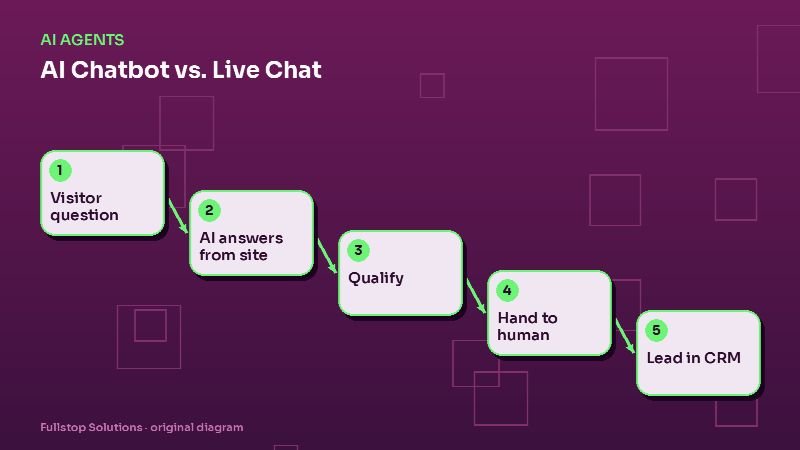
Short answer: live chat puts a real person in front of website visitors, which is great for complex sales and sensitive questions but limited by staffing hours. An AI chat assistant answers instantly at any hour, from your approved content, and can qualify visitors and capture leads. Most small businesses do best with a hybrid: AI answers first, qualifies, and hands off to a person during business hours, or takes a detailed message and books a call when nobody is available.
What each option is
Live chat: a chat widget connected to a person on your team (or an outsourced chat agent) who types replies in real time. Quality depends on who is answering and how quickly.
AI chat assistant: a chat widget that understands questions and answers from a knowledge base you control, follows a conversation flow you design (for example, discovery questions, then a recommendation, then a booking offer), and hands off to a person when needed.
Side-by-side
| Factor | Live chat | AI chat assistant |
|---|---|---|
| Availability | Staffed hours | Around the clock |
| Response time | Seconds to minutes | Instant |
| Complex or sensitive questions | Strong | Should hand off |
| Consistency | Varies by person | Same answers every time |
| Lead capture | Depends on the agent | Built into the flow |
| Cost structure | Staff time or outsourced fees | Software and setup |
| Risk | Slow or missed chats | Wrong answers if poorly built |
The risk with AI chat, and how to manage it
The biggest risk is an assistant that invents things: prices you do not charge, services you do not offer, guarantees you would never make. Avoid it by design:
- Answer only from approved content: your website pages, FAQs and policies. See AI knowledge bases explained.
- Say "I don't know" gracefully and offer a person.
- Forbid certain topics: pricing you have not published, legal or medical advice, promises about results.
- Show sources when helpful, by linking to the relevant page.
- Review transcripts weekly and add missing answers.
Designing the conversation
The best assistants act like a good front-desk person, not a search box:
- Greet and offer help with a few common starting points.
- Answer the question directly, with a link to more detail.
- Ask one discovery question at a time: what kind of business, what problem, how urgent.
- Recommend a next step that matches: a relevant page, a calculator, or a consultation.
- Capture contact details only when the visitor is ready, with clear consent language.
- Hand off to a person or book a call, with the transcript attached.
Handling common objections calmly ("Is this expensive?", "We tried software before and it didn't stick") with honest answers builds more trust than pressure.
The hybrid setup
- During business hours: AI answers first; when the visitor asks for a person, or the conversation hits a hand-off trigger, a team member is notified and joins the chat.
- After hours: AI answers, captures the lead and offers a booking link or a callback time.
- Everything is logged to your CRM with the transcript, source page and any qualification answers.
Industry notes
- Home services: visitors want to know if you serve their area, how soon you can come and roughly what it costs. Service-area checks and booking links matter most. See home services automation.
- Law firms: keep the assistant to logistics and general process; intake details should go through secure forms; attorneys handle advice. See law firm lead follow-up.
- E-commerce: order status, shipping and returns are the top questions; connect to order data. See AI customer service for e-commerce.
Measuring success
Track monthly:
- chats started and share answered without hand-off,
- hand-offs and their reasons,
- leads captured and booked calls from chat,
- visitor ratings, if you ask for them,
- questions the assistant could not answer (your content to-do list).
Mistakes to avoid
Pop-ups that interrupt immediately. Let visitors read first; open chat on intent, such as time on a pricing page.
Demanding contact details before answering. Answer first, ask later.
No human path. Even if staffed only part of the day, offer a clear way to reach a person.
Stale content. If your services or hours change, update the knowledge base the same day.
Questions to settle before launch
Which pages and documents should the assistant answer from? Which topics should it never discuss? What discovery questions matter for your sales process? Who gets notified when a visitor asks for a person, and how fast can they join? What should happen after hours? What consent wording will you show before collecting contact details? Who reviews transcripts each week, and who updates the content? Write these answers down and treat them as the assistant's job description.
Running both: a hybrid setup in practice
Many businesses end up with a chatbot and live chat working together. A visitor opens the chat on a Tuesday afternoon. The bot greets them, answers a question about service areas from the knowledge base and asks whether they want a quote. They do, and the bot collects their details. Then the visitor asks a pricing question that depends on their situation. Because staff are online, the bot transfers the chat to a person with the transcript and details already collected, and a team member takes over.
At 10 p.m., another visitor asks the same pricing question. Nobody is online, so the bot says so, collects contact details and the question, promises a reply by the next morning, and creates a task. In the morning, a team member replies first thing.
This pattern gives instant answers to routine questions at any hour, and real people for questions that need judgment, without anyone pretending to be available when they are not.
Deciding by your own numbers
Pull a month of chat transcripts or contact form messages. Sort them into routine questions (answerable from published information), lead capture, and questions needing judgment. If routine questions are a large share, a chatbot will handle much of the load. If most need judgment, staffed live chat or a quick callback promise may serve better.
Where to start
Start with an AI assistant that answers from your existing website content and books calls, plus a simple hand-off to your team during business hours. Expand the knowledge base weekly from real questions. Our AI agents service and customer service solutions explain how we build them, and the AI agents guide covers the bigger picture.