Short answer: an AI knowledge base is the set of approved documents (FAQs, policies, service and product information) your assistant searches before it answers. The system finds the most relevant passages and the assistant writes a reply grounded in them, citing or linking where useful. If the content is clear, current and well organized, answers are good; if it is messy or missing, no model will fix it.
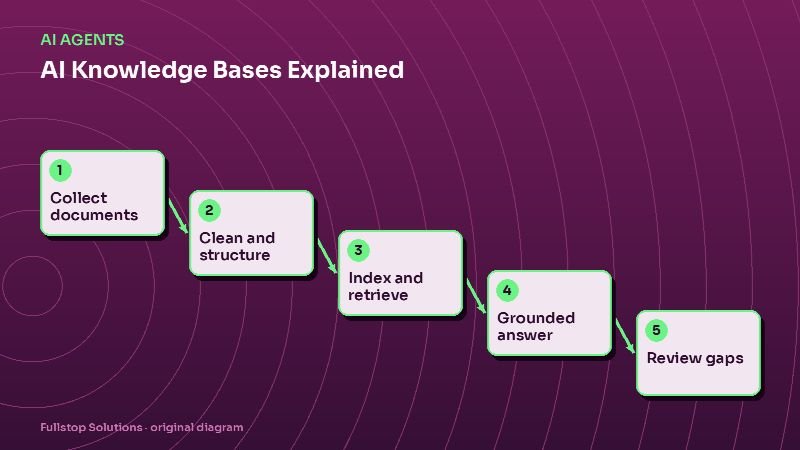
How it works, without the jargon
- Collect the content customers and staff actually need.
- Split it into small, self-contained passages, typically a question and its answer, or one section of a policy.
- Index the passages so they can be found by meaning, not just exact words. This is often called retrieval or RAG (retrieval-augmented generation).
- Retrieve the best few passages when a question arrives.
- Answer using only those passages, and say so when nothing relevant was found.
- Log the question, the passages used and the answer, so gaps can be reviewed.
The important part: the model is not "trained" on your documents in most business setups. It reads the retrieved passages each time. Change a document and the next answer changes.
What to include
- Service descriptions: what you do, who it is for, what is included and excluded.
- Process: how booking, onboarding, delivery and support work.
- Policies: cancellation, refunds, warranties, privacy, service area, hours.
- Pricing you are willing to publish: starting rates, how quotes work.
- Common questions taken from real emails, calls and chats.
- Industry pages that explain how your service applies to specific customers.
What to leave out
- internal notes, drafts and outdated versions,
- anything with customer personal information,
- staff-only procedures that customers should not see,
- legal, medical or financial advice you would not give in writing,
- marketing copy full of claims you cannot back up.
Writing content the AI can use well
AI retrieval works best with content written the way good help articles are written:
- One topic per passage. "What is your cancellation policy?" gets its own answer.
- Answer first. Put the direct answer in the first sentence, then the detail.
- Use the customer's words. If people ask "do you come out on weekends", include that phrasing, not only "after-hours service availability".
- Be specific. "We serve Pima and Pinal counties" is better than "we serve the greater area".
- Date and own it. Each passage has an owner and a review date.
These are the same habits that make web pages rank well in search, so the work pays off twice.
Structure: FAQs, policies and pages
A practical structure for a small business:
| Content type | Format | Example |
|---|---|---|
| FAQs | Question + 2–5 sentence answer | "Do you offer financing?" |
| Policies | Short sections with headings | Refund policy, privacy notice |
| Service pages | What, who, how, what is included | AI receptionist service |
| Industry pages | How the service applies to a niche | Dental practice automation |
| Process guides | Numbered steps | How onboarding works |
Keeping answers current
Knowledge bases decay. Prices change, policies update, services are added. Build a maintenance routine:
- Owner per document, responsible for accuracy.
- Review dates, with reminders.
- Change trigger: any change to a policy or price updates the knowledge base the same day.
- Weekly gap review: questions the assistant could not answer become new FAQs.
- Retirement: outdated content is deleted, not left alongside the new version.
Testing before launch
Write a list of 50 real questions from your inbox and call notes. Ask each one and check:
- Did it find the right passage?
- Is the answer correct and complete?
- Did it refuse or hand off where it should?
- Did it invent anything?
Fix content first; most failures are missing or unclear content, not model problems. See AI guardrails and human handoff for what to test.
Paid APIs versus self-hosted
Many assistants use a commercial model API to write answers from retrieved passages. It is also possible to run retrieval with open-source search and either return the matching FAQ answer directly or use a locally hosted open model. The trade-off is setup effort and answer fluency versus ongoing cost and data control. For a FAQ-heavy business, returning well-written answers directly is often enough.
Mistakes to avoid
Dumping every file in. More content is not better if it contradicts itself.
Long, multi-topic documents. Retrieval works best on focused passages.
No "I don't know". The assistant must be allowed to say it and offer a person.
No owner. Unowned content goes stale.
Questions to settle before you build
Who owns the knowledge base overall, and who owns each section? Which channels will use it: website chat, phone assistant, staff search, email drafts? What topics are explicitly out of scope? How will the assistant hand off when it cannot answer? How often will you review gaps, and who turns them into new content? Settling these keeps the knowledge base trustworthy as it grows.
A worked example: a property manager's knowledge base
A property management company starts with 40 passages: rent payment methods and due dates, late fee policy, how to submit a maintenance request, what counts as an emergency, pet policy, parking, move-out steps, deposit return timeline, and office hours. Each passage has an owner (the office manager for policies, the maintenance coordinator for repairs) and a review date.
In the first week, the assistant answers most tenant questions correctly. The weekly gap review shows that tenants keep asking about trash pickup days, which vary by property. The office adds a passage per property. Several tenants ask whether they can paint their unit; that becomes a new FAQ. One answer about deposit timelines was wrong because an old policy document was still indexed; it is deleted, not just updated.
After a month, the knowledge base has 55 passages, and unanswered questions have dropped to a handful per week, each one becoming a candidate for new content.
Where to start
Gather your 30 most common customer questions, write clear answer-first responses, add your key policies and service descriptions, and test with real questions. Then connect it to one channel, usually website chat. Our AI agents service and the AI readiness assessment can help you plan the content.