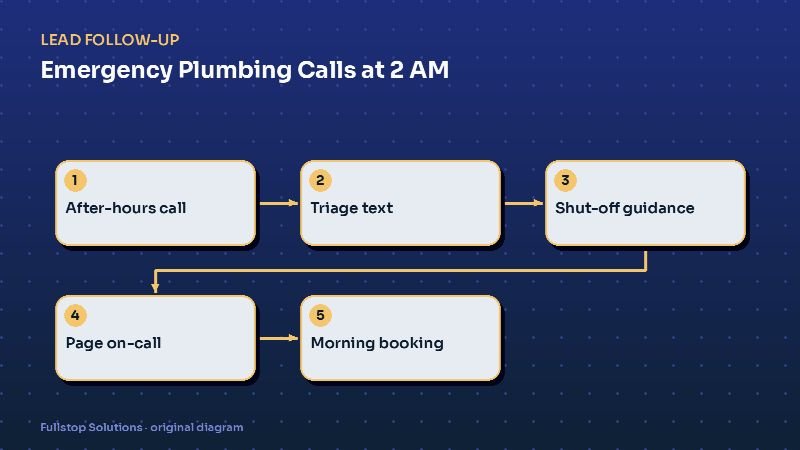
Short answer: after-hours plumbing calls are some of the most valuable calls a shop gets, and some of the easiest to lose. A simple automation answers or texts back every caller within seconds, asks what is happening, gives basic shut-off guidance, pages the on-call plumber only for real emergencies, states any after-hours fee upfront, and books everything else for the morning. Your on-call plumber sleeps more and misses fewer real jobs.
The after-hours dilemma
Plumbing emergencies do not keep business hours. A burst supply line, a water heater leaking through the ceiling, a sewage backup before a holiday: these people will pay for immediate help, and they will call down the list until someone answers.
But not every 2 am call is an emergency. A running toilet or a slow kitchen drain can wait. If every call wakes the on-call plumber, they burn out and start ignoring the phone. If calls go to voicemail, the real emergencies go to a competitor.
Triage automation solves the dilemma: it answers everything and wakes a human only when it should.
The after-hours flow
1. Answer or text back instantly
Two common setups:
- Voice first: an AI voice receptionist answers, asks the triage questions and hands off.
- Text first: calls ring the on-call phone for a short time; if unanswered, the caller gets an instant text with the triage menu.
"This is Blue Line Plumbing. Sorry we missed you. Is water actively leaking or is sewage backing up right now? Reply 1 for YES (emergency), 2 for a problem that can wait until morning."
2. Give safe, simple guidance
For an active leak, the reply includes basic, safe steps: find and close the main water shut-off if you can do so safely, turn off the water heater supply if that is the source, keep away from electrical outlets near water. For a gas smell, the message says only to leave the building and call the gas utility's emergency number or 911 from outside.
3. Collect what the plumber needs
Address, a callback number, what is leaking and where, whether the water is shut off, and photos if they can take them. This turns a groggy phone call into a ready-to-act summary.
4. State the after-hours fee
If you charge an after-hours dispatch fee, say so plainly before paging anyone: "Our after-hours emergency visit starts at $X, plus repairs. Reply YES to have our on-call plumber call you now, or MORNING for the first slot tomorrow." Callers who choose morning are booked automatically, and nobody is surprised by the bill.
5. Page the on-call plumber
The on-call plumber gets a text and app notification with the summary, address and photos, and a one-tap "calling now" button that tells the customer help is coming. If the plumber does not acknowledge within a set time, the page escalates to the backup.
6. Morning handoff
Everything that waited overnight is in the dispatcher's queue at opening, already booked or ready to book, with the conversation history.
Seasonal surges
Cold snaps freeze and burst pipes; heavy rain overwhelms sump pumps and sewers. On those nights, call volume can jump. A "surge mode" can change the message to explain longer response times honestly, prioritize the most urgent categories, and point people to official guidance such as the National Weather Service winter safety pages for preventing frozen pipes.
Connecting to your tools
Most plumbing companies use field-service software (ServiceTitan, Housecall Pro, Jobber and others) and a business phone system. The automation needs to:
- read the on-call schedule (from the software or a simple shared calendar),
- create a job or lead record with the conversation attached,
- book morning slots into real availability.
If your software cannot expose the on-call schedule, a simple rota spreadsheet works fine.
Commercial clients
Restaurants, property managers and facilities with service agreements often have contractual response times. Give them their own priority path, ideally recognized by caller ID or account number, so their calls skip the residential triage and go straight to on-call. See commercial plumbing automation.
Texting rules
Replying to someone who just called you about their emergency is a direct response to their inquiry. Promotional follow-ups ("10% off drain cleaning!") are marketing, and the FCC explains that marketing texts require written consent. Keep the emergency flow about the emergency, include opt-out language, and get consent separately for any marketing list.
Mistakes to avoid
Promising arrival times you cannot keep. Commit to a callback time, not an arrival time, until the plumber confirms.
Troubleshooting by text. Simple shut-off guidance is helpful; diagnosing the problem is not.
No escalation. If the on-call plumber misses the page, the system must go to someone else.
Losing the morning queue. "Wait until morning" leads must be booked, not just noted.
Questions to answer before you build
Write down your answers to these before any setup work starts, because they shape the whole flow: Which situations count as emergencies for your shop? Who is on call each night, and who is the backup? Do you charge an after-hours fee, and what exactly is it? How long should the system wait for the on-call plumber to acknowledge before escalating? Which commercial accounts get priority? Will you take after-hours drain-cleaning jobs, or always book them for the morning? With those decided, the automation is mostly configuration.
A frozen-pipe night, call by call
On the coldest night of the winter, calls start at 11 p.m. The first caller says water is spraying from a pipe in the garage. The assistant follows the company's rule: it tells the caller to shut off the main water valve if they can do so safely, collects the address, and pages the on-call plumber. The caller gets a text confirming the call and the expected callback time.
The second caller has no water at all, with no visible leak; likely a frozen pipe. That is urgent but not flooding, so it is booked for the first morning slot, with the company's guidance on what not to do, such as using open flames to thaw pipes, drawn from official safety pages.
By 7 a.m., the dispatcher has a list ordered by priority, and the on-call plumber has already handled the one flooding job.
Where to start
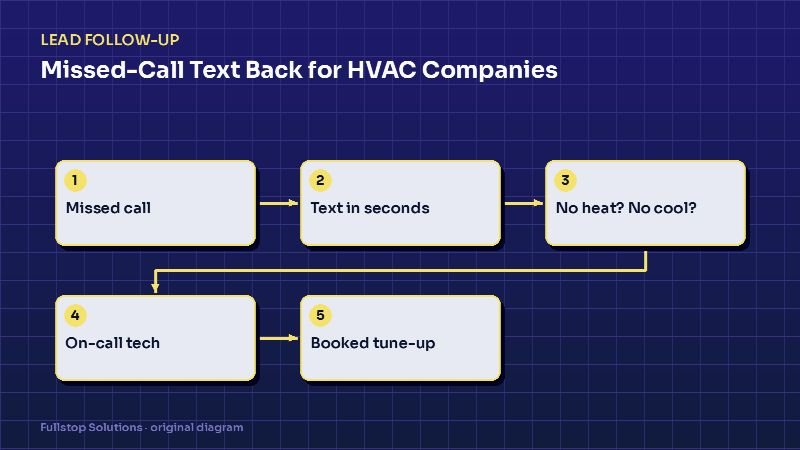
Begin with the instant text-back and two-option triage, plus on-call paging with escalation. Add the fee confirmation and morning auto-booking next. Our emergency plumbing page and plumbing automation page list the other workflows that tend to follow, and the HVAC missed-call guide shows a similar setup for heating and cooling.