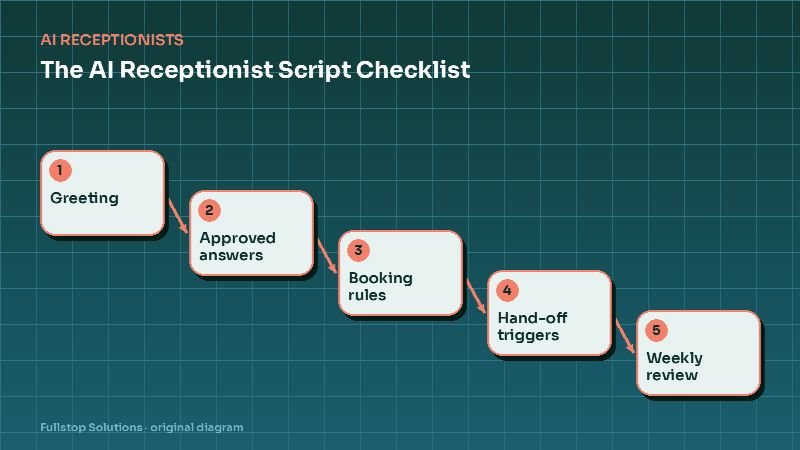
Short answer: before an AI receptionist answers a single real call, someone in your business needs to make about 30 decisions: how it greets and identifies itself, what it may and may not say, how it books, when it hands off, what a message looks like, and how you review its calls. Use the checklist below; it is the same one we work through with clients.
Section A: Greeting and identity
- Business name and greeting. Exactly what the caller hears first. Keep it under about ten seconds.
- AI disclosure. We recommend saying the caller is speaking with an automated assistant. It builds trust and avoids awkwardness later.
- Emergency line. For healthcare, veterinary, home services and similar, tell callers what to do in a true emergency (911, an emergency hospital, or a dedicated on-call option).
- Recording notice. If calls are recorded, say so. Some states require consent from everyone on the call; a notice in the greeting is a safe default. Check with your counsel.
- Language options. Which languages the assistant should handle, and how it switches.
- Voice and tone. Warm and efficient for most businesses; calm and slower for healthcare and legal.
Section B: Approved answers
- Top ten call reasons. Pull them from a batch of recent calls.
- Hours, including holidays and exceptions. Who updates them, and how.
- Location, parking, directions, and whether to text a map link.
- Services offered and not offered. Saying "we don't do that, but here's who might" is helpful.
- Service area. ZIP codes or cities, and what happens outside it.
- Prices, if any. Only fixed, approved prices. Everything else: "that depends on an inspection/consultation; I can book one for you."
- Policies. Cancellation, deposits, payment methods, warranties, what to bring.
- Source of truth. Where the assistant's knowledge lives and who keeps it current.
Section C: Booking rules
- Appointment types, each with duration and who can perform it.
- Buffers and travel time (field services) or room and chair constraints (clinics, salons).
- New versus existing customers. Different appointment types or providers?
- Booking window. How far ahead, and how soon (same-day allowed?).
- Required information before booking: name, phone, email, address, vehicle, pet, insurance.
- Confirmation format: text, email, both; what it includes.
- Rescheduling and cancellation rules, including late-cancel windows.
Section D: Hand-off and escalation
- Hand-off triggers. At minimum: the caller asks for a person; an emergency; distress or anger; a topic on the forbidden list; repeated misunderstanding (for example, the assistant fails twice).
- Transfer targets by trigger and time of day: front desk, manager, on-call, answering service.
- What happens if nobody picks up the transfer. A message with a promised callback time, plus an alert. Never a dead end.
- VIP and account callers. Commercial accounts, referral partners or key clients who should always reach a person.
Section E: Things the assistant must never do
- Forbidden topics. Medical, legal or financial advice; diagnosing; promising outcomes; discussing other customers; quoting unapproved prices; making exceptions to policy.
- Outbound calls. If you plan any outbound AI calling, note that the FCC states AI-generated voice calls are illegal unless the consumer has agreed to receive them or the caller is exempt. Keep outbound out of scope unless consent is handled.
Section F: Messages and records
- Message format. For every call that is not fully resolved: caller name, number, reason, urgency, what the assistant already told them, and the promised callback time.
- Where records go. The CRM or practice system, with transcript and recording links, and who can access them.
Section G: Review and improvement
- Review cadence and owner. Daily review for the first two weeks, then weekly. Start with transfers, failed calls and any complaint. Update the approved answers and rules each week.
How to test before go-live
Write test scripts that cover every branch: each top call reason, each appointment type, each hand-off trigger, an angry caller, a caller with a heavy accent or background noise, someone who changes their mind mid-booking, and someone who asks the assistant something it must refuse. Have two or three staff members call in and try to break it. Fix, then test again.
An example greeting and first exchange
Assistant: "Thanks for calling Northside Dental. You're speaking with our automated assistant, and this call may be recorded. If this is a medical emergency, please hang up and dial 911. How can I help today?"
Caller: "I think I cracked a tooth."
Assistant: "I'm sorry, that sounds uncomfortable. Are you having swelling, bleeding that won't stop, or severe pain right now?"
Notice the order: identity, recording, emergency, open question, empathy, then a triage question your dentists approved.
Common script mistakes
Trying to answer everything on day one. Start narrow and expand weekly from transcripts.
No owner. Without one person responsible, the knowledge base goes stale within a month.
Hiding the human option. If callers have to fight to reach a person, they will hang up and leave a review about it.
Inconsistent sources. Hours on the website, Google profile and assistant must match. Update all three together.
Testing your script before going live
Once the script is written, test it with real call scenarios. Pick 20 calls from the past month, a mix of easy and difficult, and have a team member play the caller. For each one, check:
- Did the greeting say the business name and that the caller is speaking with an automated assistant?
- Did it collect the right details in the right order?
- Did it answer from approved information, or say it did not know?
- Did urgent calls route as your rules require?
- Did transfers and messages actually reach a person, with the details captured?
- Did the caller get a confirmation by text where promised?
Record each failure and decide whether the fix is in the script, the knowledge base or the routing rules. Then test again. After launch, review a set of real calls each week for the first month.
Next steps
Download the checklist below, fill it in with your team, and bring it to a scoping call. If you are still deciding whether an AI receptionist fits, read the AI receptionist guide and AI receptionist vs. answering service. Our AI readiness assessment is a quick way to check whether your systems are ready for it.